>
Track WhatsApp Messages by phone number
>
Track WhatsApp Messages by phone number
Is it really possible to track WhatsApp messages online through a phone number? What is the best app for tracking my son’s WhatsApp messages? How can I see my daughter’s WhatsApp chat without touching her Android phone? You see this kind of question everywhere on forums. The replies are all over the place, and the person asking ends up totally lost. So in this article, let’s dig into these questions. I’ll give you straightforward answers to help you stay on the right track.
WhatsApp is a globally leading instant messaging platform owned by Meta (formerly Facebook) and headquartered in California, USA. It enables users to send texts, make voice and video calls, and share photos, videos, and documents over the internet. All communications on WhatsApp are end-to-end encrypted, ensuring that only the sender and receiver can access them. Users spend an average of 34 minutes per day on the app. With over 3 billion monthly active users, coverage across 180+ countries and regions, and support for 60 languages, WhatsApp processes more than 100 billion messages daily.
Given the data above, it’s easy to see why a large number of users want the ability to track WhatsApp messages by phone number and monitor WhatsApp message online.
Can WhatsApp messages be tracked by phone number? Technically impossible. But criminals use tricks to hack accounts. Discover real threats + 6 protection tips.
In an age where privacy is increasingly precious, we often receive messages from "friends" with suspicious links, or see ads online claiming that you can "monitor anyone's WhatsApp messages for free using just their phone number." Are these claims real? Can WhatsApp messages truly be tracked by third parties? Today, we'll completely debunk these scams for you.
First, you need to understand one concept: End-to-End Encryption (E2EE). It's the core technology that protects the content of user communications on WhatsApp.
In simple terms, end-to-end encryption is like putting a unique lock on every message you send. When your message leaves your phone, it is encrypted by this lock, turning it into a string of scrambled text that only you and the recipient can understand. During transmission, even WhatsApp's servers, your network operator, or any third-party interceptor cannot unlock or read the message content. Only the intended recipient, who holds the unique "key," can open the lock and see the original message.
Therefore, the conclusion is very clear: intercepting and reading someone else's communication content via WhatsApp's servers or the network is technically nearly impossible.
Although end-to-end encryption protects the content of messages, there's one critical security link in WhatsApp — account ownership verification — and that's the real reason various "tracking" tools can succeed.
Once an attacker gains control of a victim's account, it's as if they've obtained a pass to the "single bridge," and all the protected conversations become open to them. Common methods used by attackers include:
In terms of privacy protection, there is both strong technology backing you up and criminals trying to find loopholes. I hope this article helps you recognize various scams and better protect your information security.
When a father or mother asks something like, “How can I see my daughter’s WhatsApp messages and calls without her Android phone or QR code?” or “How can I check my son’s WhatsApp texts and calls without using his device?” — I see that parent as wise. They’ve likely noticed unusual behavior and want to keep track of their child’s activities through WhatsApp, so they can better protect them.
Some adults might ask: “How can I see my spouse’s WhatsApp messages without them knowing?” Are you concerned that your partner is being ambiguous with someone of the opposite sex, or do you suspect they’re cheating? I want to say this to you sincerely: in many countries, such behavior is illegal. Even if you could find the answers using the apps I’ve shared, an honest, open conversation would be a far better choice. Relationships are complicated — parting on good terms, if it comes to that, might be the best option.
Is there actually a free way to monitor WhatsApp messages? Don’t kid yourself! Those so-called free tools online are all scams—they either want your clicks or are just advertising something. Building a proper app takes a lot of work and money, so why would anyone offer it for free? If you really need to monitor someone’s WhatsApp on an Android phone, what comes next will help you out. I’ll recommend the safest, most reliable, and best-value app out there.
The apps I recommend aren’t free, but you can use them for a free trial period. When the trial ends, you won’t be able to use them anymore. To continue using an app, you must purchase its service. Let’s start tracking kids' WhatsApp messages online now.
Monitoring your child's online activity, especially on encrypted apps like WhatsApp, is a concern for many parents. Choosing the right tool for the job can be difficult, so below is a detailed comparison of five popular WhatsApp monitoring apps based on available user feedback and feature lists.
While there is no shortage of monitoring software, none can claim to be perfect. The table below provides a direct, at-a-glance comparison of how these five apps stack up before we dive into the specifics.
Comprehensive Comparison of 5 WhatsApp Monitoring Apps
| App | WhatsApp Monitoring | Key Differentiator | iCloud Support | Stealth Mode | Price Range (Monthly) |
|---|---|---|---|---|---|
| mSpy | Excellent, broad social coverage | Best overall balance of reliability and features | ✅ Yes | ✅ Yes | $9.17 - $69.99 |
| Eyezy | Good, reliable logs | User-friendly interface, easier iOS setup | ✅ Yes | ✅ Yes | $9.99 - $35.99 |
| FlexiSpy | Advanced, requires root | Unparalleled advanced features | ✅ Yes | ✅ Yes | $49.95 - $149+ |
| Mobistealth | Basic, feels dated | Low starting price | ✅ Yes | Unknown | ~$15 (estimated) |
| Spynger | Basic, requires root | Lower entry price, simpler dashboard | ❌ | ✅ Yes | $25.99 - $43.91 |
Data Sync Speed, Ease of Use & Customer Support
Beyond features and price, the real-world usability of these apps is defined by three critical factors: data sync speed, ease of use, and customer support. Here's a breakdown of how the five apps compare on these practical fronts.
| App | Data Sync Speed | Ease of Use | Customer Support |
|---|---|---|---|
| mSpy | Fast; syncs every 5-15 minutes | Very easy; intuitive dashboard | Generally praised 24/7 live chat |
| Eyezy | Moderate; syncs every 30 minutes | Very easy; streamlined setup | Generally good, app-based |
| FlexiSpy | Very fast; every 5 minutes (may drain battery) | Complex; requires tech expertise | Highly rated 24/7 live chat |
| Mobistealth | Slow; dated infrastructure causes delays | Difficult; frustrating installation | Poor; slow, unresponsive service |
| Spynger | Mixed reviews; some report clunky and unreliable | Relatively easy; simple dashboard | Poor; sporadic, ticket-based system |
mSpy is a comprehensive and stable WhatsApp monitoring app trusted by many parents. It captures all WhatsApp conversations (including images, videos, timestamps) without requiring root access. It also monitors other social apps (iMessage, Facebook, Snapchat) and provides real-time GPS location.
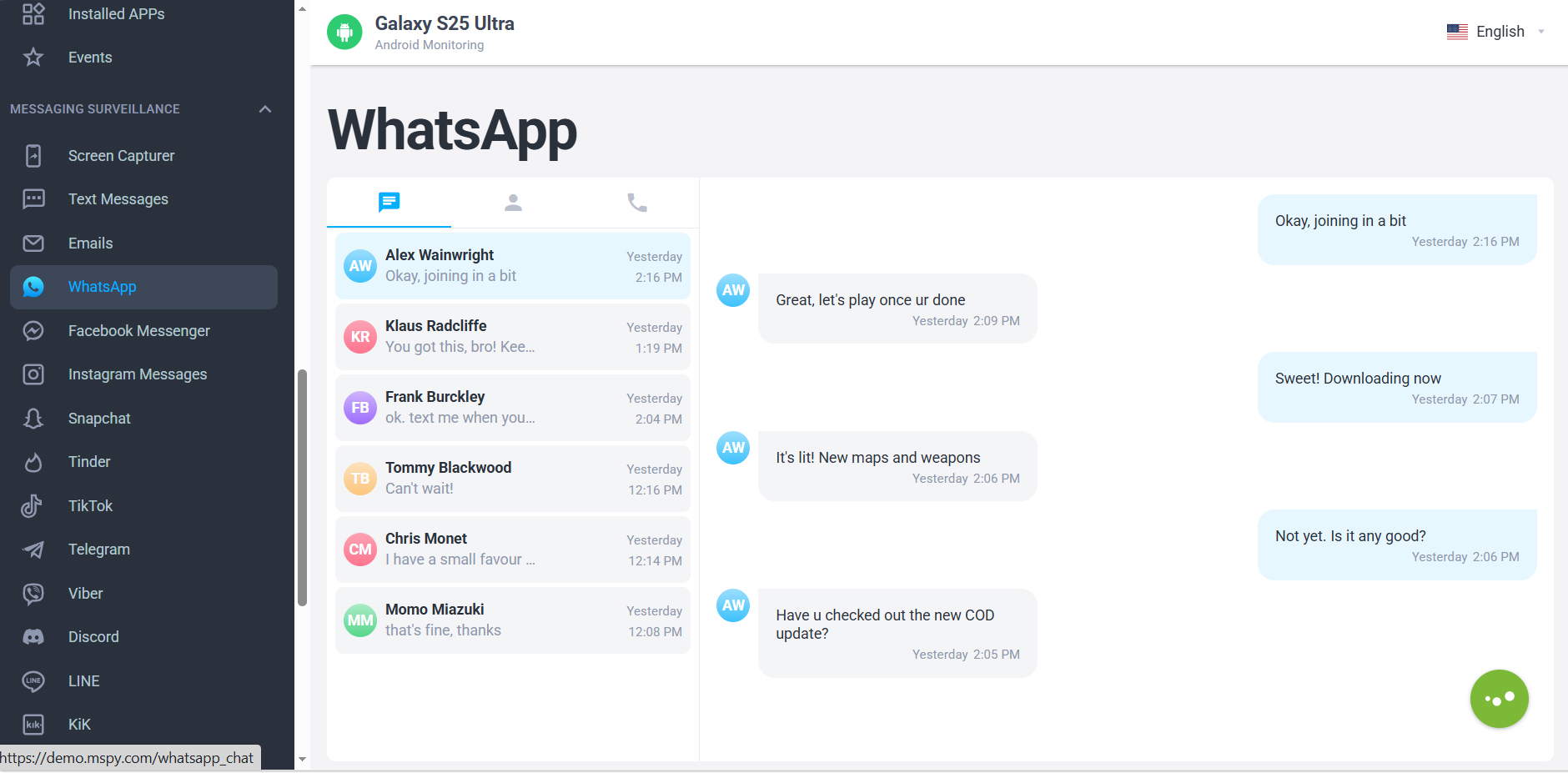
mSpy provides a range of monitoring features, though their availability depends on factors like the target device’s operating system (Android or iOS) and whether it has been rooted or jailbroken for full access.
| Category | Feature | Description |
|---|---|---|
| Communication | WhatsApp & Other Messengers | Monitors conversations, including sent and received messages, across apps like WhatsApp, Snapchat, and others. |
| Keylogger | Records every keystroke made on the target device, capturing untyped or deleted drafts. | |
| Call Logs & SMS | Tracks incoming and outgoing phone calls (with timestamps/duration) and all sent/received text messages, including photos and videos. | |
| iMessage & Email Monitoring | On iOS, can capture iMessages; on Android, offers comprehensive email monitoring. | |
| Keyword Alerts | Notifies you when specific keywords are typed in chats, emails, or browsers. | |
| Social Media | Other Social Platforms | Tracks direct messages, shared media, and interactions on platforms like Facebook Messenger, Telegram, Discord, TikTok, Tinder, and more. |
| Media & Files | Photo & Video Viewer | Allows remote viewing of all photos and videos saved on the target device's camera roll. |
| Location & Surroundings | GPS Location Tracker | Provides real-time location tracking and a searchable history of past whereabouts. |
| Geofencing | Sends alerts when the target device enters or leaves pre-set safe or restricted virtual boundaries. | |
| Surroundings Recording | Enables discreet listening to the device's surroundings (Android only). | |
| Device Control | App Management | Allows viewing of installed apps, blocking specific ones remotely, and monitoring usage statistics. |
| Live Screen Streaming | Lets you view the target device's screen in real-time (Android only). | |
| Screenrecorder | Takes periodic screenshots of the target device's screen. | |
| Security & Privacy | Stealth Mode | The app operates invisibly on the target device, with no visible icon or notifications. |
| Wi-Fi & Website Filtering | Allows blocking specific websites (by creating a blacklist) or even whole Wi-Fi networks. | |
| General Features | Device Activity Dashboard | All captured data is organized in a user-friendly, searchable web-based dashboard. |
Pros & Cons
Eyezy is a discreet parental control app that monitors WhatsApp messages (even deleted ones), tracks GPS location, logs keystrokes, captures screenshots, and checks browsing history—all from an invisible, user-friendly cloud dashboard, without needing to jailbreak iPhones.

Here's a detailed breakdown of Eyezy's key features.
| Category | Feature | Description |
|---|---|---|
| Communication | WhatsApp & Other Messengers | Supports all major social and messaging platforms including WhatsApp, Instagram, Snapchat, Facebook Messenger, Telegram, Tinder, and more. Eyezy can access text conversations, shared media, and, for WhatsApp, can even retrieve deleted messages by logging them in real-time via its keylogger. |
| Social Spotlight | A unified dashboard that displays all social media interactions—private messages, comments, and posts—from across various social apps in one place. | |
| Keylogger | Records every keystroke made on the target device, including typed messages, searches, and passwords. On Android, this feature works without rooting; on iOS, it's generally unavailable without jailbreak, but Eyezy uses iCloud data to retrieve typed content from social apps, chats, and browsers. | |
| Call Logs & SMS/MMS | Tracks all incoming and outgoing phone calls (with timestamps and duration) and all sent/received text messages, including photos and videos shared via MMS. | |
| Phone Analyzer | Provides a detailed view of contact lists, call logs (including names, dates, and durations), notes, and calendar entries from the target device. | |
| Media & Files | Files Finder & Media Viewer | Allows remote access to all photos, videos, and documents stored on the target device, and provides a list of installed apps. |
| Screen Recorder | Takes periodic screenshots of the target device's screen to visually document online activity. | |
| Location & Surroundings | Pinpoint (GPS Tracker) | Provides real-time GPS location tracking and maintains a complete historical location log, showing where the target device has been. |
| Geofencing | Allows you to set virtual safe zones (e.g., home, school) and receive automatic notifications when the target device enters or leaves those designated boundaries. | |
| Magic Alerts | Sends instant alerts based on preset triggers, such as when the target device arrives at or departs from a specific geofenced area. | |
| Web & App Control | Web Magnifier & Browser History | Provides access to the target device's complete internet browsing history and saved bookmarks. |
| App Usage & Screen Time | Offers detailed statistics on installed apps and screen-time usage, including how much time is spent on each app. Similar to Apple's Screen Time, but integrated into the monitoring dashboard. | |
| Connection Blocker | Allows you to block specific apps or websites on the target device remotely, preventing access to chosen online content. | |
| Privacy & Stealth | Invisible Shield (Stealth Mode) | The app operates completely invisibly on the target device, with no visible icon or notifications to ensure discreet monitoring. |
| General Features | Cloud Dashboard | All monitored data is accessible via a unified, mobile-friendly online dashboard that works across both iOS and Android devices. |
Pros & Cons
FlexiSpy is the most powerful monitoring software, designed for advanced users. On Android it runs remotely, extracting messages from encrypted apps (WhatsApp, Telegram, Signal). It can even remotely activate the device microphone or camera for live recording.

Pros & Cons
URL: https://www.flexispy.com/
Mobistealth monitors calls, SMS, GPS, browser history, and records chats from WhatsApp, Line, Skype, Viber, etc. It supports ambient recording and occasional screenshots.

Pros & Cons
URL: https://www.mobistealth.com/
Spynger monitors WhatsApp messages, media and call logs (with a 5-15 minute delay). It can record contact names and sometimes recover deleted messages. It works in undetectable stealth mode, offers a cloud dashboard, and covers WhatsApp, Facebook, Instagram, Snapchat, and more.

Pros & Cons
URL: https://spynger.co/
In most countries and regions, installing monitoring software to track someone’s messages or online activity without their explicit consent is illegal and may violate privacy and communication secrecy laws, leading to civil or criminal liability.
Always check local laws and obtain necessary consent before using such tools in parental, corporate, or any other scenarios.
Visit the official mSpy website. Enter your email address and purchase a subscription that fits your needs. After purchase, you will receive an email with your login credentials.
You will need brief physical access to the target phone (only once).
On any devices(Phone, Tablet or PC), open a browser and log into your mSpy account. Wait a few hours for the system to collect data (WhatsApp messages, call logs, contacts), which will appear on your dashboard.
In the dashboard > Select “WhatsApp” to view:
Beyond WhatsApp, mSpy offers:
Note: If your child's phone is an iPhone Air, iPhone 17e, or any other device running iOS, then you do not need to install this app on their phone. The official website has detailed tutorials, and customer service will patiently help you complete the registration.
Apps like mSpy can monitor WhatsApp messages not because they break the encryption, but because they cleverly capture the information at the moment it is viewed or stored locally on the device. Think of it like adding an extra extension to a telephone line – the encrypted call itself can't be cracked, but you can listen to the plaintext on the extension.
The specific technical methods differ depending on the operating system:
Thanks to Android's more open permissions, mSpy can achieve full monitoring:
Due to iOS's closed permission system, mSpy primarily uses indirect methods:
All of the above methods share one common trait: They cannot and do not break WhatsApp's end-to-end encryption. Encryption protects messages during transmission. These monitoring tools capture the information after it has reached its destination and been decrypted – locally on the device.
Can we really spy on someone's WhatsApp messages with nothing more than a phone number? The short answer is no. Don't let online ads and marketing claims deceive you. Monitoring WhatsApp chat content is not difficult — the key is using the right app. By choosing any of the five apps recommended above, you can definitely monitor a WhatsApp account running on an Android or an iPhone using your own smartphone, tablet or PC.
Answers to Popular Questions on WhatsApp Monitoring Apps
Strictly speaking, no. Most apps claiming to be “100% free” are either scams, designed to steal your data, or simply advertisements in disguise. Developing and maintaining a reliable monitoring app requires server infrastructure, security updates, and ongoing support — all of which cost money. That said, some reputable apps (like mSpy or Eyezy) offer free trial periods of a few days, allowing you to test their WhatsApp tracking features before deciding to purchase.
During a free trial of a quality app, you can typically access:
Incoming and outgoing WhatsApp messages (including media like photos and videos)
Call logs and timestamps
Contact names and group chats
Some basic activity reports (e.g., time spent on WhatsApp)
However, advanced features like remote screenshots, keylogging, or location tracking may be limited until you subscribe. Also, trials are short — usually 1 to 3 days — and require you to install the app on the target Android phone during that period.
For most free or trial-version apps, no root is required to view basic WhatsApp messages, as long as the app uses accessibility permissions. However, without root, you may not be able to see encrypted or deleted messages, nor monitor other encrypted apps like Telegram or Signal. Rooting gives deeper access but voids the phone’s warranty and increases security risks. For a free trial, non‑root monitoring is usually sufficient to test the service.
The risks are significant:
Malware or spyware – Some “free” apps inject malicious code that can steal your own login credentials or personal data.
Fake dashboards – They may show dummy data just to keep you clicking on ads.
No customer support – If something goes wrong, there’s no one to help.
Legal issues – Using any tracking app without the target’s consent may violate privacy laws, regardless of it being free or paid.
Always stick to well‑known brands (even if they only offer a paid subscription) and use their official free trial instead of downloading random “100% free” APKs from forums.
The best approach is to use the free trial of a reputable paid app. For example:
Choose a trusted app like mSpy, Eyezy, or FlexiSpy.
Sign up for its free trial (usually 1–3 days).
Install the trial version on the target Android phone (requires brief physical access).
Monitor WhatsApp messages through the trial dashboard.
After the trial ends, decide whether to pay for continued service.
This way, you get legitimate, working features without wasting time on fake “free forever” tools. If you absolutely cannot pay, consider discussing open monitoring with the person (e.g., your child) rather than spying — it’s legal, ethical, and often more effective in the long run.


I can finnally control my daughter's iPhone SE usage. She used to chat during sleep time, but your iPhone Tracker has helped me deal with that. This spyware is really an awesome monitoring app for parents. I will recommend it to my colleagues.
- Leaver, Robert