
 >
Telegram Monitoring Apps for Pixel 10 series
>
Telegram Monitoring Apps for Pixel 10 series

Google Pixel 10 series (including Pixel 10, 10a 10 Pro and 10 Pro XL) officially launched back in August 2025, with premium features like triple-lens camera system, Google Tensor G5 processor and stunning 6.8-inch Super Actua displays. If your child owns one of these high-performance handsets, they probably spend hours daily on messaging apps like Telegram. What are they sharing? Who are they chatting with? For many parents, that question keeps coming back.
Unlike LINE, Telegram is rarely used for casual family chats across the United States or Europe. Instead, many teenagers turn to Telegram because it allows large groups, file sharing up to 2GB, and optional “secret chats” with end-to-end encryption. These same features also attract suspicious contacts, anonymous channels and potentially harmful content. The app may suggest a minimum age of 12 or higher depending on region, but the platform can still expose kids to inappropriate groups or strangers. For Android devices like the Pixel 10 series, direct access to the Telegram account may feel difficult. That is where dedicated monitoring tools come into play.
Even though the apps listed below have different names, their core workflow stays nearly identical.
Sign up for a free account. Usually done with an email address. That same credential will be used later to log into a secure dashboard and see all collected data.
Purchase a plan and install the app. After buying a subscription, you will need one-time physical access to the target Pixel 10 series device to install the application and grant the necessary permissions.
Start viewing data. Within roughly 5–10 minutes after installation, the software begins forwarding Telegram activity, chats, shared media and other updates back to your dashboard. From there, you can log in from any browser and keep an eye on your child‘s online environment anytime you like.
None of these methods require you to be a tech expert, but choosing the right app for your family is still crucial.
When looking for a best Telegram monitoring app, Eyezy is the name that surfaces most often among experienced parents and reviewers. The platform has been around since 2010 and continues to lead the market with consistent performance.
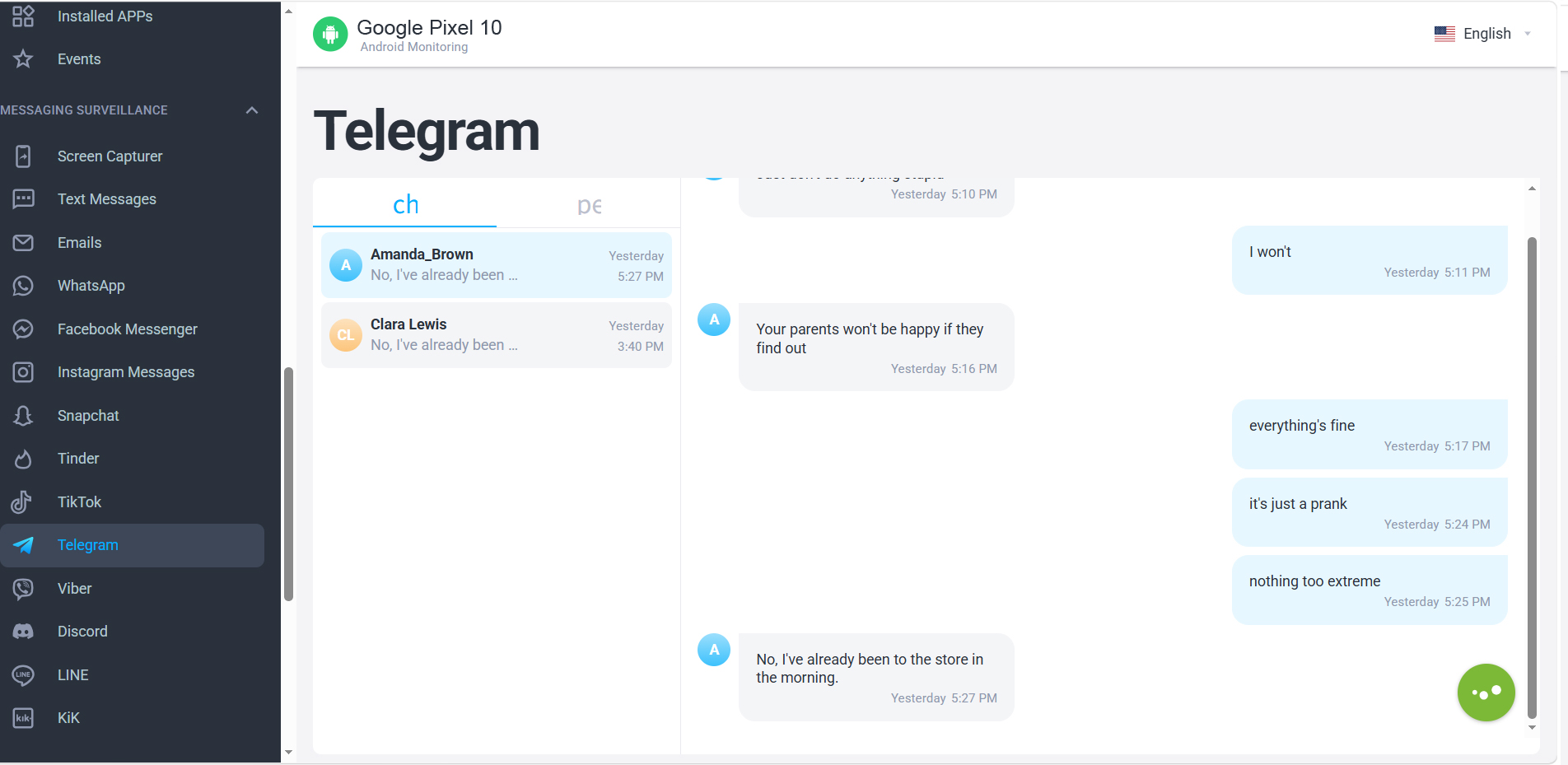
Once installed on a Pixel 10 or Pixel 10a, Eyezy can monitor Telegram chat entries (including both text and shared photos/videos) as well as record timestamps of conversations. It covers more than 25 messaging and social media apps beyond Telegram, such as WhatsApp, Snapchat and Instagram. All captured data is pushed to a clean, web-based dashboard with updates arriving roughly every 5 to 15 minutes.
Eyezy offers multiple billing options. For the Premium plan (basic monitoring features for one device), the monthly subscription starts at roughly $39.99 for the first month. The quarterly plan brings the cost down to around $19 per month for the first term, while the annual subscription lowers the average monthly price to as little as $15.99 per month during the initial term.
Higher-tier plans (FamilyKit, Extreme) unlock deeper monitoring features and support for up to three devices, but for most parents, the standard Premium subscription already provides all the tools needed to monitor Telegram messages effectively.
If you only want to install one app on your child's Pixel 10 series phones and feel confident that it will work reliably day after day, Eyezy is the safest investment.
FlexiSPY markets itself as an advanced spying toolkit capable of intercepting not only Telegram chats but also call recordings, geofencing alerts and social network tracking. Compared to Eyezy, it does offer a handful of deeper surveillance functions, such as ambient audio recording and live call interception.
URL: https://www.flexispy.com/
Despite the longer feature list, users consistently report significant drawbacks.
For parents who simply want to know whether their child is joining dangerous Telegram groups or sharing private information with strangers, FlexiSPY‘s extra functions are rarely worth the headache. In practice, FlexiSPY feels heavier, less intuitive and more expensive than necessary, making it a less compelling option for monitoring a Pixel 10 series device.
MobiStealth often appears in search results for monitoring app for Google Pixel 10 Pro XL, but real-world user experiences paint a different picture.
URL: https://www.mobistealth.com/
Among the three apps compared here, MobiStealth is widely viewed as the least reliable option. If you are serious about protecting your child’s digital safety and want to spy on Google Pixel 10 activity without constant troubleshooting, skipping MobiStealth and picking a more reputable tool is a better decision.
Pricing Summary at a Glance| App | Monthly Cost (starting) | Key Disadvantage |
|---|---|---|
| Eyezy | ~$38.39 / first month | None major; balanced feature set |
| FlexiSPY | Higher than Eyezy | Complex setup, server delays, over-engineered |
| MobiStealth | Mid-range | Glitchy performance, slow support, outdated |
Are There Free or APK Options?
Some users search for a Telegram chat tracker online free version to avoid paying subscription fees. In practice, free Telegram trackers or unofficial APK downloads often fail to capture full chat histories, expose your own device to malware, or quickly become outdated as Telegram releases security patches. If your goal is to download spyware to track Telegram online, be very cautious—any website promising a completely free solution with full features is almost certainly too good to be true. For reliable results on a Pixel 10 series phone, a paid, well-maintained application remains the only safe route.
Among the three solutions reviewed here, Eyezy stands out as the most balanced and dependable choice for monitoring Telegram on any device from the Pixel 10, Pixel 10a or Pixel 10 Pro XL lineup. It delivers consistent Telegram message capture, an intuitive dashboard and excellent customer support when questions arise. FlexiSPY aims for extra surveillance depth but suffers from high complexity, reliability problems and overkill functions not designed for everyday parenting. MobiStealth, regrettably, ranks last due to glitchy operation and poor support.
Ultimately, the best monitoring app for Google Pixel 10a is not necessarily the one with the longest feature list. It is the one that works quietly in the background and gives you honest peace of mind. Before installing any software, please ensure you comply with your local privacy laws and have a transparent conversation with your child about why you are taking these steps. Technology can help keep teenagers safer, but open communication remains the most powerful tool any parent has.


I have changed few monitoring solutions for my kids, this one really works. 5 stars for excellent 24/7 customer support.
- Thomas Groiss
The monitoring app is a unique cell phone spy that helps you keep the activity of your corporative employees at your fingertips! Impressive cost-cutting spyware.
- Michael L Hopper
Copyright © 2026 Acrok Studio All Rights Reserved.