

 >
4K to 1080P Converter 2026 online free
>
4K to 1080P Converter 2026 online free
Acrok 4K to 1080p Converter can convert 4K files (movies, footage, Blu-ray) to 1080p in formats like MP4, MOV, M4V, WebM, FLV, MKV, WMV, AVI, as well as for smartphones, tablets, smart TVs, editing software, and more – all at high speed. It supports over 300 video conversions. Moreover, you can edit any video file by cropping, rotating, adding watermarks, clipping, applying effects, and more.
Download and try the best 4K to 1080p Converter for free in 2026.
 100% Safe & Clean 100% Safe & Clean
CONTENT
4K is a much higher-resolution format. Its standard resolution is 3840 × 2160 pixels – four times the pixel count of 1080p (approximately 8.3 million pixels). This massive increase in pixels makes the image incredibly sharp, detailed, and lifelike, especially on larger screens. 1080p is a high-definition video format with a resolution of 1920 × 1080 pixels, meaning the screen displays just over 2 million pixels. It has been the standard for TVs, monitors, and online video (including Blu-ray and many streaming services) for many years, offering clear and detailed picture quality.
When to Choose 4K:
When to Choose 1080p:
4K excels in detail and immersion, but it incurs higher costs and requires more resources. 1080p strikes a balance between quality and practicality for everyday use.
How should you handle your 4K movies or footage in 2026? You may need to play downloaded 4K movies on popular multimedia devices, edit 4K videos on a computer using video editing software, or upload 4K files to popular video-sharing platforms.
While 4K resolution offers superior detail and clarity, there are several practical reasons why converting it to 1080p is often necessary or beneficial:
In summary, converting from 4K to 1080p is primarily done for reasons of practicality, compatibility, and efficiency – saving space, speeding up workflows, and ensuring smooth playback across the broadest range of devices, often without a noticeable loss in quality for the end-viewer on a standard screen.
Here we have listed the 6 best 4K to 1080p converters for you, allowing you to convert any 4K files to 1080p online and offline.
In a world of subscription software, Acrok delivers professional-grade transcoding without a single ad or upsell. It is powered by robust engines like FFmpeg, ensuring superb compatibility and quality.
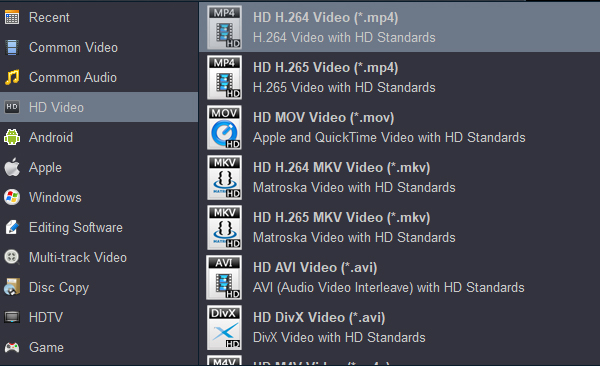
Acrok 4K to 1080P Converter enables you to easily convert videos from 4K to 1080p both online and offline. With this software, you can rip and convert 4K Blu-ray to 1080p H.264 MP4 for smooth playback on Smart TVs and tablets, or transcode 4K MXF/MP4/MOV – even H.265/HEVC footage – to 1080p format at fast speed on Windows PC. (Of course, this depends on your computer having a robust hardware configuration.) For Mac users, the Mac 4K to 1080P Converter can convert any 4K videos to 1080p easily on macOS.
Features of Acrok 4K to 1080P Converter
Free download Acrok 4K to 1080p Converter
100% Safe & Clean 100% Safe & CleanThe website claims that 4K videos can be converted to 1080p for free, but after testing, we concluded that payment is required. Once you pay, you can enjoy high-definition video conversion. Whether downscaling 4K to 1080p or enhancing small files to 4K UHD quality, this tool delivers adjustable settings and diverse output formats like MOV, AVI, M4V, MKV, and MP4. Users have control over uploaded files and can delete them from the server, making the service secure and reliable. However, the application contains numerous irritating ads, the conversion speed is not as fast as claimed, and it does not support 4K Blu-ray ripping or converting.
Link: https://hdconvert.com/en/
Online video converters are the perfect tool for quick, simple, one‑time conversions of small, non-sensitive files where convenience is the top priority – for example, converting a short smartphone clip for social media while away from your main computer.
However, for larger files, frequent conversions, projects requiring quality control, or videos containing private content, dedicated desktop software like Acrok or a professional tool is far superior, offering security, consistency, and high-fidelity results.
Link: https://www.freeconvert.com/video-converter
Leawo Video Converter Ultimate is competent software, greatly enhanced by its ability to create and burn Blu-ray discs. The program supports conversion in over 180 video and audio formats, allows DVD creation with the option to design your own template, downloads videos from an array of sites, creates photo slideshows, converts 2D to 3D, includes video editing and a built-in player, and performs a variety of other functions. However, it is not completely free ($99.94), and in our opinion, this price is outrageously high. There are much better video converters you can choose.

Link: https://www.leawo.org/video-converter-ultimate/
DVDFab’s Free Online Converter is a convenient, no-frills solution for users seeking quick media conversions without downloading software. The platform supports a range of formats (MP4, MKV, MOV, etc.) and excels in speed, processing files efficiently even on slower connections. Its minimalist interface makes it accessible for beginners, and the privacy-focused approach – automatically deleting files after conversion – adds peace of mind.
However, the free version has notable drawbacks. Output files carry a watermark, which may frustrate professional users. The 200 MB file size limit and occasional ads also hinder the experience for larger projects. Additionally, advanced customization options (bitrate adjustments, resolution tweaks) are reserved for paid tiers.

Link: https://www.dvdfab.cn/online-video-converter.htm
HandBrake is completely free to use, with no ads, trials, or hidden fees. Its open-source nature ensures transparency and frequent community-driven updates. It is available for Windows, macOS, and Linux, providing a consistent experience across operating systems.
HandBrake is an exceptionally powerful and versatile tool for video conversion, best suited for users who value cost-effectiveness, broad format support, and deep customization. Its main trade-offs are complexity for beginners and the lack of professional editing features or direct technical support.

Link: https://handbrake.fr
In this guide, we've explored a diverse range of 4K to 1080p converters for both online and offline use. Among these options, Acrok 4K to 1080p Converter stands out as the top recommendation. It boasts professional-grade capabilities, user-friendly features, and support for various output formats. Acrok allows users to effortlessly convert and edit video, as well as back up, rip, and convert Blu-ray/DVD to any format. Embrace the full potential of your videos with Acrok 4K to 1080p Converter.
Avoid:
Acrok strikes the perfect balance between power, speed, and simplicity for most users. Give it a try!


Acrok Ultimate Converter delivers impressively fast batch conversions with broad format support, making it a reliable powerhouse for both casual and professional video processing needs."
Erik Lee
Copyright © 2026 Acrok Studio All Rights Reserved. Terms and Conditions | Privacy | Refund Policy