

 >
Blu-ray Region Code Remover
>
Blu-ray Region Code Remover
Q & A
Q: Why can't my LG Blu-ray player play the disc I brought back from the United States? The player is new, and the disc is new too. How can I make my LG Blu-ray player region-free?
A: The reason is that Blu-ray discs cannot be played freely across all regions. Regional restrictions are the most common cause of playback issues. To make your Blu-ray movies playable from other countries or regions, you can make your Blu-ray player region-free. But how? Let me explain.
How do you make your Blu-ray player region-free? Blu-ray region codes restrict playback because the codes on discs and players vary around the world. For example, if you travel to the US and bring back an original Blu-ray disc to Europe, the region code on the disc won't match your Blu-ray player, and a "Wrong Region" message will appear on your screen.
No worries – the good news is that you can still watch your region-locked Blu-rays in different areas. One of the best ways is to unlock your Blu-ray player's region code. It's not too difficult for beginners. So let's go through the instructions for the unlocking process.
CONTENTS
1. Blu-ray Region Codes Explained
2. How to Remove Regional Lock on Your Blu-ray Player for Free
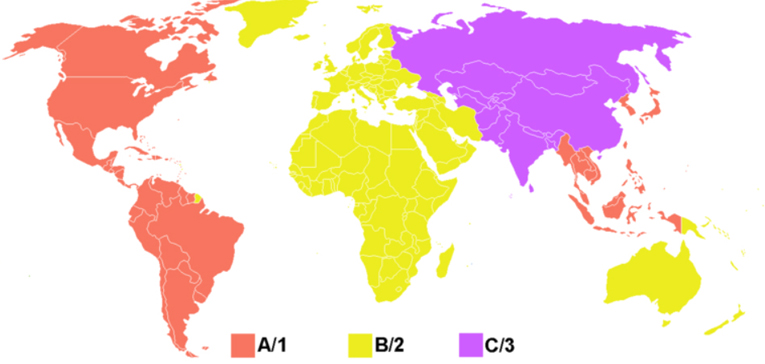
First, let's learn more about Blu-ray region codes. Blu-ray discs have region codes, but unlike DVD players, the region codes for Blu-ray disc media use letters instead of numbers to indicate the zone or region where the discs can be played.
The Blu-ray Disc region codes are as follows:
Region A: North America, South America, U.S. Territories, Japan, South Korea, Taiwan, and other areas of Southeast Asia
Region B: Europe, Africa, the Middle East, Australia, and New Zealand
Region C: Asia (except Japan, Korea, Taiwan, and other areas of Southeast Asia)
Region FREE: This is not an official setting, but discs with the Region FREE symbol either have no flag set or have all region flags (A, B, and C) set.
NOTE:The region codes for commercial Blu-ray disc movies can be found on the back of the Blu-ray disc case.
(A color-coded region map for Blu-rays would be placed here.)
The following unlocking guide will show you how to make your Blu-ray player region-free. You can search the VideoHelp site and choose a model from its massive database – then the Blu-ray region code can be easily hacked. There are two different hacking methods for making your Blu-ray player region-free.
Works with most Blu-ray players.
Your Blu-ray player should now be region-free. If this code does not work, once the player displays the “No Disc” message, press STOP before entering the code.
Works with most LG Blu-ray players and many other brands.
Your Blu-ray player is now region-free.
Is it possible to make a Blu-ray player region-free? Although the region-code unlock instructions above work for the majority of Blu-ray player brands, to avoid resetting your player or being restricted by region codes, you should explore more options to bypass Blu-ray region codes.
Option 1: Buy a multi-region Blu-ray player (but this is not always possible or affordable).
Option 2 (Recommended): Rip and copy region-locked Blu-rays using your PC, without worrying about region-code errors on your Blu-ray player.
There are plenty of programs that allow you to rip or copy a Blu-ray to your computer and then convert it to a format your Blu-ray player can read. Acrok Video Converter Ultimate is one of the best programs for making any Blu-ray region-free. It can remove the region code stored on the Blu-ray, making your copy region-free. It is the best Blu-ray region code removal software. Set your Blu-ray discs completely free now.
Option 1: Buy a multi-region Blu-ray player (but this is not always possible or affordable).
Option 2 (Recommended): Rip and copy region-locked Blu-rays using your PC, without worrying about region-code errors on your Blu-ray player.
There are plenty of programs that allow you to rip or copy a Blu-ray to your computer and then convert it to a format your Blu-ray player can read. Acrok Video Converter Ultimate is one of the best programs for making any Blu-ray region-free. It can remove the region code stored on the Blu-ray, making your copy region-free. It is the best Blu-ray region code removal software. Set your Blu-ray discs completely free now.
Free download and try the best Blu-ray ripping and converting software.
 100% Safe & Clean 100% Safe & Clean
The Ripping Process (Simple Steps)
Insert a region A/B/C Blu-ray disc into your Blu-ray drive, launch the program, and click the Load Disc button to import the file you want to convert.

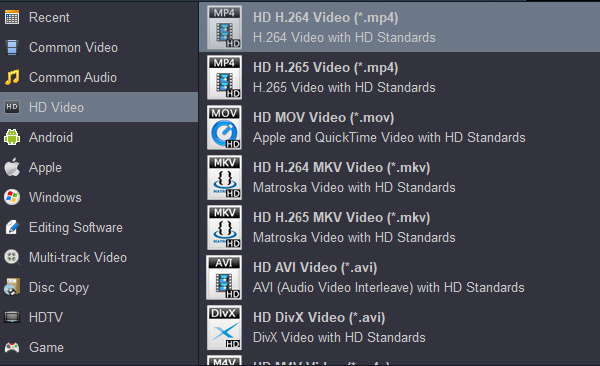
Click the Format button to choose an output format. You can convert the region-locked Blu-ray to over 1000 built-in video formats according to your needs – for example, convert Blu-ray to iPad-supported video format, rip Blu-ray to a Galaxy S series phone-playable format, or compress Blu-ray to H.265 MP4.
Click the Output option to change the destination path to an easy-to-find folder on your computer.
Hit the Convert button and start converting the region-locked Blu-ray. After ripping is completed, the Blu-ray video is totally region-free, and you can play it on your Blu-ray player without anxiety.
Besides removing region codes on Blu-rays, Acrok Blu-ray Ripper Software can also rip DRM-protected Blu-rays. In addition, this program provides editing capabilities, many utility functions, and an impressively simple design.
In this article, we discussed Blu-ray region codes and how to make them region-free on Blu-ray players or computers. There is no denying that Blu-ray region codes offer some benefit in protecting copyright. However, when you get movie Blu-rays from different countries and regions, playability is another matter entirely. Luckily, Blu-ray players can be hacked. And if you are looking for the most effective solution for unlocking any region-locked Blu-ray without restrictions, you can try Acrok Video Converter Ultimate. The versatility, ripping process, and output quality of this Blu-ray copying program are excellent – it can rip a full main title to a single MKV file as a lossless option. The 5.1-channel AC3/DTS Dolby audio can also be preserved.
Free download Acrok Blu-ray Ripper.
100% Safe & Clean 100% Safe & Clean

Well, to be honest, I'm a big fan of Acrok Video Converter Ultimate – it works perfectly and is great. The next thing is, we can do as many conversions as we want. I mean, we can convert or edit using this 4K Blu‑ray ripping software.
Alexander Tutass
Copyright © 2026 Acrok Studio All Rights Reserved. Terms and Conditions | Privacy | Refund Policy