

 >
Best 4K Blu-ray Ripper
>
Best 4K Blu-ray Ripper

How to rip and convert 4K Blu-ray discs on Windows 10 or Windows 11? How to back up 4K Blu-ray movies on macOS 15? How to rip 4K Blu-ray for Plex?
Just keep reading—you'll get the best 4K Blu-ray ripper software to rip, convert, back up, and compress 4K Blu-ray files.
4K resolution refers to a horizontal display resolution of approximately 4,000 pixels. Digital television and digital cinematography commonly use several different 4K resolutions. In television and consumer media, 3840×2160 is the dominant 4K standard, whereas the movie projection industry uses 4096×2160. 4K technology has been widely used in film production.
Ultra HD Blu-ray (marketed as 4K Ultra HD) is a digital optical disc data storage format that is an enhanced variant of Blu-ray. Ultra HD Blu-ray discs are incompatible with existing standard Blu-ray players. Ultra HD Blu-ray supports 4K UHD (3840×2160 pixel resolution) video at frame rates up to 60 progressive frames per second, encoded using High Efficiency Video Coding (HEVC). People, especially movie fans, are getting more and more crazy about watching Blu-ray films in 4K resolution.
| Blu-ray | 4k UHD | |
|---|---|---|
| Resolution | 1920*1080 (1080p) | 4096*2160 or 3840*2160 |
| Storage | 25GB/50GB | 50 to 100GB |
| Laser Type | 405nm (blue laser) | (N/A) |
| Video Codecs | MPEG-2, H264, VC-1 | HEVC |
| Region Codes | 3 region codes | no region codecs |
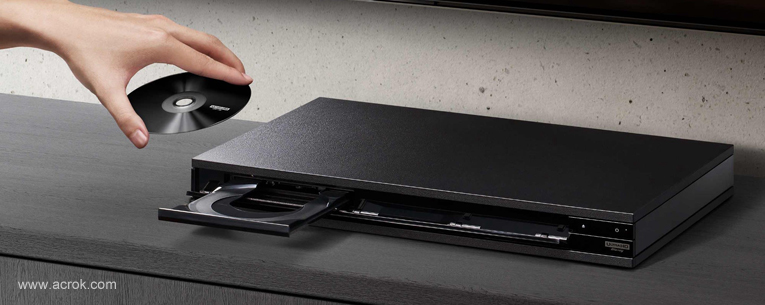
You need three things: a 4K UHD disc, an Ultra HD Blu-ray player, and an Ultra HD TV or a computer with a 4K monitor.
First, make sure your Smart TV or HDTV supports the HDMI 2.0 standard or above. Most TVs released in the past year support HDMI 2.0, but older models released before 2014 might not support it. Check your TV manual or search the model number online. The even newer HDMI 2.1 standard is also fine.
Also, only the newest TVs released after 2016 support HDR technology. That’s because HDR requires TVs that can display more colors and have a higher peak brightness. You can still enjoy Ultra HD Blu-ray without an HDR-ready TV, but you won't get the benefits of HDR.
Finally, there are only a few Ultra HD Blu-ray players available on the market. These include the still-impressive Panasonic DMP-UB900, the newer equally excellent Panasonic DMP-UB700, and the slightly cheaper but still very good Samsung UBD-K8500. However, for portable viewing, a computer and external Blu-ray drive are inconvenient to carry, so ripping 4K Blu-rays to portable devices is a better choice.
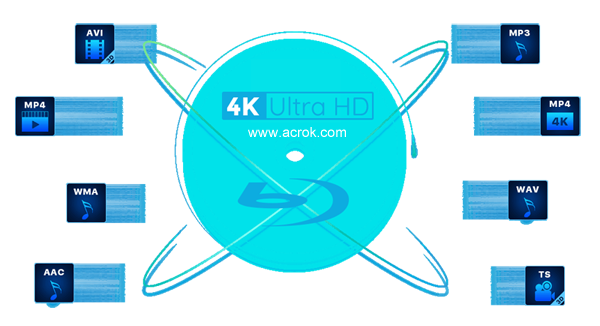
4K Ultra HD Blu-ray movies are becoming increasingly popular day by day. I believe we are able to get 8K videos on discs but they will be huge since it can be 80 GB for a two-hour long 4K Blu-ray and 45 GB for a 1080P Blu-ray. What if you have no 4K Blu-ray Player or have no plan to buy one? Don't worry! There are always solutions out there. You can use a Blu-ray ripping tool to rip/convert 4K UHD Blu-ray to digital files for streaming to 4K digital device without needing a 4K Blu-ray player.
The best 4K Blu-ray Ripper - Acrok Video Converter Ultimate is a program that converts a 4K or 1080p Blu-ray movie into a file, typically an ISO image, which is helpful when you want to back up a movie for safekeeping or convert a disc to a file for playing on your TV, smartphone, or tablet. Can we get a free 4K Blu-ray Ripper to rip and convert 4K Blu-ray discs? The answer is NO.
Acrok Video Converter Ultimate - Best 4K Blu-ray Ripper
Have tons of 4K Blu-ray discs lying around? Want to digitize them? Rip your 4K Blu-rays to your computer easily with Acrok Video Converter Ultimate (For Windows | For Mac). Digitize UHD Blu-ray discs for any purpose: backup, archiving, Blu-ray copying, ISO image creation, playback on TV or portable devices, sharing 4K Blu-rays online, etc. A physical disc, ISO file, or folder of 4K Blu-ray files can be loaded into Acrok 4K Blu-ray ripping software.
4K Blu-rays can be ripped to many video file formats such as MP4, MOV, M4V, WMV, MPG, FLV, MKV, or AVI. Presets for HDTV, Smart TV, Apple, Android, Microsoft, and more are available for ripping Blu-rays to device-compatible formats if you don't know which file type to choose. You can also rip and convert 4K Blu-ray for editing in software like Final Cut Pro, iMovie, Premiere Pro, Vegas Pro, DaVinci Resolve, etc.
Many advanced options are available before you start the 4K Blu-ray rip, so you can change the video resolution, crop the video, adjust the audio codec, choose a different frame rate, merge titles into one file, exclude titles, add subtitles, and more.
Free download Acrok 4K Blu-ray Ripper for Mac & Windows
 100% Safe & Clean 100% Safe & Clean
4K Blu-ray to MP4/H.264/HEVC Conversion
Rip a full 4K Blu-ray in 25 minutes: Acrok 4K Blu-ray converting software can convert a 4K Blu-ray disc to MP4 (main title) or other common formats, and save to a hard drive, USB, NAS, media players, YouTube, or editing apps. It provides mobile-specific MPEG4/H.264/HEVC outputs for smartphones, tablets, Smart TVs, Xbox Series X, PlayStation 5, etc., as various viewing options. And it makes 25-minute full Blu-ray ripping a reality, as long as your hardware configuration is outstanding enough.
200+ video and audio codecs: To further suit your needs, the abundant profile library is geared up for NAS streaming, SNS sharing, file compression, and for EVERYTHING.
Unique! 1:1 Blu-ray to ISO/MPEG-2 Copy
4K Blu-ray to ISO: This 4K Blu-ray ripping software enables you to make an uncompressed and genuine copy of the original disc while preserving quality. It keeps the original structure, video/audio tracks, menus, chapters, and subtitles without a shred of quality reduction. The ISO image can be further burned to another optical disc or mounted as a virtual drive.
4K Blu-ray to MPEG2: This 4K Blu-ray converting program also allows you to copy the full or main title of a Blu-ray to a single MPEG2 file as a lossless option. The 5.1-channel AC3/DTS Dolby audio can be preserved.
Note: If you prefer watching 4K video on portable devices, make sure your laptop/smartphone has a 4K-capable screen; otherwise, the device will still play the 4K video at a lower resolution.
Note: When importing a 4K Blu-ray disc, please make sure your PC is equipped with an external or internal Blu-ray drive to read your 4K Blu-ray disc. Here are the steps to rip 4K Blu-ray to a common format in Windows. The way to convert 4K Blu-ray files on macOS Sequoia is almost the same as in Windows. Just make sure you have downloaded the right version.
Our software will automatically compress your 4K Blu-ray movie to the ideal state when ripping and converting.
Install and run this Windows 4K Blu-ray Ripper on your computer. Insert the 4K Blu-ray disc into the BD drive, then click "Load Disc" to import your 4K Blu-ray files into this best 4K converting software. You can play the loaded Blu-ray files using this free 4K Blu-ray player. Double-click the preview window to view the imported material in full screen.

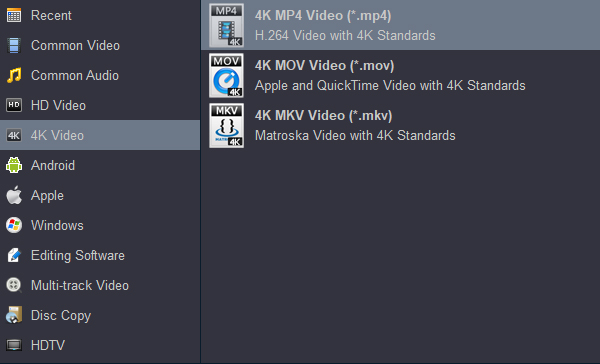
Click the "Format" bar and choose the output format as you need. To get 4K output videos, please select "4K Video" and then choose "4K MP4 Video (*.mp4)" as the output format. You can also select output formats under categories such as Common Video, Android, Apple, Windows, Editing Software, HDTV, etc.
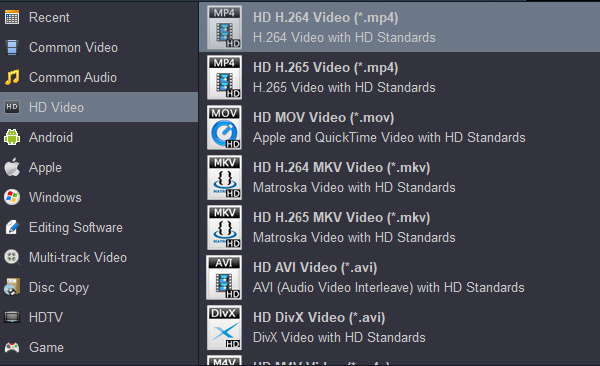
To better compress your movie and play it on more devices, you can choose 1080p MP4 as the output format.
Tip 1: Click the "Settings" button. You are free to tune or customize the parameters based on your personal requirements. If you like, you can merge Blu-ray clips into a new video file.
Tip 2: Set H.265 MP4 or H.265 MKV as the output format. The final videos will be as small as possible with near-zero quality loss.
Finally, click the "Convert" button to start ripping and converting 4K Blu-ray movies to any format, any device, any editing software, etc. Then you can fully enjoy your Blu-ray discs on portable devices whenever and wherever you want!
Backing up a disc can be a lot of trouble, but there might be a workaround coming soon for all BDXL drives, including newer types that support AACS 2.0. In the meantime, if you have a capable drive, say hello to Acrok Video Converter Ultimate. Ultra HD Blu-ray uses standard Blu-ray media—it just stores data in a slightly different way.
Copying Blu-ray discs is a technical and often confusing process. The best 4K Blu-ray copy software distills the process down to its simplest form. The intuitive, almost childishly simple interface makes it easy for anyone to understand each button and the next step.
After loading 4K Blu-ray movies into this best 4K Blu-ray copy software, click "Format" > "Disc Copy" > "Directly Copy (Only for Blu-ray/DVD)" or "Full Disc Copy (Only for Blu-ray/DVD)".
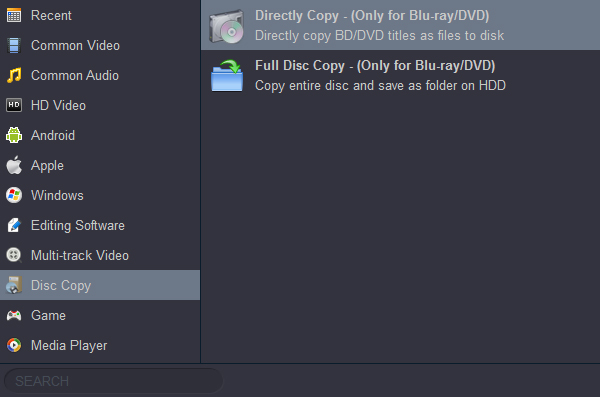
Click the "Convert" button to back up 4K Blu-ray movies to your computer.
Note: The backup option is a great way to protect the 4K Blu-ray discs you purchased. You can't play these backed-up 4K movies on your tablet or TV directly. You must convert the 4K Blu-ray movies to a common video format first.
Free download Acrok 4K Blu-ray Ripper for Windows & Mac
100% Safe & Clean 100% Safe & Clean

Well to be honest i'm a big fan of Acrok Video Converter Ultimate which works perfect and great. next thing is we can do as many conversion as we want, i mean we can convert or edit by using this 4K Blu-ray ripping software.
Alexander Tutass
Copyright © 2026 Acrok Studio All Rights Reserved. Terms and Conditions | Privacy | Refund Policy