

 >
4K Blu-ray Ripper for Plex
>
4K Blu-ray Ripper for Plex

Plex is one of the best tools to play movies. More and more fans choose to use Plex to play their movies. Do you have some 4K Blu-ray collections? Do you want to transfer 4K Blu-ray disc movies to Plex and then play them smoothly via Plex? In this article, you will find the best 4K Blu-ray to Plex converter. It will rip 4K Blu-ray movies to Plex-supported formats easily. This powerful 4K Blu-ray ripper software can also help you rip 4K Blu-ray, Full HD Blu-ray, and DVD disc movies to any unprotected video formats, so you can watch converted Blu-ray movies on any device freely.
In daily life, many friends may encounter a situation like this: you download a high-definition movie on your computer, then feel sleepy and want to take your iPad to bed to watch it. When you arrive at the company or school, you remember you haven't finished the movie on your computer. You want to watch it on your phone but can't find the resources. If you encounter the above problems, what would be your solution? I think many people would scramble to find a data cable. These data cable terms sound strange to someone not familiar with electronic products. When you finally find the data cable and are ready to copy the movie, you look at the small storage space on your phone and can only shake your head and give up. At this point, you realize that a single-function local player can't meet your needs. Many geek players might choose to build a NAS, but not everyone has the energy and budget to DIY a private cloud disk. This is where Plex shines.
Plex is one of the most popular programs on the market for managing movies. More and more users are choosing to build a Plex media server to watch on their 4K TVs. Compared to previous versions, the latest Plex program has many new features. You can easily access your videos and movies with the help of Plex. But what about 4K Blu-ray movies? How do you rip 4K Blu-ray for Plex? If you have some 4K Blu-ray discs and want to play them on Plex, you may not know the easiest way. But don't worry—after reading this article, you will get the easiest way to watch 4K Blu-ray movies on Plex.
Questions:
How to Rip 4K Blu-ray for Plex?
"Hello, can you help me rip 4K Blu-ray to Plex? I built a Plex media server not long ago. I want to connect it to my Sony 85-inch Bravia 4K TV to watch 4K Blu-ray movies. Today I want to copy 4K Blu-ray movies to Plex for playing, as I have collected a few 4K Blu-ray discs in the past. But now I don't know how to get 4K Blu-ray to Plex. Can you help me? Any suggestion is appreciated. Thanks!"
How to Get 4K Blu-ray Movies into Plex?
"I know Plex does not support ISO, IMG, Video_TS, BDMV, or other 'disk image' formats. I learned from online tutorials that I can convert these 4K Blu-ray movies into formats supported by Plex and sync them to Plex playlists. Which software do you recommend for me to use?"
After you set up Plex, you may want to transfer some 4K Blu-ray movies to Plex to watch on your 4K TV. As shown in the question above, many users on Plex-related websites and forums want to rip 4K Blu-ray for Plex, but most don't know which software can accomplish this task. To help you convert 4K Blu-ray to Plex and play 4K Blu-ray movies smoothly, we want to introduce the best 4K Blu-ray to Plex converter: Acrok Video Converter Ultimate (Windows or Mac version). With this software, you can rip 4K Blu-ray, Full HD Blu-ray, and DVD videos to any video format you want.
Acrok Video Converter Ultimate is the best 4K Blu-ray ripper software to convert 4K Blu-ray to Plex-supported formats. It can rip purchased 4K Blu-ray disc movies to any unprotected videos, and then you can transfer the converted 4K Blu-ray movies to Plex or any device for watching. Once you get this powerful Blu-ray to Plex converter, it becomes easy to rip 4K Blu-ray to Plex, rip Full HD Blu-ray to Plex, or rip DVD to Plex.
Besides 4K Blu-ray, you can also load 4K UHD videos, including 4K MP4, 4K MOV, 4K MKV, M4V, FLV, MTS, MPG, and others, for conversion. Acrok Video Converter Ultimate also has many preset output formats. You can choose output formats for Plex, or for tablets like iPad Pro or Galaxy Tab series, or iPhone 17 series, or Android smartphones, or 4K TV, or editing programs. Customization is also supported by this 4K Blu-ray to Plex converter: you can adjust resolution, bitrate, frame rate, and other parameters according to your needs before conversion.
Free download 4K Blu-ray Ripper for Plex
 100% Safe & Clean 100% Safe & Clean
Our software will automatically compress your 4K Blu-ray movie to the ideal state when ripping and converting.
Download Acrok Video Converter Ultimate from the link provided in this article. You will get the excellent 4K Blu-ray to Plex Converter. Both Windows and Mac versions are available. With this Plex 4K Blu-ray converter, you can rip 4K Blu-ray or Full HD Blu-ray to any unprotected formats. Just install and run this 4K Blu-ray to Plex converter.
Click the "Load Disc" button to import the 4K Blu-ray movies you want to convert. You can load a 4K Blu-ray disc, 4K Blu-ray ISO, 4K Blu-ray folder, Full HD Blu-ray disc, Full HD 1080p Blu-ray ISO, or Full HD Blu-ray folder. If you want to load 4K UHD videos, click the "Add Files" button or simply drag and drop the 4K videos into the software's main interface. Batch loading and converting are supported by this Blu-ray to Plex converter.

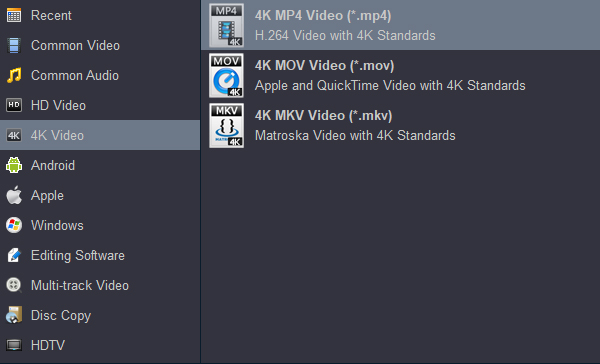
Choose a Plex-supported format as the output format. Click the format column and choose the format according to your needs. To play 4K Blu-ray on Plex with a compatible format, you can choose "Common Video -> H.264 MP4 Video", or "HD Video -> H.264 MP4 Video", or "HD Video -> H.264 MKV Video", etc. If you want 4K videos, just select output formats in the "4K Video" category—they are all compatible with Plex.
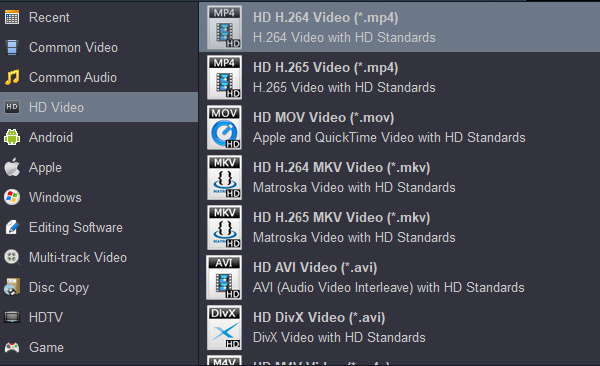
Tip: For playing the converted movie on a 4K TV via USB, you can choose 4K MP4 as the output format.
If you want to adjust the output parameters in this 4K Blu-ray ripper for Plex, click the Settings button on the main interface, then adjust resolution, bitrate, frame rate, codec, and others. If you don't need to adjust, skip this step.
Click the Convert button to start the 4K Blu-ray to Plex conversion process. This is the last step, and Acrok Video Converter Ultimate will rip your 4K Blu-ray movies immediately.
Acrok Video Converter Ultimate rips 4K Blu-ray to Plex at fast speed. It has adapted NVIDIA and AMD video card acceleration technology, so it will save you a lot of time. When the 4K Blu-ray to Plex ripping process is finished, click the Open button to get the converted videos. Then you can transfer the converted 4K Blu-ray movies to Plex. Now you can watch 4K Blu-ray movies on your 4K TV via Plex without needing the 4K Blu-ray discs or a hardware player anymore!
Besides 4K UHD output formats and Full HD output formats, Acrok Video Converter Ultimate can perform quality-lossless Blu-ray conversion. You can choose "Disc Copy -> Directly Copy" or "Disc Copy -> Full Disc Copy" — both are lossless formats for Blu-ray and DVD movies. What's more, you can also choose quality-lossless formats in the "Multi-track Video" category. For example, you can choose Multi-track Video -> Multi-track MKV output format. This format maintains all the original subtitles, audio tracks, and languages for you, so you can choose any subtitle or language you want. Multi-track MP4 and Multi-track MOV video formats are also available; they can maintain multiple audio tracks for you.
No. 1 Plex is a program that focuses on streaming media transmission. It can integrate the videos, pictures, and music from all your devices into one database. As long as your mobile phone and computer are on the same LAN, you can break boundaries without downloading, allowing these media materials to be accessed from any device—just like watching a video's real-time cache on a website.
No. 2 Plex has many advantages. It has very low requirements for playback device performance, and Plex has almost no requirements for mobile device performance. Any device that can open a web browser to watch videos can basically use Plex. Plex supports remote access. Plex supports cloud synchronization and friend sharing library functions, making it especially suitable for home audio/video libraries. Family members can freely choose content from the library, watch synchronously, and save progress in real time. Even if they pause halfway, they can resume anytime. Plex has strong compatibility. The media library sorting function of Plex is excellent. Plex's advantage lies in aggregation and sorting. The best part is you don't have to worry about various file formats for pictures, audio, and video. You can throw them all into Plex. When you want to enjoy them, they are already waiting for you. It saves you time—it's so convenient.
No. 3 Acrok Video Converter Ultimate is the best tool for Plex Media Server. It can help you digitize Blu-ray and DVD discs. It can convert Blu-ray to Plex, DVD to Plex, 4K UHD videos for Plex, or Full HD 1080p videos for Plex. Once you convert Blu-ray and DVD disc movies to Plex, you can access your Blu-ray and DVD movies through Plex conveniently.
Free download 4K Blu-ray Ripper for Plex
100% Safe & Clean 100% Safe & Clean

Well to be honest i'm a big fan of Acrok Video Converter Ultimate which works perfect and great. next thing is we can do as many conversion as we want, i mean we can convert or edit by using this 4K Blu-ray ripping software.
Alexander Tutass
Copyright © 2026 Acrok Studio All Rights Reserved. Terms and Conditions | Privacy | Refund Policy