

 >
Edit Blu-ray in Premiere Pro
>
Edit Blu-ray in Premiere Pro
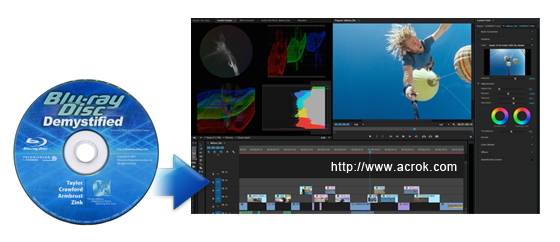
"Please help! I plan to make a short movie via Premeire Pro CC 2022 (22.2), and I need to cut some footage from a Blu-ray movies as my video material. But I don't know how to import Blu-ray movies from a disc into Premiere Pro CC. Can you help me solve this problem? - Chris Deitz"
"I need a Blu-ray Ripper lets me easily copy and rip Blu-ray to various video and audio formats and convert Blu-ray to virtually any multimedia device with ultra-fast speed. The urgent issue at present is to determine which format is most suitable for Premiere Pro 2025 to convert files on Blu ray discs. - Miroslav Nevlida"
Adobe Premiere Pro is a powerful and professional video editing software that allows producers and filmmakers to easily edit their footage without losing quality. Import and combine virtually any type of videos and audios, from video shot on a phone to raw 8K and higher resolution footage, and then edit it in its native format without wasting time transcoding. The latest version (2025) added a lot of new features, the ability to import more video formats, including ProRes RAW on Windows is now available for Intel and AMD GPUs. HDR workflows now include support for Rec2100 PQ color working space in Premiere Pro. Improved playback with H.264/HEVC files, as well as faster audio playback. Premiere Pro 2025 brings major AI-driven & quality-of-life updates, including Media Intelligence for searching clips by description, AI Caption Translation in 27 languages, Generative Extend, enhanced Color Management, over 90 free Film Impact effects/transitions, and significant timeline performance boosts with better audio handling. But we still unable load Blu-ray files into Premiere Pro for editing directly.
Since Adobe Premiere Pro is very powerful and supports a wide range of video formats, it receives popularity around the world. However, Premiere Pro doesn't support Blu-ray importing, especially the newly released 4K Blu-ray discs. That means if you want to import Blu-ray to Premiere Pro for editing, you will be failed. Fortunately, there are many third party software can help you rip Blu-ray to Premiere Pro supported video formats in an easy and fast way.
In order to keep the video quality as well as finish the Blu-ray Premiere Pro (CC, 23.0-25.0) task as quickly as possible, Blu-ray to Premiere Pro Converter is in use. We at Acrok naturally recommends the Video Converter Ultimate. With it, you also can easily rip and convert any video (4K/1080P Blu-ray, DVD, 4K MOV/MP4/MXF, 1080P MTS) to Premiere Pro best editing format with a few clicks. Below is the step by step guide on how to rip Blu-ray for editing in Premeire Pro.
Free download Acrok Blu-ray Ripper here
 100% Safe & Clean 100% Safe & Clean
This guide takes the Windows (Including Windows 11) version screenshots for example. The way to rip Blu-ray to Adobe Premiere Pro on Mac OS X is the same. Just make sure you get the right version.
Insert your Blu-ray disc into your Blu-ray drive. After you open Blu-ray to Premeire Pro Converter, click "Load Disc" to add the Blu-ray files you want to rip. On the software main interface, there is a viewing window provided for you to preview the Blu-ray files to ensure the files are what you want to rip. You can also take snapshots of the Blu-ray movies when previewing them. You can select the subtitle that you like.

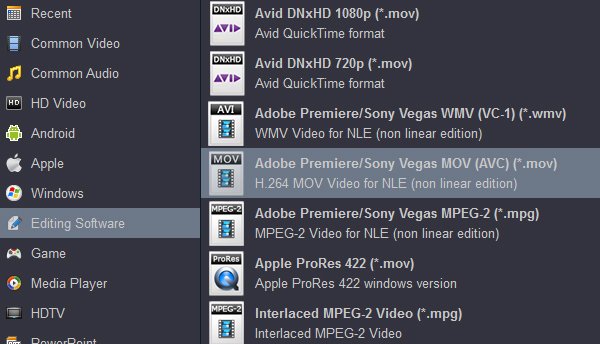
Premiere Pro supports various video formats, such as MOV, WMV, MP4, MPG, etc. To edit Blu-ray in Premiere Pro , you can choose MOV as the output format, which is highly compatible with Premiere Pro. Click "Format" bar, choose "Editing Software" then select "Adobe Premiere/Sony Vegas MOV AVC (*.mov)". You can also set video and audio bit rate, encoder, etc. as you like by clicking "Settings".
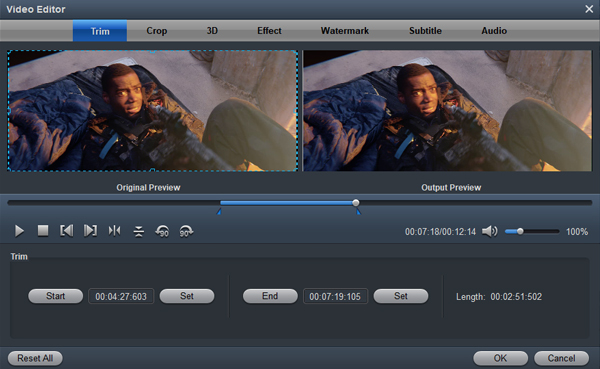
Acrok Video Converter Ultimate is not only a Blu-ray and DVD Converter program, but also a simple and easy video editor. After your Blu-ray or DVD files have finished loading, you can use this Blu-ray Ripper to edit, combine and crop your Blu-ray or DVD movie.
Click "Convert" to start converting Blu-ray movies to MOV format for Premeire Pro. The conversion process may take long time but it will not bother to render in Adobe Premiere Pro. After conversion just click the "Open" button to locate converted videos for Premiere Pro post-production.
You see, it's just so easy to turn Blu-ray to Premiere Pro supported video formats in a few clicks! Just get the Blu-ray ripper and enjoy Blu-ray editing in Premiere Pro.


I tried some other Blu-ray ripping software before, theny couldn't handle Blu-ray IFO/ISO files. Acrok program is a reaally Blu-ray ripping and converting tool. I can rip Blu-ray to H.264 and H.265 on Windows 10 easily. And I can remove subtitle via this tool. Great Jobs!!!
John J Kopecky
Copyright © 2026 Acrok Studio All Rights Reserved. Terms and Conditions | Privacy | Refund Policy