

 >
>
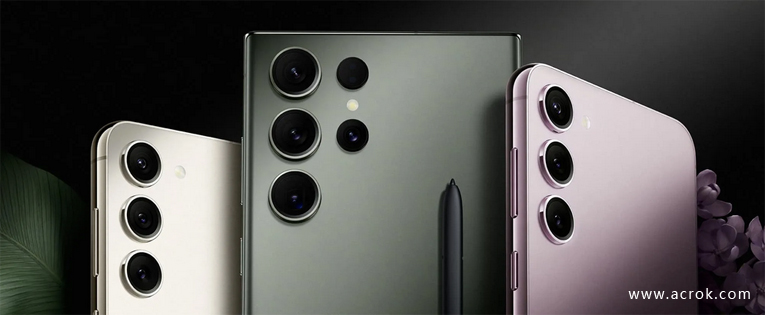
We will tell you how to play MKV, AVI, MOV, MP4 files on Galaxy S23 if you experience problems with format compatibility. It could be said that the most used video files nowadays are MKV , MOV, AVI and MP4, being able to find them in videos, movies, and more. However, these are not the only ones, as there is a wide variety of formats.
Frankly speaking, the problem on how to play movies on Galaxy S23/S23+/S23 Ultra is very common for Samsung users since MKV/AVI/MOV/MP4 is widely used. When we download a movie on site, its format is probably .mkv, .mov, .avi or .mp4 files have their own unique advantage but they are natively unsupported to play on Galaxy S23 series phones.
Get failure or error message when you try playing downloaded MKV, MP4 and other movie formats on Galaxy S23? Here is a solution to solve formats doesn't work in Galaxy S23, Galaxy S23+ amd Galaxy Ultra.
Luckily, this problem can be solved by converting any format to Galaxy S23 supported format. You will know how to apply the solution once you read the whole text.
Acrok Video Converter Ultimate must be the best choice to play your downloaded file on Galaxy S23, Galaxy S23+ and Galaxy S23 Ultra. It can convert any format to many formats that Galaxy S23 supported, including H.264 MP4. While selecting the output format, you can choose among dozens of preset profiles including Android, Apple, 4K Video, HDTV, etc. More than that, you are able to choose multiple audio tracks and select one of the subtitle tracks to embed into the video, so you can farthest keep the completeness and high quality of the original movie.
Converting video to Galaxy S23/S23+/S23 Ultra with Acrok software is simple as ABC. After downloading, follow the wizard to install and run the program. Then follow the steps below to covnert MKV/AVI/MOV/MP4 to Galaxy S23/S23+/S23 Ultra playable videos in a few clicks! The below guide takes Acrok Video Converter Ultimate for Windows screenshots for example.
After installing Acrok Video Converter Ultimate as the any format to Galaxy S23 Converter, open its main menu.
 100% Safe & Clean 100% Safe & Clean
Open Acrok Video Converter Ultimate, you can directly drag and drop source video files, or click Add File icon on the toolbar to load your MKV, AVI, MP4 and MOV files.

Input File Format Supported
Blu-ray disc, Blu-ray ISO, Blu-ray folder, DVD disc, DVD ISO/IFO, DVD folder, AVI, MKV, MP4, MOV, M4V, DivX, MPG, MPEG, VOB, WMV, MXF, FLV, F4V, ASF, XAVC MXF, XAVC MP4, XAVC-S MP4, TiVo, DVR-MS, DAT, DV, MOD, TOD, M4B, MVI, EVO, M2V, MTS/M2TS/TS/TP/TRP (AVCHD H.264, VC-1, MPEG-2 HD), RM, RMVB, WTV, 3GP, 3G2
Output File Format Supported
MP4, AVI, MKV, MOV, FLV, F4V, DivX, XviD, M4V, WMV, VOB, MPG, TS, ASF, DV, SWF, 3G2, 3GPP, 3GP
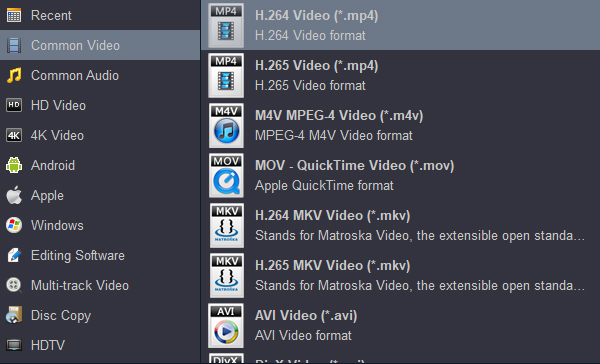
Click Format pull down list to select H.264 Video (*.mp4) from Common Video category as the best video format for Galaxy S23/S23+/S23 Ultra. Another two specialized formats: Android > Android 720 Video (*.mp4) and Android 1080P Video (*.mp4) are the good choice as well.
Tip: With this free audio converter, you can convert video/music to Galaxy S23 series phones supported audio format. Such as you can rip CD to MP3 for Galaxy S23, convert MV to AAC for Galaxy S23 Ultra, etc.
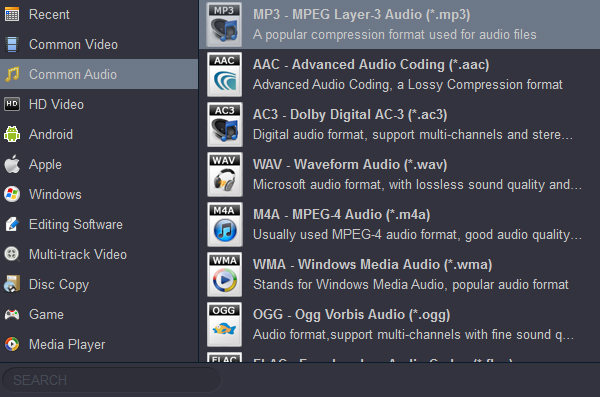
Supported Audio Formats
Input: MP3, WAV, WMA, APE, FLAC, M4A, AAC, AC3, MKA, OGG, MP2, MPA, AIFF, DTS, AU
Output: MP3, WMA, MKA, AAC, AC3, WAV, OGG, AIFF, APE, FLAC, M4A, DTS, MP2, AU, MPA
Hit Convert button in the lower right corner and the conversion will begin in no time. Once done, Galaxy S23/S23+/S23 Ultra should be able to play the converted MKV, AVI, MOV and MP4 movies without any trouble.


I have an anniversary gift Blu-ray, and it didn't work on any of the two Blu-ray players that I have. Use Acrok Blu-ray converting software to convert the Blu-ray to H.265 so that it would play it in the media player software. Good performance.
Graham Carter
I was truly thankful to find this software. I had a very large numbers of Blu-ray disc and want to backup on my removable Hard Disk. Acrok did the job! Rip all my Blu-ray disc to the digital file for storingon my removable Hard Disk and did not compromise the quality of the movie. Love IT!
Olivier Cant
Copyright © 2026 Acrok Studio All Rights Reserved. Terms and Conditions | Privacy | Refund Policy