

 >
Copyright Protection Removal Software
>
Copyright Protection Removal Software
Questions
"I have some DVD discs, all of which are my favorite movies. Some of these discs can be played on a DVD player, while others are too old and have many scratches, so they cannot be played. I want to back up these movies to my portable hard drive. I searched online for tutorials, and most of the ones Google recommended suggested using HandBrake.
However, after downloading and installing it, I found that it cannot directly copy these movies. It prompted me that the disc is protected and cannot be imported. I am using a Mac Pro running macOS 15. I would like to know if HandBrake can back up copy-protected DVD movies to my computer. If so, please tell me how. If not, please provide me with a better solution."
- Josep Castells
"How to rip DVD with Handbrake on Windows 11? Many years ago, I recorded some videos using a DV camcorder. Last week, I used HandBrake to copy the video files from the discs to my computer, and these files played smoothly. However, I encountered a problem: HandBrake cannot import the DVDs I purchased. Is this because these discs are copy-protected? Howto to remove copyright protection from DVD with HandBrake on Windows 11?"
- Roger Blackwell
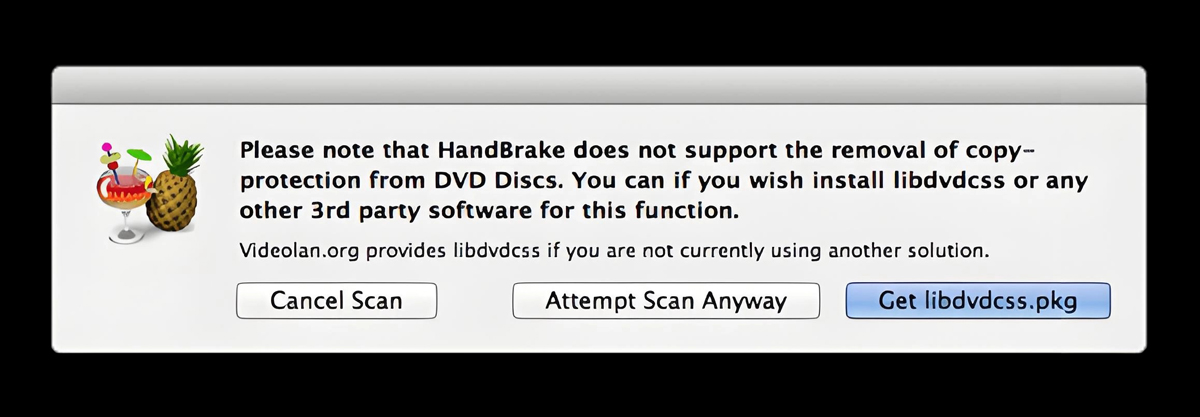
HandBrake itself cannot directly remove DVD copy protection. It is an open-source video transcoder that is very powerful, but according to its official documentation, it does not support decoding copy-protected discs. What it excels at is converting videos into mainstream formats, including MP4, .MKV, and WebM.
However, this doesn’t mean you cannot use HandBrake to handle such discs at all. You can enable it to "gain" this capability through some methods. Below are two mainstream solutions:
Core Method: Install an open-source decryption library—libdvdcss—for HandBrake.
Advantages: Completely free, and you can complete decryption and conversion in one go within the HandBrake interface.
Considerations: Requires installation via the command line (e.g., Homebrew) on a Mac, which may be slightly challenging for beginners.
Core Method: First, use specialized software like MakeMKV to crack and extract the DVD into a lossless MKV file. Then, use HandBrake to convert this MKV file into your desired format.
Advantages: The process is stable and can handle advanced encryption that libdvdcss might not support.
Considerations: Requires installing two pieces of software, making the steps slightly more cumbersome, and will take up double the temporary hard drive space.
Detailed Steps for Solution 1: Unlocking Decryption Capabilities for HandBrake via libdvdcss
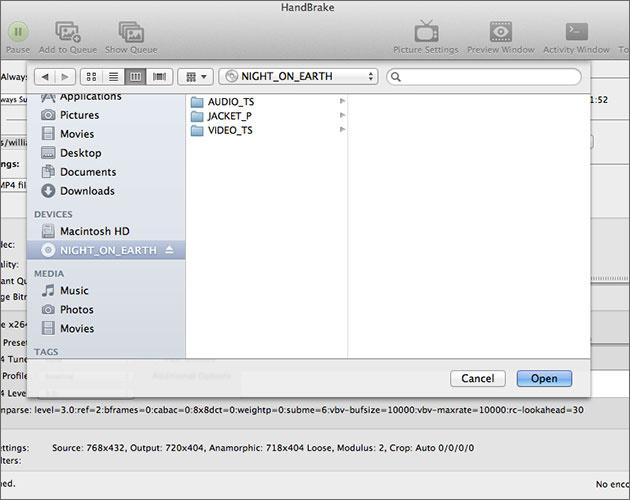
If you prefer to complete all operations directly within HandBrake, follow these steps to install libdvdcss:
Using the methods above, you can remove DVD copy protection with HandBrake. If you're not very proficient with computers, the above methods may not be suitable for you. Are there any simpler ways to easily remove DVD copy protection and convert videos to your desired format? Of course, there are. Please read on.
Since we can't rip DVD with HandBrake directly, what other good way is there to remove copyright protection from a DVD disc? Ultimately, what we want to know is how to back up or convert protected DVDs. Once we understand the key issue, the approach to solving the problem becomes clear. We will review the best DVD copy protection removal software and show you how to use it to strip DVD copy protection. Now, let's embark on our cracking journey.
First, reading a DVD disc requires an external DVD drive. Some computers come with a built-in DVD drive, but if your computer doesn't have one, you will need to purchase an external drive.
Second, you need to ensure you have enough space to store the files ripped from the DVD. The amount of storage required for files ripped from a DVD disc depends on several factors, including the file format, the video and audio quality, and the length of the movie you specify. On average, a DVD movie with a runtime of 1.5 hours and good video and audio quality in MP4 format will take up about 2-3GB of storage space.
Finally, you will also need specialized software to remove DVD copy protection and rip the DVD disc. Once you have all these things ready, you can start setting up your computer to remove DVD copy protection.
Best DVD Copy Protection Removal Software - Acrok Video Converter Ultimate
 100% Safe & Clean 100% Safe & Clean
Acrok Video Converter Ultimate can remove a variety of copy protections from DVDs without additional software. It supports almost all Blu-ray encryptions, covering CSS, APS, RC, RCE, Sony ARccOS, UOPs, RipGuard, and other special encryption schemes. Old and latest DVD movies and TV series.
This reliable DVD protection removal software has the ability to rip and convert DVD to almost all mainstream video and audio formats, including but not limited to ripping DVD to MP4, MOV, M4V, MKV, WMV, etc. If you don't know what settings to use to rip DVD for your devices, not to worry, as there are more than 300 pre-configured device profiles for TVs, Android, iPhone, Game Console and more.
3 disc copy modes manage to back up DVD with 100% quality reserved. And its High Quality Engine can deliver almost original quality while ripping DVD to digital files while Hyper-threading Tech, Multi-core support and hardware acceleration technology gurantee the ultra-fast DVD encoding speed. It may only take 5 minutes to copy a whole DVD disc.
What's more? This best DVD copy protection removal tool also comes with a bulit-in video editor which can help you edit own DVD videos to make the result videos more stylish. And you can flexibily select desired subtitle, audio tracks and you're allowed to adjust resolution, bitrate, codec, etc to produce optimal file size.
Insert the DVD disc into your computer's DVD drive or an external USB DVD drive. Install and run Acrok Video Converter Ultimate as the best Copyright Protection Removal Software on your PC, click "Load Disc" icon to add the DVD files to the program

Click "Format" bar and move mouse cursor to "Common Video" or "Common Audio" category, then click and select any option as the output format.
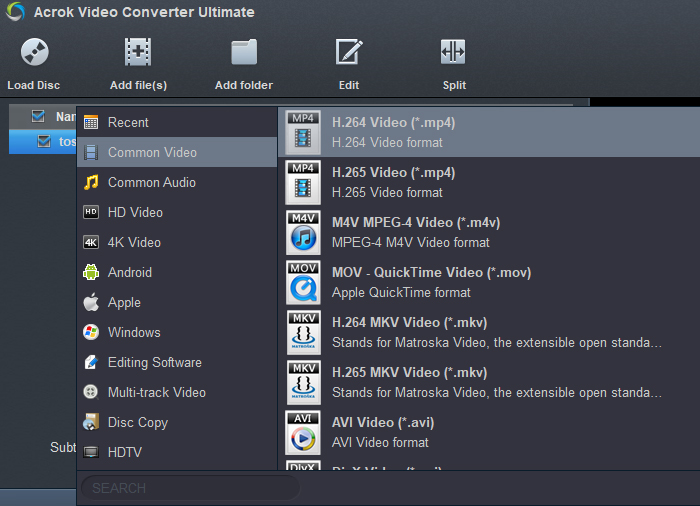
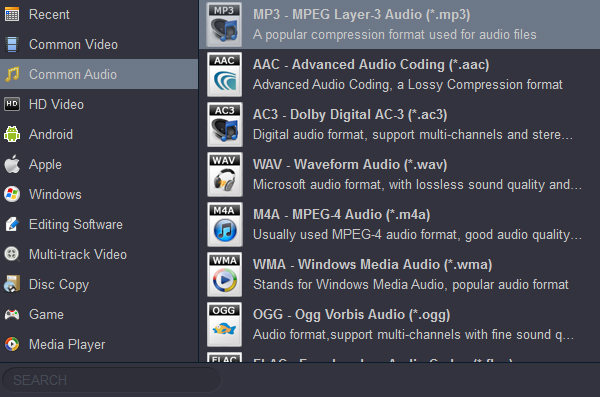
Tip: Due to the fact that old DVD movies generally have a resolution of 720P, with a maximum resolution not exceeding 1080P, it is not recommended to select an output format under the 4K category. Doing so will not only affect the quality of the output video but also take up too much storage space.
Click the Folder button in the Output bar to select a destination folder in the dialog box that opens, and click OK. Then click the "Convert" button to start converting DVD to the previously set output format.
By reading the content above, I believe you have learned how to remove copy protection from DVD discs using HandBrake. However, this method has high technical requirements and is not recommended. But if you're asking, "What is the best copyright protection removal software?" my answer is Acrok Video Converter Ultimate. It can load any DVD disc, whether DRM-free or copy-protected. Thanks to support for advanced hardware acceleration, multi-core CPUs, and hyper-threading technology, it works much faster than HandBrake.
Free try the best DVD decrypter and converter
100% Safe & Clean 100% Safe & Clean

Your content is very informative, thank you for sharing. I gave Acrok a try as you suggested, and everything worked great. It's user-friendly and efficient.
Jim Curry
I used your software to convert all my DVDs into digital formats, so now I no longer have to rummage through the drawers looking for the movies I want to watch. Thank you for sharing.
Birane Diarra
Copyright © 2026 Acrok Studio All Rights Reserved. Terms and Conditions | Privacy | Refund Policy