

 >
>

"My friend shared some 4K MKV movies with me, but my Xperia 10 VI can't read these files. Why?"
"I have bought the 6.5-inch Sony Xperia 1 VI for a while, and I like watching movies on it that I can lay on my bed comfortably. And I have downloaded some MKV, AVI and MOV movies. Is there any way to put my favorite (Marvel's Captain America: Civil War, London Has Fallen, The Revenant) movies on my Xperia 1 VI for playback? How? Thank you very much."
You can play videos on Sony Xperia 1 VI online easily, but you can't play your downloaded movies on Xperia 1 VI or Xperia 10 VI directly. In fact, Sony Xperia phone can play movies with good video quality but compared with Samsung smartphones, Xperia phone can only support formats - H.264/MPEG-4 AVC well. For playing the unsupported formats on Xperia 1 VI/10 VI, you have to convert MKV, AVI and MOV to Xperia phone supported format for watching. Want to enjoy any HD movies on the Xperia X with high quality? Just try the powerful Xperia Video Converter - it can not only convert common formats, but also rip and convert Blu-ray/DVD disc to Xperia 1 VI/10 VI friendly video formats in fast speed.
Software you need:
Acrok Video Converter Ultimate - A Feature-Rich & Fast 4K Video Converter, Blu-ray/DVD Ripper, Compressor and Editor. If you're using a Mac, simply turn to Acrok Video Converter Ultimate for Mac to convert and transfer movies to Portable devices on Mac.
- Process any video and audio files from any device / any source;Free download Xperia Video Converter
 100% Safe & Clean 100% Safe & Clean
The guide below will show you how to convert video to Xperia phone supported video format on Windows so you can transfer and play MKV, AVI and MOV movies files with Xperia 1 VI and Xperia 10 VI freely.
Click "Add Files" to load source files into the MKV/AVI/MOV to Xperia Video converter, or you can drag them into the software. For ripping Blu-ray/DVD for playing on Xperia 1 VI and Xperia 1 VI, please click "Load Disc" icon to load your movies.

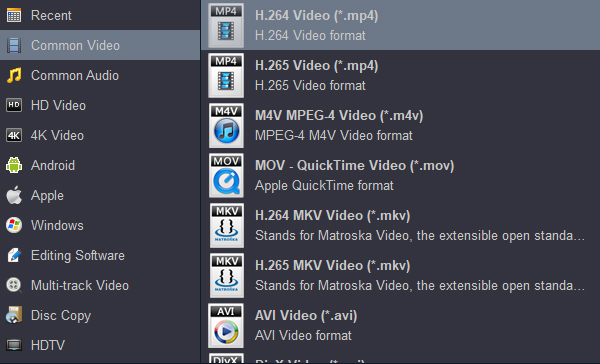
You can select a friendly output video format to Xperia 1 VI/10 VI, like MP4. For getting the best output quality, I recommend you to select "Common Video" ->"H.264 Video (*.mp4)" to get 100% lossless quality.
When you finished above steps, click "Convert" button to start converting MKV, AVI or MOV to Xperia 1 VI/10 VI. After that, link your Xperia phone to PC and transfer the converted movies to it for enjoyment easily.


My family enjoys movie night now so much more than before. Now I can convert Blu-ray, DVD, and downloaded movies to the right format to fit my Android smartphone and tablet.
Csaba Fikker
Copyright © 2026 Acrok Studio All Rights Reserved. Terms and Conditions | Privacy | Refund Policy