

 >
>

Q: Can I play .mkv on Samsung TV? Do Samsung TVs play 4K MKV files? Why I can't open H.265 MKV movies on my Samsung 4K UHD Smart TV?
A: MKV has become the most popular format used in devices. If you are thinking whether you can watch MKV movies on Samsung TV, you will get the answer over here. This article will show you how to play all MKV on Samsung QLED 4K TVs, QLED 8K TVs and other 4K Smart TVs, HD TVs. Stay tuned!
There are 3 ways to play MKV movies on Samsung TV. One is to connect your USB flash disk where contains your target MKV to the Samsung TV, and insert the USB flash disk to the Samsung TV's USB interface. You can find the MKV video from your USB flash disk there. While the second way is play your MKV movies on Samsung TV use DLNA (Digital Living Network Alliance). The third way is enjoy downloaded movies on Samsung TV via Pleax Media Server. No matter which way to watch your favorite movies on Samsung TV, you have to solve the compatibility problem. So you have to convert these MKV videos to your Samsung TV supported format.
MKV is not compatible with every device. Some Samsung TV support MKV, but not all of them. So if you want to stream MKV on Samsung TV, you must convert MKV to Samsung TV compatible formats. Acrok Video Converter Ultimate (Windows Version | Mac Version) will help you do the conversion. It helps convert MKV or other video formats quickly and do NO harm to the resolution or video quality.
Free download MKV to Samsung TV Converter
 100% Safe & Clean 100% Safe & Clean
By following the guide below you will learn successfully convert your MKV format for playback on Samsung TV:
Have Acrok Video Converter Ultiamte on your Mac or Windows PC. Open it. Click "Add Files" to import MKV movies you want to convert. Or directly drag and drop your MKV videos or the folder where you MKV files are to main interface of the MKV to Samsung TV Converter.

If the desire MKV video is on your smartphone or tablet, simply connect your device to the computer and click the little drop down icon to load video from device.
After uploading your desired MKV videos, you can select the Samsung TV supported format from the format tray. There are Samsung TV option and other TV brands available. Now select Samsung TV as output option.
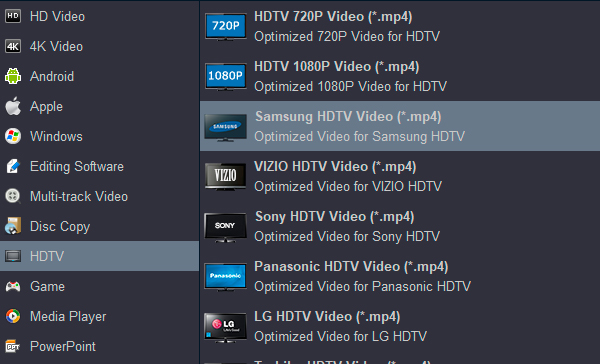
If your Samsung TV supportes 4K video playback, you can choose 4K MP4 as output format too.
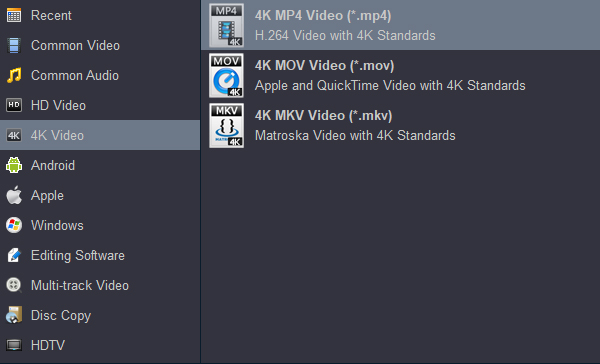
When all the things are set in place you can click the "Convert" button to start conversion. After a few seconds you will get your MKV video in Samsung TV compatible format.
Now you will have to put the converted video to your USB flash disk that can connect to your Samsung TV. Simply connect the USB flash disk to the computer. Add the converted video to USB flash disk. Finally, you just need to connect the USB flash disk to your Samsung 4K TV, 8K TV, Smart TV or other HD TV. You can find your video and play it without any problem!
Samsung Smart TVs have an advantage over non-smart TVs. They not only connect to the internet but also let you stream media wirelessly from your smartphones and tablets. It uses a technology popularly called DLNA, something most Samsung 4K/8K/Smart TVs today come built with. All you need apart from a Samsung TV is a smartphone or tablet, and a wireless router. You can also connect a NAS to your router and use it to stream all your media content on your Samsung TV.
Step 1: Connecting your devices to the network
To use DLNA on your Samsung TV, you need to connect both, your Samsung TV and your smartphone or tablet to the same network.
Step 2: Loading a DLNA app on your device
To stream content from your smartphone or tablet, you need to have a DLNA app installed on it.
Step 3: Selecting a device
Once you have the BubbleUPnP app loaded on your smartphone, you are presented with a screen with four menus at the bottom - Now Playing, Playlist, Library and Devices.
Step 4: Streaming media content on the Samsung TV
Once you select the device, you need to select the content you want to play on it. You can access all your media by selecting first the source from where you want to play.
Plex is spoken of as an app, a device and a network, so it can be a bit confusing. In a nutshell, if your PC has and is using the built-in Plex Media Server, most modern Samsung smart TVs will be able to detect the stream and play media.
If your PC seems not to have a Plex ability, install it onto your desired device. Any Samsung smart TV can browse and install the app, too, but the majority will be able to pick up streaming without additional downloads. The app appears as an option when media is playing so that you can simply hit Play and watch it all on your Samsung smart TV in the next room.
Free download Video Converter for Samsung TV
100% Safe & Clean 100% Safe & Clean

I know MKV is very powerful, it can contain a lot of audio and video codecs, so your software is essential. I didn't expect it to have so many amazing features. Converting, ediitng and ripping. I like it so much !!!
Sylvester, Karen
Copyright © 2026 Acrok Studio All Rights Reserved. Terms and Conditions | Privacy | Refund Policy