

 >
BIN Video Converter
>
BIN Video Converter

This article mainly introduce free and easy ways to convert BIN file to MP4, MOV and M4V video while keeping the original video quality so that you can play your favorite .bon files on different devices anywhere anytime.
Convtents
Why convert a BIN file to MP4, MOV, and M4V?
Recommended free online BIN converters + desktop converter
Comparison of the five BIN video conversion tools
Summary: How to choose the right BIN File Converter for you?
Have you ever encountered a file with the .bin extension and didn’t know how to open it? BIN stands for binary file - a raw data container format. Unlike readable text files, BIN files represent information using binary sequences of 0s and 1s, making them unreadable to humans but highly efficient for computer processing.
In the multimedia field, the most common form of a BIN file is a CD or DVD disc image. When you back up a disc with certain software, you might get a .bin file together with a .cue file - the former holds the raw disc data, while the latter acts as an index table. Additionally, BIN files can be cached files downloaded by certain media players or video data packages inside game programs.
Although BIN files may contain video content, they are not a common video format and can be inconvenient to play or edit. Converting BIN files to mainstream video formats is therefore quite necessary. Below we explain the advantages of each target format.
1. Why convert BIN to MP4?
MP4 is the world’s most popular universal video format. Almost all modern devices - from Windows and Mac computers to Android and iPhone smartphones, smart TVs and tablets - natively support MP4 playback. For most users, to convert BIN to MP4 is the most practical and versatile choice. MP4 delivers good quality with relatively small file sizes, making it ideal for storage and network transmission, widely used for streaming, social media sharing, and everyday viewing.
2. Why convert BIN to MOV?
MOV is a multimedia container format developed by Apple and is especially popular in professional video editing. If you use editing software like Final Cut Pro or Adobe Premiere, or need to import videos into a Mac system for post-production, then to convert BIN to MOV is an ideal option. MOV can store high-quality video and audio while supporting multiple audio and subtitle tracks.
3. Why convert BIN to M4V?
M4V is a video format closely tied to Apple’s iTunes, often used for movies purchased from the iTunes Store. M4V employs high-efficiency H.264 or HEVC encoding, providing excellent image quality in a small file size. If you need to import videos into iTunes or play them within the Apple ecosystem, to convert BIN to M4V is the best choice. Notably, M4V is very similar to MP4; many players can still play an M4V file after simply renaming its extension to .mp4.
Here are 4 tools for converting BIN videos, including online tools and desktop tools, both free and paid. You can choose the tool that suits your needs based on your requirements.
- Comparison of all tools, highlighting Acrok’s advantages
When your conversion needs go beyond what ordinary online tools can handle, or you want a single software that can handle video format conversion, editing, and disc backup, Acrok Video Converter Ultimate is the most comprehensive solution worth considering.
 100% Safe & Clean 100% Safe & Clean
Acrok Video Converter Ultimate works not only as a BIN Video Converter but also as an all-in-one tool that combines powerful conversion, editing, and Blu-ray/DVD backup capabilities.
Input & output formats
Powerful editing features
High-speed conversion with quality retention
Convenient batch processing & built-in player
Step 1: Add BIN Video Files
Install and Run Acrok Video Converter Ultimate as the BIN Video Converter. Click "Add File(s)" icon to load your BIN files.

Step 2: Choose Output Format
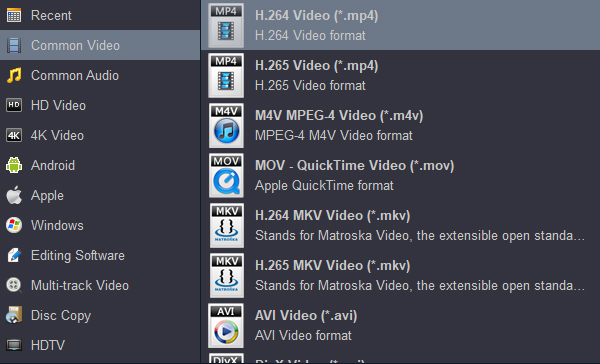
Click "Format" bar to select output format. You can get MP4, MOV and M4V format in "Common Video" category.
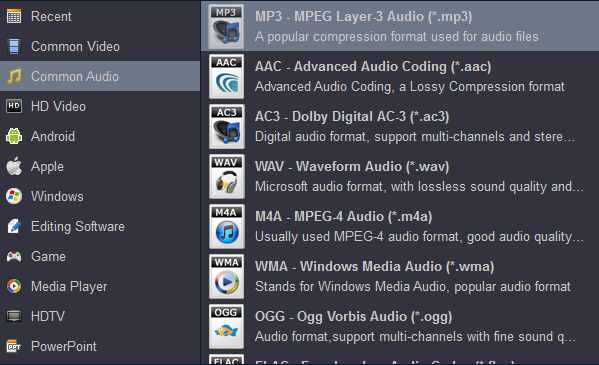
Tip: If you plan to convert your BIN files to MP3, you need to select MP3 format in "Common Audio" category. The function of converting video to audio, or converting between audio formats, is free. So you can use Acrok’s software to convert BIN files to MP3 format for free.
Step 3: Start Video Conversion
Click the "Convert" button to initiate the BIN to MP4, MOV or M4V conversion. This might take some time; however, it is important to note that the conversion time depends on the quality and duration of the output movie.
Online-Convert is an extremely powerful and free online conversion platform that supports virtually any format conversion, including video, audio, images, documents, and e-books, making it a reliable BIN Video Converter. The website is categorised by target format – just choose MOV or MP4 under “Video” to start.
FreeConvert is a professional online file conversion platform supporting various formats such as images, audio, and video. Its biggest highlight is that all conversions are done locally in the user’s browser - your files never leave your device, making it far more privacy-conscious than similar online tools. Whether you need to convert BIN to MP4, convert BIN to MOV, or even convert BIN to M4V, FreeConvert can handle it efficiently right in your browser.
If you frequently convert videos or have very large files that are impractical to upload, HandBrake is an excellent choice. It is a completely free, open-source, cross-platform desktop video converter available for Windows, Mac, and Linux.
Features of HandBrake:
HandBrake is an ideal choice for users who need long-term, large-volume, high-quality video conversion - and it’s completely free. Because the internal structure of BIN files varies, if HandBrake cannot recognise a BIN file directly, you can first extract the video data using a tool like VLC and then convert.
| Aspect | Online-Convert | FreeConvert | HandBrake | Acrok Video Converter Ultimate |
|---|---|---|---|---|
| Usage method | Online (upload required) | Online (local in browser) | Desktop software | Desktop software |
| Price | Free with limitations + paid plans | Completely free | Completely free | Trial available; lifetime version paid |
| File privacy | ⚠️ Uploaded to servers | ✅ Local, no upload | ✅ Fully offline | ✅ Fully offline |
| Batch processing | ✅ Supported | ✅ Supported | ✅ Supported | ✅ Supported |
| Hardware acceleration | ❌ Not supported | ❌ Not supported | ✅ Limited support | ✅ NVIDIA/AMD technology |
| Video editing | ❌ None | ❌ None | ✅ Basic editing | ✅ Powerful editing features |
| Blu-ray / DVD support | ❌ Not supported | ❌ Not supported | ✅ Can read non-encrypted discs | ✅ Full support (including encrypted discs and ISO) |
| Device presets | ❌ None | ❌ None | ✅ A few presets | ✅ Rich presets (phones, tablets, game consoles) |
| Best for | Occasional conversion, small files | Privacy-conscious, occasional use | Tech-savvy users, free-oriented users | Users with comprehensive needs, professionals |
Looking at the comparison table, Acrok’s core advantages are:
Which tool you pick depends on your actual needs:
Whichever tool you choose, back up your original BIN files before conversion to avoid data loss in case of errors. We hope this article helps you find the most suitable BIN Video Converter and smoothly convert BIN to MP4, convert BIN to MOV, or convert BIN to M4V!


My friend and I both like the content you share - it doesn’t ove-hype the software’s features. I tried and bought your software, and everything is great.
James Thorne
I converted all the CDs I bought before into MP3 format, so that I can play my favorite songs on any of my devices. It’s really free! Thank you for sharing.
David Stuart
Copyright © 2026 Acrok Studio All Rights Reserved. Terms and Conditions | Privacy | Refund Policy