

 >
Best Blu-ray Ripper
>
Best Blu-ray Ripper
Questions
After Effects, with its stunning features, is a popular video editing tool for creating personalized videos or movies on both Mac and Windows. For those who want to import Blu-ray footage into After Effects for editing, it isn't without hiccups – After Effects does not support Blu-ray importing. How to solve this problem gives me a bad headache. - Jakovljevic, Nikola
Can anyone recommend a 4K Blu-ray ripping software for me? I plan to convert and compress my 4K UHD Blu-ray discs to 4K MP4 on Windows 11 so that I can enjoy them on my 4K screen after work. - Bruce Dean
I purchased an LG E9 OLED TV last month. I want to watch my old Blu-ray movies on my new LG Smart TV via the USB port. What should I do? - Michael Silbaugh
How can I convert Blu-ray discs into digital video files that can be played on an iPad Pro? I have a tablet and more than 40 Blu-ray discs. We've packed the food and camping equipment in the trailer. We will spend the next half month in the mountains – classic movies are essential. - Ian Johnson
Which is the best Blu-ray Ripper in 2026? How do I rip Blu-ray to a common video or audio format for playing on the go? Relax! We have ranked and reviewed the best Blu-ray decrypters and converters for you. Our list of the best Blu-ray ripping software of 2026 gathers the top Blu-ray rippers in the world that will convert, rip, and back up homemade or protected Blu-rays smoothly and easily with ideal results. Acrok Video Converter Ultimate is the best Blu-ray Ripper – it can rip Blu-rays to popular video/audio formats and multimedia devices with high quality and fast ripping speed.
Free download and try Blu-ray ripping software here.
 100% Safe & Clean 100% Safe & Clean
Read the best Blu-ray ripper reviews below to choose the most cost-effective Windows or Mac Blu-ray ripping software now.
There is a mixture of free and paid Blu-ray ripping applications on the market. Generally, the paid ones are faster, offer more options, and often include the ability to rip Blu-ray discs. If you are only interested in ripping a disc or two, a free app will probably give you all the tools you need. None of the premium apps are particularly expensive, though, so it may be worth paying a little for a license just to enjoy the increased user-friendliness and to keep it on your hard drive for the next time you need it.
Contents
Part 1: Best Paid Blu-ray Ripper - 2026
Part 2: Side-by-side Comparison of top 6 Paid Blu-ray Ripping Software
Part 3: Best Free Blu-ray Ripper - 2026
Part 4: Conclusion and Our Pick
Part 5: How to rip Blu-ray movies with Best Blu-ray Ripper flawlessly?
The rise of digital devices has led to a major shift in the way we watch movies – from Blu-ray players to smartphones and tablets. If you have a collection of 4K or 1080p Blu-ray discs, it's essential to have a Blu-ray ripping tool to convert these movies into digital formats or make a safe copy on your computer. However, as we move into 2026 with new systems and devices, some popular Blu-ray rippers have started to encounter problems. For example, MakeMKV won't rip Blu-ray on the latest macOS Sonoma, Leawo Blu-ray Ripper can't decrypt the newest 4K Blu-ray discs, and Pavtube Blu-ray Ripper can't be installed on the latest operating systems. So you may want a Blu-ray ripping software that is easy to use and capable of ripping Blu-rays to the latest devices (such as iPhone 17 Pro Max, tablets, smart TVs, PlayStation 5, Xbox Series X) as well as to editing programs (like Final Cut Pro), media players, and more – all on macOS Sonoma and Windows 11. This article will help.
While the tools listed above are among the best Blu-ray rippers available, there are plenty of options for ripping a Blu-ray or DVD on your PC. Which option you choose depends on whether you're ripping Blu-rays, what video formats you prefer, your desired quality, and more. Read our reviews to find the best one for you. Here are the top tools for ripping Blu-rays on your computer.
Price: $89.00 $53.40
Platform: Mac OS X and Windows

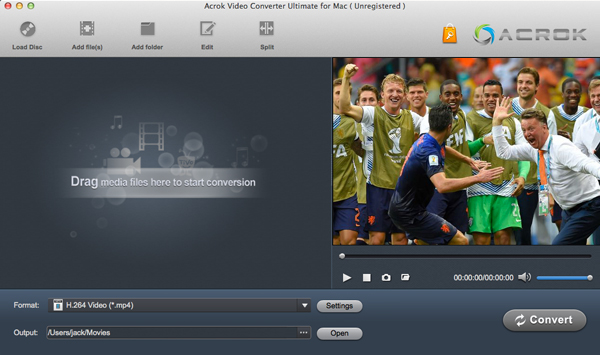
Acrok Video Converter Ultimate tops the list of the best Blu-ray ripping software. It is an all-in-one Blu-ray ripping tool with powerful features. It can rip 4K and 1080p Blu-ray discs to popular audio and video formats, allowing you to play them freely on various devices. Rip any Blu-ray at the fastest speed. It supports the latest macOS 14 and Windows 11. The functions for converting Blu-ray/DVD/CD/video to audio, as well as converting audio to other audio formats, are completely free.
Rip latest Blu-ray to any formats and devices
All the latest user demands are fully covered. Acrok Video Converter Ultimate ranks among the best Blu-ray rippers, working seamlessly with macOS and Windows to rip 4K/1080p Blu-ray discs, ISO images, and Blu-ray folders to HEVC/H.265, MP4, M4V, AVI, WMV, MOV, FLV, MKV, 3GP, and more. This allows playback on the latest iOS, Android, and Windows portable devices, including iPhone, iPad, Android tablets/phones, Xbox Series X, PlayStation 5, and many others. Additionally, you can convert Blu-ray, DVD, and almost all 4K MKV, MP4, and MOV movies to video formats supported by popular smart TVs, QuickTime, Windows Media Player, Plex, and more. Enjoy any movies on Samsung, Sony, Vizio, Panasonic, TCL, Sharp, LG, Hisense TVs smoothly via USB flash drive or Plex.
Convert downloaded movies and recorded videos
Transcode H.265/HEVC (.MKV, .MP4, .MOV), AVI, MKV, MP4, MOV, M4V, DivX, MPG, MPEG, VOB, WMV, MXF, FLV, F4V, ASF, XAVC MXF, XAVC-S MP4, TiVo, DVR-MS, DAT, DV, MOD, TOD, M4B, MVI, EVO, M2V, MTS/M2TS/TS/TP/TRP (AVCHD H.264, VC-1, MPEG-2 HD), RM, RMVB, WTV, 3GP, 3G2 to any video format for playing and editing. Supports 8K, 6K, 4K, and 1080p footage from Panasonic, Canon, Leica, Sony, Zeiss, DJI, RED, Blackmagic Design, Fujifilm, Nikon, and other camcorders/cameras.
Remove Blu-ray copy protections
Bypass all copyright protections to enable any Blu-ray ripping activity. It updates with the latest Blu-ray copy protections (AACS encryption, BD+ protection, and Cinavia protection), allowing users to remove any encryptions on newly released Blu-rays, rip the latest movies from Paramount, Disney, Warner Bros, Sony, etc., and solve crash, block, and read problems that many other rippers encounter.
GPU Acceleration
It increases Blu-ray ripping speed with GPU acceleration, including Intel QSV, NVIDIA NVENC/CUDA, and AMD. This software offers the fastest conversion speed and comprehensive decryption capabilities.
Make 1:1 Backup
The wide range of options also makes it the best Blu-ray ripper from 2020 to 2026. Blu-ray discs, Blu-ray folders, and Blu-ray ISO files are all supported. Users can make a full copy in a 1:1 ratio, copy a full title with audio, video streams, subtitles, and extras, copy Blu-ray to ISO images, rip Blu-ray to digital formats, and more – all at 10x faster speed with excellent quality.
Convert 2D Blu-ray to 3D
Acrok Blu-ray Ripper has added the ability to convert 2D Blu-ray to 3D formats. It allows you to choose different 3D features such as Red/Green, Red/Blue, Side by Side, and Top/Bottom. Play 3D movies on HTC EVO 3D, LG Optimus 3D P920, 3D smart TVs, 3D game consoles, and more.
Convert audio to audio and video to audio for free
Convert MP3, WAV, WMA, APE, FLAC, M4A, AAC, AC3, MKA, OGG, MP2, MPA, AIFF, DTS, AU to any audio format for playing on iPods, smartphones, car stereos, etc. Convert Blu-ray, DVD, CD, and other video formats to any audio format. The audio-to-audio and video-to-audio conversion functions are completely free.
Convert Blu-ray for editing software
This Blu-ray decrypter is also a powerful assistant for video editors. With this best Blu-ray ripper, you can rip and convert Blu-ray to ProRes, AIC, MPEG-2, DNxHD, H.265/HEVC, H.264, etc., for editing in Final Cut Pro, iMovie, Premiere Pro, Vegas Pro, Avid Media Composer, Windows Movie Maker, DaVinci Resolve, Lightworks, PowerDirector, Corel VideoStudio, VideoPad Video Editor, After Effects, Premiere Elements, and more.
Free download and try the best Blu-ray Ripper in 2026 now:
100% Safe & Clean 100% Safe & CleanAcrok Blu-ray converting software reviews – 2026
I'm always afraid of buying something online and making a bad purchase. I tried the trial version of Blu-ray Ripper, then purchased it once I knew I was getting exactly what was advertised. With a free trial and a 30-day money-back guarantee, how can you go wrong? Thanks! – James Pelkey
As a film and television editing enthusiast, I used to find it difficult to obtain high-quality material. Since I started using your software, this situation has improved – I can now capture wonderful scenes from Blu-ray films to use as my editing material. – Humberto Herrera
Rip, convert, and back up my Blu-ray discs easily. It is the best ripper I have. It supports many formats, and the conversion speed is amazing – the clarity is also excellent. – Yin Louie
Price: $99.95
Platform: macOS and Windows

Being easy to use, quick, and user-friendly, Leawo Blu-ray Ripper makes it the second best Blu-ray ripping software. As a professional Blu-ray movie ripper, Leawo Blu-ray Ripper effortlessly rips both non-commercial and commercial protected Blu-rays to MP4, WMV, MKV, FLV, F4V, and more. In addition to over 180 supported digital formats, users can also rip Blu-rays directly to popular smartphones, including iPhones, Galaxy S series phones, and many others.
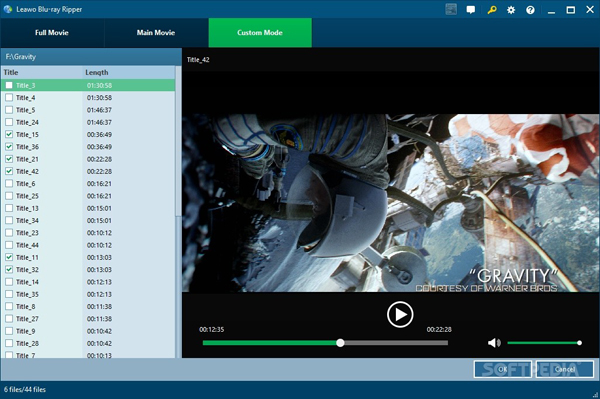
This excellent Blu-ray ripper has a unique feature that others on our list of the best Blu-ray rippers (2020–2022) don't have: the ability to convert standard 2D Blu-rays into 3D movies with six different 3D effects: Red/Cyan, Red/Blue, Red/Green, Blue/Yellow, Interleaved, and Side by Side. However, the current high price of the Leawo Blu-ray Converter keeps many users away. When considering cost-effectiveness, Acrok is better than Leawo.
Pros: Leawo Blu-ray is able to rip many Blu-ray discs on Windows or Mac.
Cons: The price is unacceptable.
Free download Leawo Blu-ray Ripper: https://www.leawo.com/pro/bak_blu-ray-ripper.html
Leawo Blu-ray Ripper reviews 2026:
It's a really powerful software. As you know, it is not cheap. I think the pricing is not reasonable. – Eric Alonzo
Annoying pop-ups: Adware can bombard your computer with pop-up ads, even when you're not online. – Sean Truesdale
Leawo Blu-ray Ripper lets you rip Blu-ray to HD video, either 1080p or 720p, according to your preferences. I think the price is a little high. - Thomas Lee
Price: $49.95
Platform: macOS and Windows

Xilisoft Blu-ray Ripper can convert both unprotected standard Blu-ray videos and 3D Blu-ray videos to SD and HD video formats such as MKV, AVI, WMV, TS, and more. It preserves 3D effects when your source is a 3D Blu-ray movie. NVIDIA CUDA and AMD APP graphics acceleration technologies have been introduced to provide a faster conversion experience. This ripper can convert Blu-ray to approximately 100 video and audio formats, including MPEG-4, AVI, DivX, FLV, MOV, 3GP, WMV, WMA, MP3, WAV, etc. It also supports a wide range of portable devices, such as iPod, iPhone, iPad, HTC, PSP, Xbox, PS3, Kindle, and Samsung Galaxy.
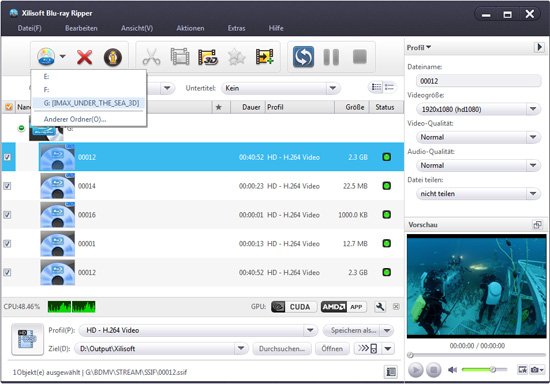
The app does not decrypt Blu-ray protections and requires AnyDVD HD to be installed in advance for Blu-ray ripping. DVD ripping is not supported.
Xilisoft Blu-ray Ripper does not rip movies from commercial Blu-ray discs. However, if you have already cracked the Blu-ray and saved its contents to your computer's hard drive, this tool can be helpful for enjoying movies on devices such as iPod, iPhone, Apple TV, PSP, Xbox, Zune, NDS, Wii, and 3D smartphones.
Pros: This tool is only recommended if you want to convert 3D Blu-ray while preserving the 3D effect.
Cons: Cannot rip copy-protected Blu-rays. Does not support the latest versions of Windows and macOS.
Free download Xilisoft Blu-ray Ripper: https://www.xilisoft.com/blu-ray-ripper.htm
Xilisoft Blu-ray Reviews – 2026:
Very easy to use, lots of features included and not over priced. I can convert the backuped M2TS video to the format I want. Unfortunately, I can't crack the Blu ray disc directly. – Bellrichard, Robert
Price: $119.00
Platform: macOS and Windows

DVDFab Blu-ray Ripper is the first full-featured Blu-ray ripping software capable of ripping any 2D/3D Blu-rays to popular 2D or 3D videos – including H.265 and 4K videos – efficiently and effortlessly, with a wide variety of format choices. Thanks to its Cinavia Removal Solution, it can permanently remove Cinavia watermarks from Cinavia-infected Blu-rays, making the resulting videos playable on devices equipped with Cinavia detectors (such as PlayStation). However, the price is too high to be acceptable.
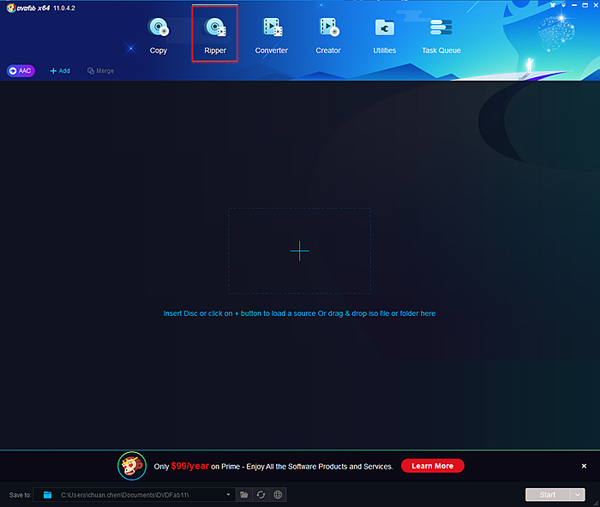
Pros: DVDFab Blu-ray is able to rip many Blu-ray discs on Windows and Mac.
Cons: The price is unreasonable.
Free download DADFab Blu-ray Ripper: https://www.dvdfab.cn/blu-ray-ripper.htm
DVDFab Bu-ray Ripper Reviews – 2026:
DVDFab Blu-ray Ripper application takes advantage of the NVIDIA CUDA technology and AMD APP technology, and the conversion speed can be increased up to 6 times faster than ever before.The highly recommended features is that it can support converting old DVDs to 3D H.264 Video, which means I can enjoy my DVD movies on my 3D Smart TV.I can hardly believe it is so nice for me! – JAE YUN JEONG
What are we supposed to use to rip Blu-Ray's? My final choice is DVDFab Blu-ray Ripper. It has a built in ripper. I also know clearly that DVDFab is not simply the decryptor and the ripper. – Roger Brown
Price: $49.00
Platform: macOS and Windows

Pavtube BDMagic is also among the options of the top Blu-ray rippers of 2026. It is a simple and useful tool for making 1:1 copies or backups, or for converting old Blu-ray movies to MP4, AVI, MKV, WMV, FLV, and many other formats. It accepts a wide range of files, including some 3D Blu-ray discs, 2D Blu-ray discs, Blu-ray folders, and Blu-ray ISO image files, and outputs them for playback on older devices.
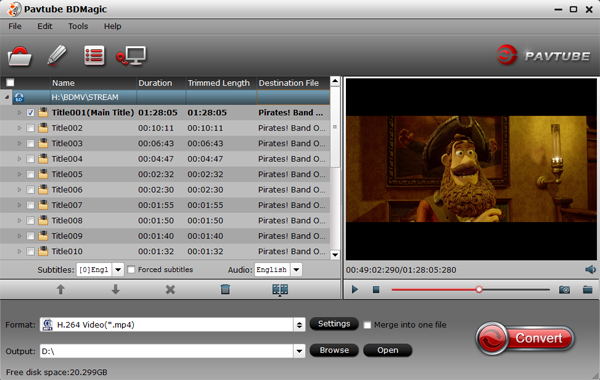
As for copy protections, this Blu-ray ripper removes both CSS protection and region codes from old commercial Blu-ray discs, and therefore supports some of the new Blu-ray movies released in 2025. However, you cannot convert your downloaded or recorded videos to any video format, nor can you play or rip the latest Blu-ray and DVD discs.
Pros: Pavtube BDMagic is able to rip old Blu-ray and DVD discs, reasonable price.
Cons: Can't rip and convert the latest Blu-ray and DVD discs. Only supports macOS Sierra, Mac OS X 10.6-10.11, we can't install BDMagic on MacOS Monterey.
Free download Pavtube BDMagic: https://www.multipelife.com/bdmagic
Pavtube BDMagic Reviews – 2026:
The software can't break the latest discs. I really need a best Blu-ray ripping software, a DVD converting program and a video converter together for me to convert any commercial Blu-ray/DVD discs and almost all kinds of videos to universal video and audio file types with super fast conversion speed and excellent image and sound quality. But this one can't do these well. – Bill Putney
It's good for ripping Blu-ray files. But I don't like it. The speed of conversion is not as fast as imagination. – John Utting
Price: $50 (30-day free trial)
Platform: macOs, Windows and Linux

MakeMKV has a simple, unassuming name, and there's no big trick to transcoding a video from one container format to another. If that were all this utility did, it would be worthwhile but boring. The discussion gets more interesting when you consider its ability to rip DVDs and Blu-ray movies to your hard drive. You can use MakeMKV for free for 30 days, but continuing to use it for Blu-ray ripping after that costs $50.
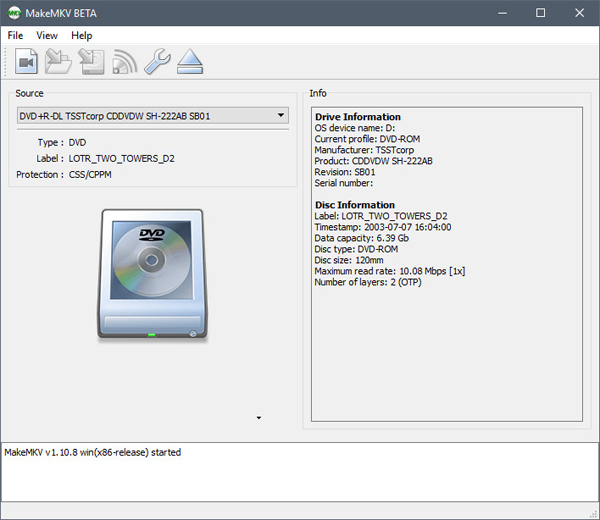
If you want to make a lossless copy of your Blu-ray collection, then MakeMKV is a Blu-ray ripping software we recommend. MakeMKV is available on Windows, macOS, and Linux. It works as a good Blu-ray decrypter, bypassing copy protections on Blu-rays and DVDs and converting the videos from encrypted discs into lossless MKV files with all video and audio tracks intact. As a format converter or "transcoder," MakeMKV offers only one output format – lossless MKV, as its name suggests. It rips and converts Blu-ray/DVD to lossless MKV that contains all the original data from the discs with no compression.
You may use this software to convert or stream DVDs for free, as much as you want. However, when it comes to Blu-rays, you will need to purchase a MakeMKV activation key after a 30-day trial period.
One important thing to note is that MKV is the only output format available. Additionally, because MKV preserves all the information from the disc, the output file can be very large – typically only about 10% smaller than the original Blu-ray files.
Pros: A free trial is available (30 days).
Cons: Only one output option. The output file is too large to play on tablets and smartphones.
Free download MakeMKV: https://www.makemkv.com/
MakeMKV Reviews – 2026:
I'm fairly new to ripping Blu-ray movie as of the past few weeks. I read into some forums and started to use MakeMKV to rip it. The program was in beta for a long time and I'd have to reinstall it every 30 days or so and all was well. – Alex Smith
The UHD was single play list. After getting the hash key file in the correct place the rip was easy… just like any other disc I have done. Size of the .mkv w/ just the True HD track selected was around 70gb. Oddly it really did not take as long as I had thought considering the size. I was ripping straight to NAS. – Nathan Watts
The list of the best Blu-ray ripping software gathers the top 6 Blu-ray rippers with detailed reviews. Your needs will surely be met by one of them. Just choose the appropriate Blu-ray ripper based on your requirements.
| Name | Speed | Latest System | Copy protection | Input file | Output formats | Output profiles | Output quality | Editing feature | Price |
| Acrok Video Converter Ultimate | 10X | macOS 15, Windows 11 |
AACS, BD+, ROM Mark | 3D/2D Blu-ray Disc, Blu-ray Folder, Blu-ray ISO, DVD, Any video format | 180+ | Any | Excellent | Yes | $53.40 |
| Leawo Blu-ray Ripper | 6X | macOS 14 Windows 11 |
Commercial Blu-rays | Blu-ray disc, Blu-ray folder, Blu-ray ISO, DVD |
180+ | 300+ | Excellent | Yes | $99.95 |
| Xilisoft Blu-ray Ripper | 2X | macOS Big Sur (11), Windows 10 |
None | Blu-ray M2TS files | 100+ | 100+ | Fair | No | $49.95 |
| DVDFab Blu-ray Ripper | 6X | macOS 10.15 Windows 10 |
Commercial Blu-rays | Blu-ray disc, Blu-ray folder, Blu-ray ISO, DVD |
180+ | 300+ | Goog | Yes | $119 |
| Pavtube BDMagic | 5X | macOs 10.11, Windows 10 | No | Blu-ray disc, Blu-ray folder, Blu-ray ISO Image File | 100+ | 100+ | Good | Yes | $49 |
| MakeMKV | No | Mac, Windows, Linux | Copy protections | Blu-ray disc, Blu-ray folder, Blu-ray ISO, DVD, | MKV | No | Poor | No | $50 |
Generally speaking, when it comes to timely updates, price, Blu-ray ripping speed, output quality, supported formats, and stability, the best Blu-ray ripper is Acrok Video Converter Ultiamte. However, if you need the best Blu-ray ripping software for a specific purpose – such as creating 3D videos, making lossless MKV files, converting Blu-ray movies for playback on digital devices, and more – you can choose accordingly.
Among the long list of the best Blu-ray ripping software above, you can definitely pick the right one for your computer. Freeware is useful enough if you simply want to make a full backup of your favorite Blu-ray movie and don't want to purchase a ripper for extra features and better resolution. Otherwise, make a professional choice that not only suits your high Blu-ray conversion demands but is also convenient for your operation. We would truly appreciate it if you found this article helpful.
Platform: Linux, macOS and Windows

It's not one for beginners, but this is an undeniably powerful tool that can handle just about any video you care to throw at it. Since video encoding can be a time-consuming process, it's good to see that there's a queuing feature, and the batch conversion tool can be used to encode an entire folder full of videos in one fell swoop.
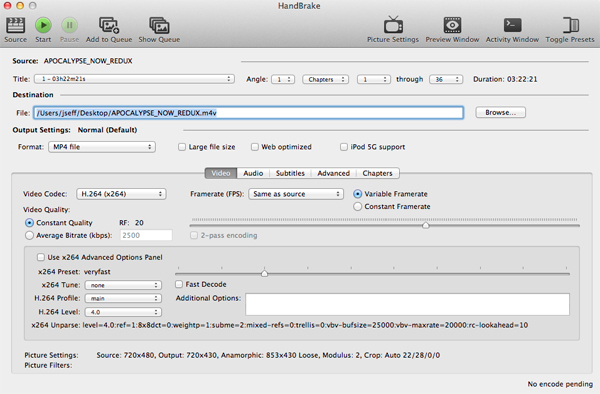
HandBrake is a free and open-source transcoder for common formats, originally developed in 2003 by Eric Petit to make ripping a film from a DVD to a data storage device easier. It's a free video converting tool. HandBrake transcodes video and audio from nearly any format to a handful of modern ones, but it does not defeat or circumvent copy protection. One form of input is DVD-Video stored on a DVD, in an ISO image of a DVD, or on any data storage device as a VIDEO_TS folder. As with DVDs, HandBrake does not directly support the decryption of Blu-ray Discs. HandBrake isn't ashamed of the fact that it is hugely powerful and packed with features, and this means sacrificing user-friendliness to some extent. However, HandBrake can be used to transcode a Blu-ray Disc if DRM is first removed using a third-party application, such as Acrok Video Converter Ultimate.
Pros
1. HandBrake is able to convert homemade Blu-ray discs on Windows, Mac and Linux.
2. It is free of charge without virus, ads or spyware.
Cons
1. Non-tech savvy may feel confused since there are too many custom options.
2. It cannot remove encryptions from commercial Blu-ray discs.
Free download HandBrake: https://handbrake.fr/
HandBrake Reviews - 2026:
The queueing function seems like it's pretty outdated at this point. I wish I could just add a whole folder at once with the same preset. In this way it struggles like Adobe Media Encoder does. I also have to guess & check a lot as far as what settings will work best.- Zahanine Streeter
One thing i dislike about Handbrake is the fact that you can only output mp4 and mkv format. – TONY SANDY
Platform: macOS and Windows

Aiseesoft is a popular DVD and video converter widely used by people around the world. Aiseesoft Free Blu-ray Ripper is a straightforward Blu-ray ripping software that can help you rip Blu-ray discs, Blu-ray ISOs, and Blu-ray folders to other video formats for playback and editing on devices such as iPad, iPhone, iPod, Apple TV, Xbox, Zune, PlayStation, PSP, Blackberry, 3GP, Flash Video, Wii, Samsung, PowerPoint, Sony phones, and more.
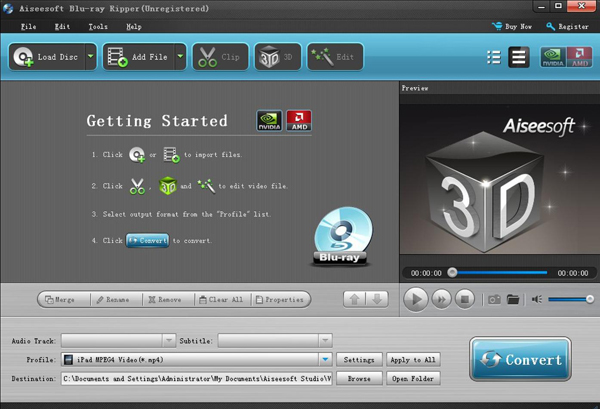
People often look for a free program without considering the time it takes to rip a disc. If you have many Blu-rays to transcode, this is not a good choice; instead, you should use the free alternatives recommended above.
Pros:
1. Many presets are available for you to produce the output file faster. For the advanced users, you even can custom preset and make your own preset.
2. Able to process more than one file (batch encoding) just take a long time to complete.
Cons:
1. The encoding processes that long time to complete (low speed).
2.
A software with pop-ups.
3. Copy-protected discs are not supported.
4. The interface comes with much functionality that may confuse the newbies.
Free download Aiseesoft Free Blu-ray Ripper: https://www.aiseesoft.net
Platform: Windows

Free Blu-ray Ripper is a professional Blu-ray ripping software capable of helping users rip homemade Blu-rays to common video formats, as well as 4K and 1080p HD videos.
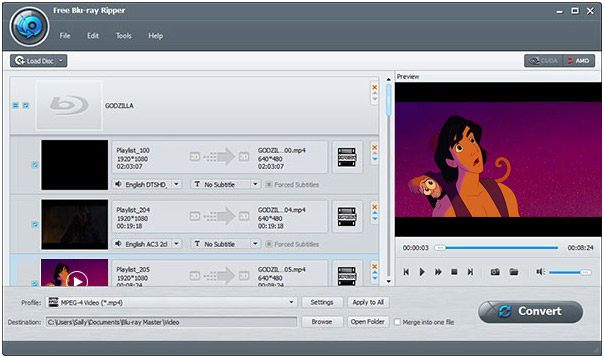
Blu-ray Master is very easy to use. Simply choose a source folder or disc, select where the ripped Blu-ray should be saved, and then start ripping. A Blu-ray ripped with Blu-ray Master Free Blu-ray Ripper is saved only in MKV or MP4 format, as there are no additional options or advanced features to select a different file format. This program works on Windows computers.
Pros:
1. Easy installation
2. Simple UI
Cons:
1. Cannot modify file.
2. A software with pop-ups.
3. Can't handle encrypted blu-rays.
4. Can only convert homemade Blu-ray to MP4 and MKV.
Free download Blu-ray Master: https://www.bluraycopys.com/
| Name | Speed | Latest System | Copy protection | Input file | Output formats | Output profiles | Output quality | Editing feature |
| HandBeake | 3X | macOS Big Sur, Windows 10, Linux |
No | Homemade Blu-ray and DVD disc, common formats | MKV, WebM, MP4 | No | Good | No |
| Aiseesoft Free Blu-ray Ripper | NO | macOS , Windows, 10 |
No | Homemade Blu-ray and DVD disc | 15+ | No | Good | No |
| Blu-ray Master | NO | Windows 10 | No | Homemade Blu-ray Disc, Blu-ray Folder, Blu-ray ISO | 15+ | No | Good | No |
When choosing the best free Blu-ray ripper for Mac, we should consider output quality and conversion speed based on personal needs. From our review, we know that HandBrake is superior to other options in terms of speed, quality, and support for homemade Blu-rays. Although it cannot import purchased or downloaded Blu-ray discs, it meets all the needs for ripping Blu-ray M2TS files. I believe HandBrake is the best free Blu-ray ripper for Mac and is well worth trying.
With Blu-ray decrypter software, you can copy a Blu-ray movie in less time than it takes to watch it. A reliable Blu-ray ripper is very fast and features a simple ripping process that even a computer novice can use.
If you want us to pick the best Blu-ray ripping software, we choose Acrok Video Converter Ultimate – it is truly a great program that became the winner throughout our editors' testing.
Free Trial Download Available Now:
100% Safe & Clean 100% Safe & CleanBelow is a simple guide on how to rip Blu-ray movies using Acrok Blu-ray ripping software. The ripping steps for other Blu-ray rippers are quite similar. First of all, free download the Blu-ray ripping software on your computer – get the Mac version or Windows version based on your needs. Then choose the output option and start Blu-ray conversion.
Launch Acrok Video Converter Ultimate, the best Blu-ray ripper. Insert the Blu-ray disc into the Blu-ray drive on your computer. Then click the "Load Disc" icon to import the 4K or 1080p Blu-ray movies you want to rip. Blu-ray folders, Blu-ray ISO files, and DVD files are also supported. You can also load downloaded MKV, MP4, MOV, WMV, AVI movies and recorded 8K, 6K, 5.5K, 4K, and 1080p recordings into this software.

Select the format you'd like to rip the Blu-ray to. You can either rip Blu-ray to .mp4, .mov, .3gp, .m4v, etc., or to Android, Apple, Windows tablets, smart TVs, and more.
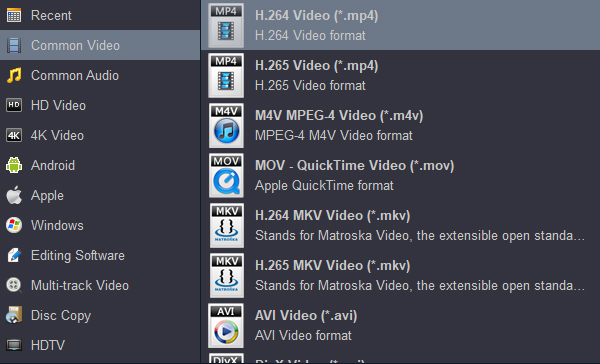
Tip 1: You can click the "Settings" button to adjust the output video and audio settings, including resolution, video quality, frame rate, aspect ratio, video & audio codec, bitrate, sample rate, and more.
Tip 2: Acrok Video Converter Ultimate makes video editing easy with its built-in video editor. It has rich video editing features: trim, crop, add effects, add watermarks, replace or remove subtitles, and adjust volume, among others.
Return to the main interface. Click the "Output" bar to set a folder to save the output Blu-ray movie, then choose the correct subtitle. If you don't define a folder for the output files, the software will automatically save them in a safe folder.
After completing the settings, simply hit the "Convert" button at the bottom to rip, convert, or back up the Blu-ray to your PC. Detailed progress information will be provided during the process. You will get an outstanding output very soon. Learning how to convert Blu-ray files with Acrok Blu-ray Ripper is very easy and fun. It is freeware – safe and easy to use.


I'm so glad that we've found Acrok at last! Simple interface, faster conersion speed, comprehensive function... I have to share this best bluray ripper with my friends.
Alycia Workman
This Blu-ray disc converting software is very easy to use, and is a great tool to have all my DVD's ready to watch where ever I go.
Siddarth
Copyright © 2026 Acrok Studio All Rights Reserved. Terms and Conditions | Privacy | Refund Policy