

 >
Galaxy S25 Video Format
>
Galaxy S25 Video Format
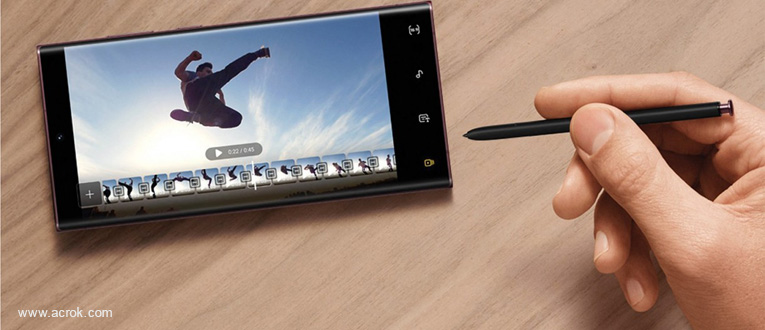
The Galaxy S25 Ultra is a high-end Android flagship phone. It has a 6.8-inch screen with the latest generation Super AMOLED technology, tiny bezels, and an adaptive 1–120Hz refresh rate. Under the hood is the top-of-the-line Qualcomm Snapdragon 8, backed by 8GB of RAM and 128GB of storage. On the video side, the S25 Ultra can record in 8K resolution as well as 4K.
But when you want to transfer personal video files such as 4K H.265 MKV, Xvid, FLV, MOV, MKV, MTS, M2TS, MP4, MXF, MPG, DivX, WMV, VOB, AVI, etc. to your Galaxy S25 phone, you may find that the Android phone can't play these videos well or even can't recognize them. To play and watch movies on Galaxy S25/S25+/S25 Ultra smoothly, what you need to consider first is the Galaxy S25 video format.
What types of video and audio file formats do the Samsung Galaxy S25 series phones support? The Android-powered S25 series phones are compatible with the following formats:
Video playback formats: MP4, M4V, 3GP, 3G2, AVI, FLV, MKV, WEBM
Audio playback formats: MP3, M4A, 3GA, AAC, OGG, OGA, WAV, AMR, AWB, FLAC, MID, MIDI, XMF, MXMF, IMY, RTTTL, RTX, OTA, APE, DSF, DFF
Some people suggest installing a media player app for Galaxy S25 series phones, but unfortunately, even popular video players like MX Player still can't handle all media files. The possible solution is to convert videos to a Galaxy S25-compatible format first using third-party software.
As a professional video converter program, Galaxy S25 Video Converter is highly recommended to help you finish the Galaxy S25 format conversion task. This video converter for Galaxy S25/S25+/S25 Ultra offers a quite effective solution for converting almost all videos — MKV, Xvid, DivX, MOV, MTS, M2TS, XAVC, MXF, AVI, WTV, TiVo, VOB, DVD, Blu-ray — to Galaxy S25-friendly videos without quality loss. It also allows you to adjust the video and audio parameters to get the decent output video you want. For encoding videos to Galaxy S25 on Mac, Galaxy S25 Video Converter for Mac is the alternative. Check the following guide to learn how to change the video format for playing on Galaxy S25.
Free download Galaxy S25 Format Converter
 100% Safe & Clean 100% Safe & Clean
What are the optimal settings for converting a video for playing on Galaxy S25, Galaxy S25+, or Galaxy S25 Ultra? When you find that the video you want to watch on your Galaxy S25 is unwatchable, you may need to convert it to a supported format first. In this tutorial, we'll show you how to encode on-hand video files for playing on Galaxy S25 series phones with very good performance. If this is what you are looking for, feel free to read on.
Here is the detailed way to convert video files on Windows 10/11. The way to convert videos on macOS is the same. Just make sure you've downloaded the right version.
Free download Video Converter for Galaxy S25. Install and launch the program on your computer. It is compatible with Windows 11, 10, 8.1, 7, etc.
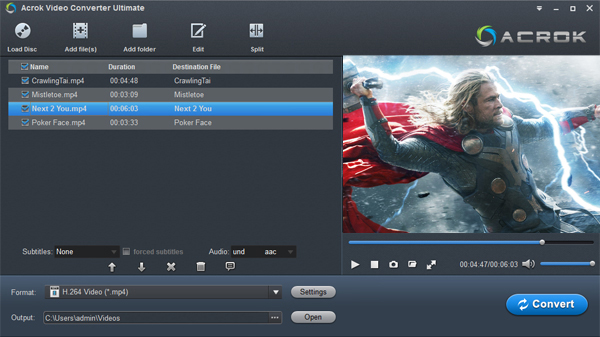
Click the "Add File" icon to add files to the Galaxy S25 Format Converter. For converting DVD and Blu-ray discs to Galaxy S25-supported video format, please click the "Load Disc" icon to load video files from a DVD or Blu-ray drive. You can play the loaded videos with its media playback function.
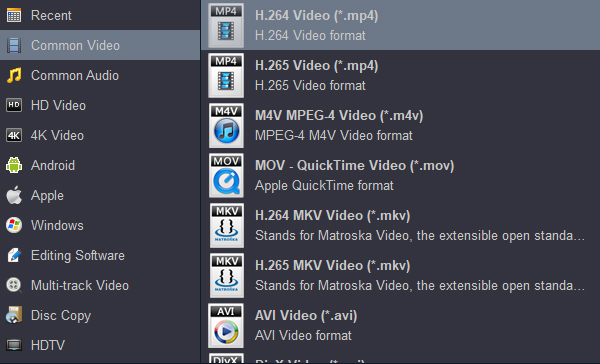
Click the "Format" drop-down menu and choose a Galaxy S25-supported format. If your source video files are in original resolution, choose "H.264 Video (*.mp4)" from the "Common Video" category. If you want to save your phone's storage space, please select 720p Video under the "Android" category. For compressing larger videos, this profile is a good choice.
Hit the "Convert" button to start converting video to Galaxy S25/S25+/S25 Ultra-supported MP4 format.
When the conversion is finished, you can transfer the video files to your Galaxy S25/S25+/S25 Ultra and enjoy the videos. It's that easy to play all kinds of video files on your Samsung Android smartphone.


Wow, I can save a lot of money now. Originally I buy the Blu-ray disc, and then buy the digital videos. Now I don't need to re-buy the movie.
Lewis, Wenda
This is a great user friendly software. I love the ability to change the language of the movies.
Gilchrist, George
Copyright © 2026 Acrok Studio All Rights Reserved. Terms and Conditions | Privacy | Refund Policy