

 >
Sony ILX-LR1 MP4 to in DaVinci Resolve/Premeire Pro workflow
>
Sony ILX-LR1 MP4 to in DaVinci Resolve/Premeire Pro workflow

Sony ILX-LR1 users often wonder why some MP4 files won't import into DaVinci Resolve or Premiere Pro. Even though both companies claim MP4 is natively supported, you're likely to run into errors like "Unsupported format" or "Codec missing." And if you're using one of them, you might find that only the audio track is recognized—the video is nowhere to be seen.
The two most important factors for successfully importing your high-quality videos into the software are whether your computer meets the system requirements and whether the software version supports the encoding format used by your video.
MP4 files from different sources—such as video editing software or various cameras—use different codecs internally. If you're using an older version of DaVinci Resolve or Premiere Pro, upgrading to a newer version might help. What if you still can't import your Sony ILX-LR1 4K 10-bit MP4 files into them after several failed attempts? Don't worry! There's an easy solution to resolve the import issues between MP4 files and professional video editing software—convert the problematic Sony ILX-LR1 MP4 (XAVC HS, XAVC S, XAVC S-I) files to ProRes or another format natively supported by your editing software.
If you've made many unsuccessful attempts, the problem is probably caused by Sony ILX-LR1 MP4 codec incompatibility or a missing codec. Transcoding is likely the most efficient and easiest solution to fix the error of not being able to import Sony ILX-LR1 MP4 files into Premiere Pro and DaVinci Resolve. The process is fairly easy as long as you have such an easy-to-use yet powerful tool—Acrok Video Converter Ultimate (Windows Version | Mac Version). It can handle various MP4 files, no matter what codecs they contain or which device recorded them.
Free download Sony ILX-LR1 Video Converter
 100% Safe & Clean 100% Safe & Clean
With it, you can easily convert any media incompatible with your editing software—including but not limited to MP4, MXF, MTS, MKV, MOV, and even DVD and Blu-ray files—to a format that works natively in the latest versions of DaVinci Resolve 21 and Premiere Pro 26, as well as lower versions. ProRes preserves excellent image quality and provides better performance when used in DaVinci Resolve; MPEG-2 similarly offers great quality and performance in Premiere Pro. Therefore, you can transcode your Sony ILX-LR1 MP4 footage to either of these two formats, depending on your editing software.
Step 1. Download and launch Acrok Video Converter Ultimate for Mac, then click "Add File" to import your Sony ILX-LR1 MP4 video (you can also drag and drop).
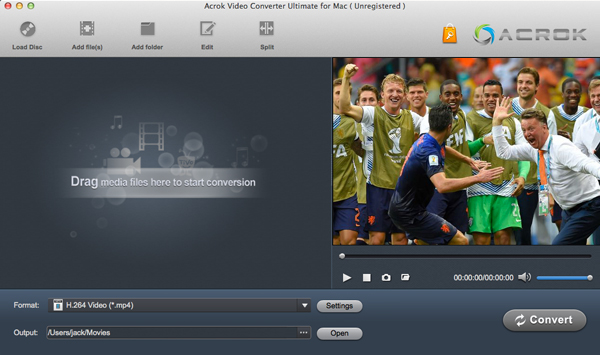
Step 2. At the bottom, click the "Format" menu and select a preset that DaVinci Resolve supports. We recommend the MOV option (using Apple ProRes) from the "Final Cut Pro" category.
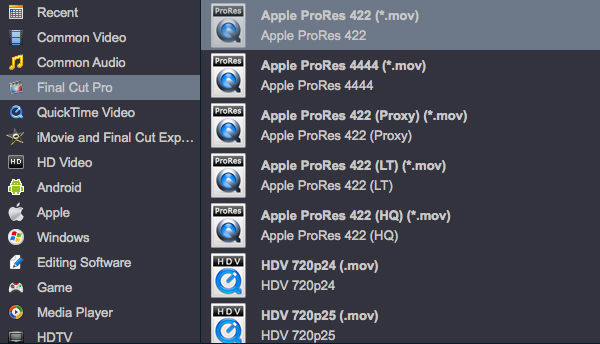
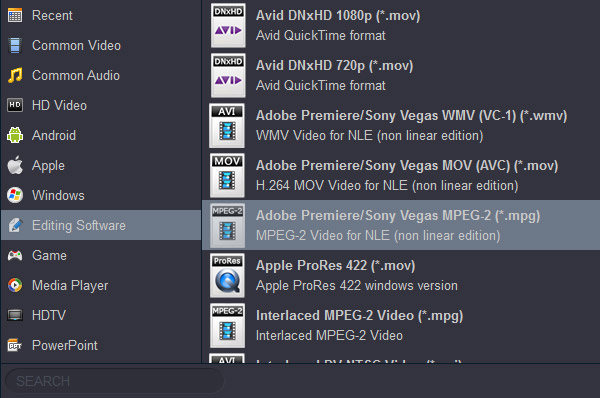
To import and edit Sony ILX-LR1 MP4 files in Premiere Pro, you should select the output format from the "Editing Software" category, although Premiere Pro does support many other video formats as well.
Step 3. Hit "Convert" and it will quickly begin decoding, converting, and processing your Sony ILX-LR1 video all in one go. Once the conversion is complete, click the "Open" button to locate the resulting files, and you can then import them into DaVinci Resolve or Premiere Pro without any issues.
If you're facing compatibility issues with Sony ILX-LR1 MP4 files in DaVinci Resolve or Premiere Pro, upgrading your computer and software is an option—but it doesn't come cheap. In my view, the smartest and most affordable fix is to use a professional converter like Acrok Video Converter Ultimate. I'm confident you'll enjoy using it once you give it a shot—it packs plenty of extra powerful features, and did I mention it's also a free audio converter?


I have used Acrok Mac software in four different forms, and have been very pleased overall. The conversion speed is so fast. I like Acrok product. I can make my short video now.
Dragos
Copyright © 2026 Acrok Studio All Rights Reserved. Terms and Conditions | Privacy | Refund Policy