

 >
Renault USB Audio Format
>
Renault USB Audio Format
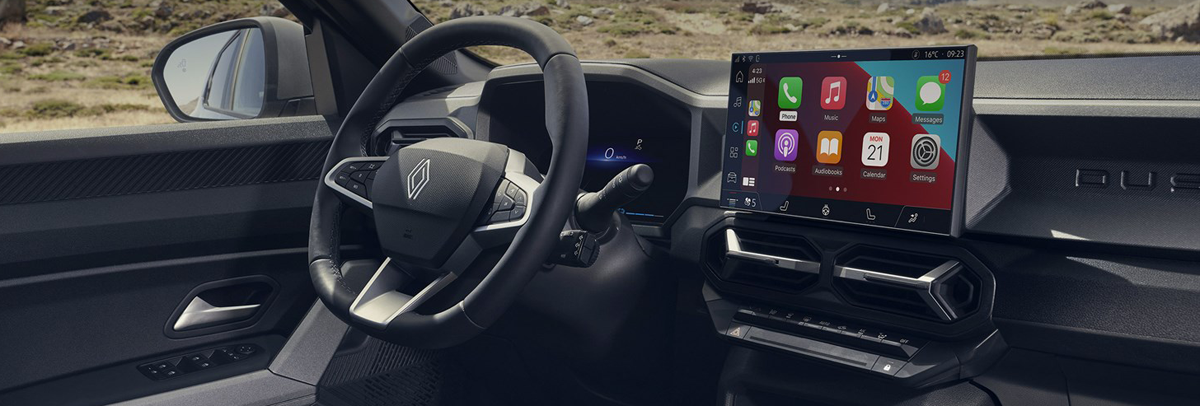
If you own a Renault vehicle-whether it’s a Clio, Megane, Captur, Kadjar, Scénic, or Talisman-you’ve probably tried playing music from a USB drive at some point. And you may have encountered frustrating error messages, silent playback, or files that simply refuse to show up.
This guide covers everything you need to know about the Renault USB audio format, including which file types work, why your USB might not be recognized, how to solve common problems like Renault usb not working or Renault usb m4a not working, and what to do when Renault can't read audio files from usb. We’ll also introduce the best audio format converter for Renault - Acrok Video Converter Ultimate - to get your music playing perfectly.
Questions
My car stereo won't play all the songs in usb flash drive. My model is Renault Clio 2024.
Why my KOLEOS can't read MP3 files from the USB disk module?
Why the Alpine A110 won't play M4A audio files?
USB drive not Recognised / Supported in My Sandero stereo.
How to organize music on usb for Renault Sandero?
How to solve Renault usb loading error problem?
Can I play music from a usb stick in my MEGANE SEDAN?
And so on.
Modern Renault vehicles come equipped with the R-Link, R-Link 2, Easy Link, or Media Nav infotainment systems. Each system has slightly different audio codec support, but there are general rules that apply across most models (from approximately 2012 onward).
| Format | File Extension | Typical Support |
|---|---|---|
| MP3 | .mp3 | ✅ Full support |
| WMA | .wma | ✅ Supported (non‑DRM) |
| AAC | .aac, .m4a | ⚠️ Partial support (see notes) |
| WAV | .wav | ✅ Supported |
| FLAC | .flac | ❌ Not supported (most models) |
Many Renault owners report that Renault USB m4a not working is one of the most common issues. While the official documentation sometimes lists AAC (the codec inside .m4a files) as supported, in practice many Renault systems fail to play .m4a files-especially those downloaded from iTunes or Apple Music, which may contain DRM or use a specific AAC variant.
If you see “File not recognized” or the track is simply skipped, your Renault is rejecting the .m4a format.
If you’re a lossless audio enthusiast, you’ve likely discovered that Renault can't read flac files from USB no matter what you try. This is normal. Renault infotainment systems do not include FLAC decoders. The car expects compressed formats like MP3/WMA or uncompressed WAV, but not FLAC. Trying to play FLAC files will result in silence or an error message.
When you encounter Renault USB audio format not working, the problem usually falls into one of these categories:
Renault systems typically require the USB drive to be formatted as FAT32 or exFAT. Drives formatted as NTFS (common on Windows) will not be recognized. Some newer models support exFAT, but FAT32 is the safest choice.
Solution: Reformat your USB drive to FAT32 (or exFAT if FAT32 isn’t available for large drives). Note that FAT32 has a 4GB per-file limit, which is fine for audio but not for very large files.
As mentioned, Renault usb audio not working and Renault can't read songs from usb are expected behaviors. The system simply lacks the codec.
Solution: Convert unsupported files to MP3 or WMA using a reliable converter like Acrok Video Converter Ultimate.
Very old Renault systems (pre-2015) may struggle with USB drives larger than 32GB. Even newer systems can be slow to index a 128GB drive full of thousands of tracks.
Solution: Try a smaller USB drive (16GB or 32GB) and limit the number of files to a few hundred per folder.
Renault systems read USB folders as “albums” or “playlists.” Extremely deep folder nesting or files placed directly in the root directory can cause problems.
Solution: Keep a simple folder structure: USB Root → Artist → Album → Tracks.mp3
Special characters (é, ñ, ü, Chinese characters, emojis) or very long file names can confuse the system.
Solution: Rename files using only letters, numbers, underscores, and hyphens. Keep names under 50 characters.
Some cheap USB drives have slow read speeds or unreliable controllers.
Solution: Test the drive on a computer. If it works there but not in the car, try a different brand (SanDisk, Samsung, Kingston are reliable).
The most effective and permanent solution is to convert your audio files into a format that Renault can read without issues. The universally safest choice is MP3 at 320kbps (or 192kbps for smaller file sizes).
| Property | Recommended Setting |
|---|---|
| Format | MP3 |
| Bitrate | 192–320 kbps (CBR or VBR) |
| Sample Rate | 44.1 kHz or 48 kHz |
| File System | FAT32 |
If you prefer slightly better quality with smaller files, WMA (Windows Media Audio) is also supported, but MP3 is more universal.
When you need a reliable free audio format converter for Renault, Acrok Video Converter Ultimate is the only tool you’ll ever need. This professional desktop application for Windows and Mac works offline and handles any number of files without restrictions. You will be able to enjoy an auditory feast in Renault Clio, Sandero, Alpine, Koleos, Kardian, DUSTER, MEGANE SEDAN, etc.
Free download free audio converter for Renault cars/suvs
 100% Safe & Clean 100% Safe & Clean
| Feature | Acrok Video Converter Ultimate |
|---|---|
| Audio conversion | ✅ Free to use |
| Input formats | MP3, M4A, FLAC, WMA, AAC, OGG, WAV, AIFF, APE, and more |
| Output formats for Renault | MP3, WMA, WAV |
| M4A → MP3 | ✅ Full support |
| FLAC → MP3 | ✅ Full support |
| Batch conversion | ✅ Unlimited files at once |
| File size limit | ❌ None |
| Offline use | ✅ Yes (no internet needed after install) |
| Preserves ID3 tags | ✅ Artist, album, cover art, etc. |
| Conversion speed | Hardware accelerated (NVIDIA/AMD/Intel) |
Free audio conversion – Acrok Video Converter Ultimate provides powerful audio conversion features for free. You can convert video to audio for free, and convert from one audio format to another for free (e.g., M4A or FLAC to MP3). You don’t have to pay anything to convert unsupported files into the MP3 format your Renault needs.
No file size or quantity limits – Convert entire music libraries (thousands of FLAC or M4A files) in one batch. Free online tools often limit you to 50MB or a handful of files per day.
Offline operation – Your files never leave your computer. This is especially important if you’re converting sensitive or personal audio. No upload delays, no waiting for servers.
Lossless quality – Acrok can convert FLAC to high-bitrate MP3 (320kbps CBR) with virtually no perceptible quality loss. For M4A files, it retains full audio fidelity.
ID3 tag preservation – Your song metadata (artist name, album, genre, cover art) stays intact. After conversion, your Renault will display track information correctly on the dashboard screen.
Batch processing – Select 500 M4A files, set output to MP3, and click “Convert All.” Acrok processes everything in the background while you do other things.
Download and install Acrok Video Converter Ultimate from the official website (Windows or Mac version).
100% Safe & Clean 100% Safe & CleanLaunch the software and click “Add Files” to import all your M4A or FLAC tracks. You can drag and drop entire folders.
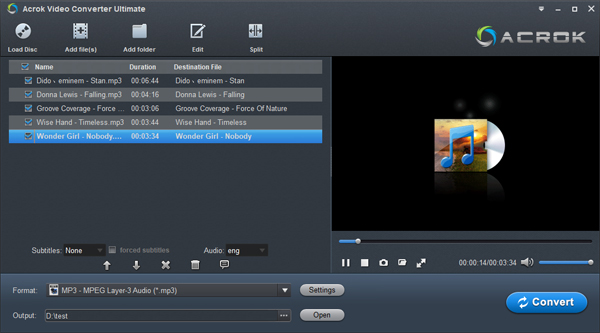
Select output format – Click the output format dropdown, go to the “Audio” tab, and choose MP3.
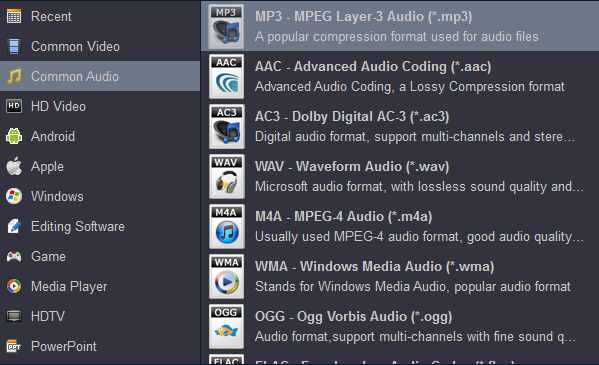
Adjust settings (optional) – Click the settings gear icon next to MP3 to choose bitrate (320kbps recommended for best quality in your Renault). You can also set sample rate to 44100 Hz.
Choose destination folder – Pick a location on your computer for the converted MP3 files.
Click “Convert” (or “Convert All” for batch processing). Acrok will process every file quickly using hardware acceleration.
Copy to USB – Once conversion is complete, copy the MP3 files to your FAT32-formatted USB drive, maintaining a simple folder structure.
Note on features: While the audio conversion features are free, Acrok Video Converter Ultimate also offers advanced video conversion, editing, and DVD/Blu-ray ripping as paid features.
If you’ve converted your files to MP3 using Acrok but renault usb not working persists, check these final steps:
Reformat the USB drive to FAT32 (or exFAT for newer Renaults). Use a tool like FAT32 Format if Windows won’t let you format large drives to FAT32.
Keep folder structure simple: No more than 2-3 levels deep. Example: USB:/Music/Artist/Album/song.mp3
Avoid special characters in file and folder names. Acrok can automatically sanitize names during conversion-enable this option.
Try a different USB port (if your Renault has multiple USB ports).
Update your Renault infotainment firmware (dealer or official Renault website).
Test with a single MP3 file in the root of the USB to isolate the issue. If that works, the problem is likely folder depth, naming, or a corrupted file.
If a single MP3 works but your full library doesn’t, try splitting files into smaller folders (no more than 255 files per folder, as some older Renault systems have a file limit per directory).
Most Renault systems do not reliably play .m4a files. Even if a few play, many will be skipped. The safe answer: convert M4A to MP3 using Acrok Video Converter Ultimate.
Why does my Renault say “USB not recognized”?Common causes: NTFS formatting, USB drive too large (over 32GB on older models), or a corrupted drive. Reformat to FAT32 and try a smaller drive.
Does Renault support FLAC via USB?No. Renault can't read music from usb by design. Convert unsupported music to high-bitrate MP3 (320kbps) using Acrok – the quality difference in a car environment is negligible.
Is Acrok Video Converter Ultimate a free audio converter for Renault?Yes, absolutely! Acrok Video Converter Ultimate offers free audio conversion features. You can free convert video to audio, and free convert from one audio format to another (e.g., M4A or FLAC to MP3). This makes it an excellent free music converter for Renault.
Can I use Acrok offline?Yes. After installation and activation, Acrok works entirely offline. Your files never leave your computer, ensuring privacy and no dependence on internet speed.
Will Acrok preserve my album art and metadata?Absolutely. Acrok automatically copies ID3 tags (artist, album, genre, track number, cover art) from the source M4A or FLAC file to the output MP3. Your Renault’s display will show the correct information.
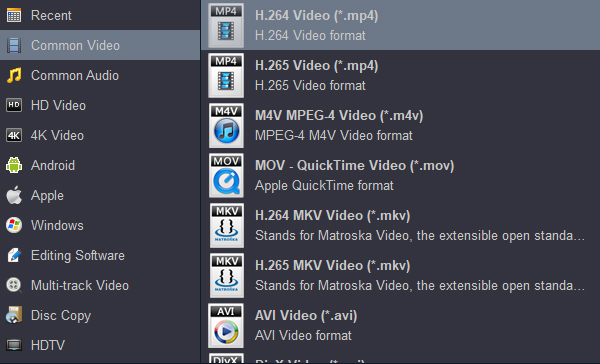
Tip: For playing own videos from USB on Renault cars or SUVs, H.264 MP4 it the best option for outputing. If you want to play movies on your tablet, smartphone or smart tv, please choose HD MP4 or 4K MP4 as output format.
For playing the converted Blu-ray, DVD and downloaded movies from USB in your Renault car or SUV, you have to install a media player software on the Renault. Here we take Renault Megane E-tech electric vehicle as an example to introduce how to install a player and how to play videos.
1. Download the VLC media player. It's fully tested and verified safe. Put the USB stick into your computer. We need to format your SB stick.
1) Go to "This PC" onthe taskbar, if you don't have it type PC into the search bar.
2) Navigate to the USB drive. Right click and goto "Format". Make sure it;s fat 32, exfat. Click on "Start".
3) Click "Ok" then click close.
2. Copy and paste the downloaded APK file into your USB drive.
3. Now go to your car and put the USB in the slot.
1) Click on "Apps" icon.
2) Click "Files".
3) Click USB on the bottom left.
4) Click on the folder where the APK files are stored.
5) Click on the APK the click "Continue".
6) Click "Install".
7) Click "Open".
8) Click "Next > Next > Allow permissions > Next > Yes".
The software will now search for media which takes a while depending on how much media you have. Wait for it to finish it takes a minute or two.
9) Open video to test. It will now give you a small tour of the buttons, read and click next until complete. Or play via USB from files app. All done.
Dealing with Renault usb audio format issues is frustrating, but the solution is straightforward: convert everything to MP3 (192–320 kbps) on a FAT32-formatted USB drive with a simple folder structure.
For a few files: You could search for a free online tool, but beware of file size limits and privacy concerns.
For a real, permanent fix: Download Acrok Video Converter Ultimate - the best audio format converter for Renault. It handles batch conversions, preserves ID3 tags, works offline, has no file limits, and converts M4A, FLAC, WMA, OGG, and any other unsupported format to perfect MP3 files that your Renault will love. Best of all, its audio conversion features are completely free!
Remember: Renault usb m4a not working and Renault can't read flac files from usb are not defects in your car. They are simply format limitations. Convert once with Acrok, copy to a properly formatted USB, and enjoy uninterrupted driving music for years to come.
Acrok Video Converter Ultimate is available for Windows and Mac. Its powerful audio conversion features are free to use, making it the perfect tool for Renault owners.


I'm a music lover and have a collection of CDs. I tried to copy the songs from the CD to the USB drive for playing in my Alpine A110, but I didn't achieve my goal. It wasn't until I tried acrok's software that I realized I wasted too much time and energy.
Ronald McGinnis
I find the interface of Acrok Video Converter Ultimate fairly intuitive which makes it's use easy for me and I will be using the files mostly for home videos to ensure they will play on my smart tv.
Stefan Ilic
Copyright © 2026 Acrok Studio All Rights Reserved. Terms and Conditions | Privacy | Refund Policy