What's the best workflow for ALEXA Mini LF MXF footage and Blackmagic Design's DaVnci Resolve (20, 19, 18, etc)? The workflow would depend greatly on how powerful your system is. If for any reason you are unable to use ALEXA Mini LF files in DaVnci Resolve fluidly, this tutorial may shed you some light. It explains a way of transcoding ARRI MXF media to DaVnci Resolve best editing format for a smooth editing workflow on your Windows machine.
Questions
Hi, I was given footage in MXF files and I am trying to work with them in DaVinci Resolve - and I have never worked with MXF files before. When I import them into DaVinci Resolve the video really lags behind the audio and is super glitchy. I have a 2021 iMac with 32GB RAM, is it something to do with my devvice? I will only be using them on social media so trying to figure out the best way to edit if it won't stop lagging, if exported to a MOV can we still color correct the footage after I edit what I like? and first would there be a way to export these files into a MOV format? HELP!
"I have an issue with ALEXA Mini LF footage in DaVnci Resolve. Worked perfectly with Windows 10, not working anymore with Windows 11. DaVnci Resolve reports an import error, then you can play the clip but no sound. Does anyone have the same issue? How do you solve it? Please kindly suggest a solution if you know. Thanks in advance.”
The ALEXA Mini LF is a hybrid of the ALEXA Mini and the ALEXA LF, as it retains the same LF sensor but the form factor of the Mini. The Mini LF offers an array of recording format choices in MXF ARRIRAW and MXF ProRes, recording to 1TB Codex capture drives. After the upgradation to Windows 11, DaVnci Resolve has issues coping with MXF footage from Canon and other cameras. To be able to use ARRI ALEXA Mini LF MXF files in DaVnci Resolve fluidly, you could convert them first. Check a guide on how to encode MXF files to H.264, DNxHD or ProRes MOV for editing in DaVnci Resolve 20, 19, 18 fluently.
Best MXF Converter for ARRI ALEXA Mini LF
Download Acrok Video Converter Ultimate to help you seamlessly do the MXF to compatible format conversion task for DaVnci Resolve. You're allowed to add whatever ALEXA Mini LF footage into this converter, be it MXF ARRIRAW, MXF ProRes and convert these MXF to other aommon format in solely simple clicks without degrading the quality of your footage. Also let you trim, crop, merge ALEXA Mini LF clips to reduce MXF size and auto repair slightly damaged MXF footage without any 3rd party involvement.
Free download ARRI MXF Converter
Tip: Acrok Video Converter Ultimate is an intuitive and fast converter. With this fast video converter, you can effortlessly convert video, Blu-ray, DVD and audio files to any format in high quality which enables you to play videos on various devices and web platforms. Just enjoy video/audio files anywhere and anytime you like.
How to convert ALEXA Mini LF MXF for editing in DaVinci Resolve?
1
Load MXF files
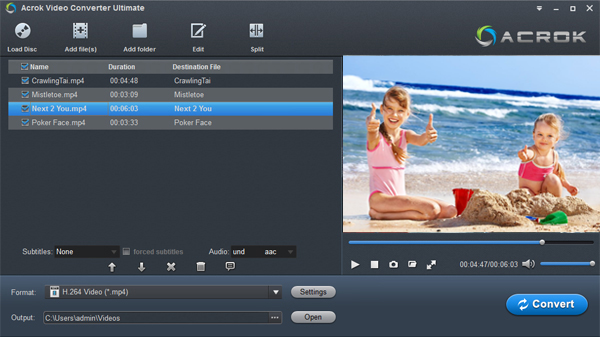
Run Acrok software as a professional MXF to DaVinci Resolve Converter. When its main interface comes up, click "Add File" to load ALEXA Mini LF video to it.
2
Select an edit-friendly codec/format
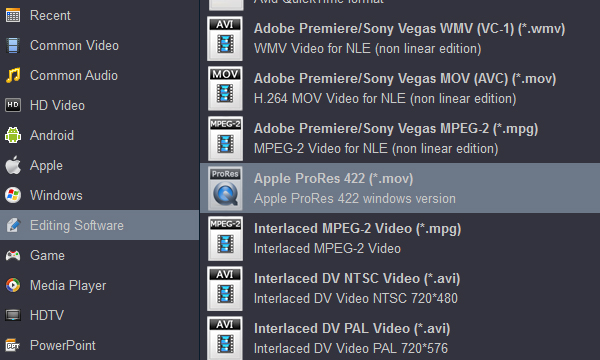
From the "Format" bar, move to "Editing Software" catalogue, and select "Apple ProRes 422 (*.mov)" as target format. If you like, you can select H.264 MP4 under "4K Video" category. When loading them into DaVinci Resolve, you needn't wait for a long time for rendering.
If you are Mac user, you can get Apple ProRes profiles under "Final Cut Pro" category.
3
Settings
If necessary, you can click "Settings" button and go to "Profiles Settings" panel to modify video and audio settings like video encoder, resolution, video bit rate, frame rate, aspect ratio, audio encoder, sample rate, audio bit rate, and audio channels.
4
Edit MXF video
This MXF to DaVnci Resolve integrates a full-featured video editor into the program, which enables you to make professional-looking home movies in minutes. After loading your video, select it and then click "Edit" bicon to pop up the Video Editor window. You can do some simple editing according to your needs.
5
Start video covnersion
Click "Convert" button to start converting ALEXA Mini LF MXF to ProRes or H.264 for DaVinci Resolve on Windows 11. Once the conversion is at 100%, you can click "Open" on the main interface to find the generated .mov or .mp4 videos which can be directly imported to DaVinci Resolve 20, 19, 18 for further smooth editing.


 100% Safe & Clean




