

 > Sony FX5 Video Converter
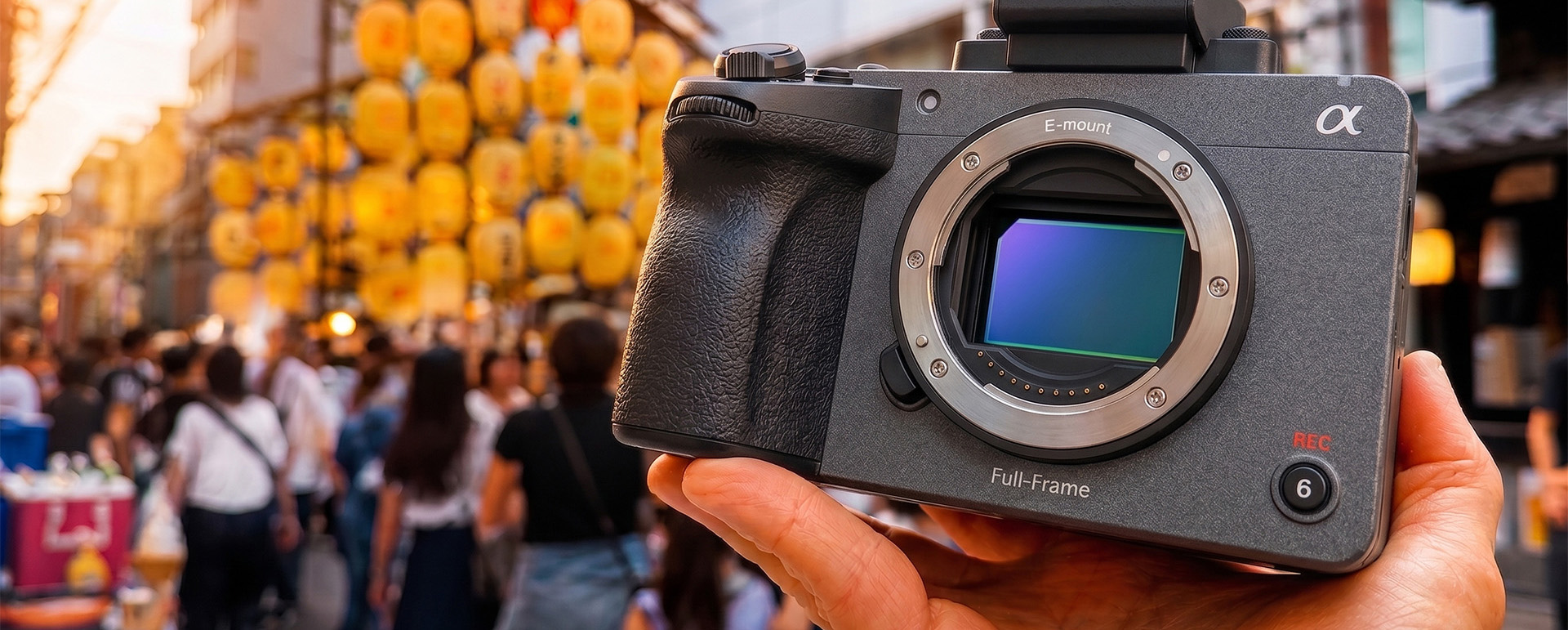
The Sony FX5 is a formidable cinema camera that records in X-OCN, XAVC HS (MPEG-H HEVC/H.265), and XAVC S (MPEG-4 AVC/H.264) formats. If you are a Final Cut Pro user, you may be wondering whether you can import Sony FX5 videos to Final Cut Pro and edit them smoothly. The answer depends entirely on which version of Final Cut Pro you are running—and, more importantly, the hardware that runs it.
The latest version of Final Cut Pro fully supports Sony FX5 video import and editing. Apple‘s professional editing software handles XAVC and X-OCN formats natively. For X-OCN files specifically, Final Cut Pro can import and work with them after installing the nablet X-OCN Media Extension.
However, some older versions of Final Cut Pro do not support the FX5—particularly versions released before the camera itself hit the market. Apple’s official supported cameras list includes models like the Sony FX6, FX3, and FX30, but the FX5 is a newer addition that requires up-to-date software to be recognized. If you are running an older build of Final Cut Pro X or, worse, legacy versions like Final Cut Pro 7, you will likely encounter import errors or format incompatibility.
This brings us to a critical obstacle. Many editors who rely on older versions of Final Cut Pro are running them on older Mac hardware—and due to hardware limitations, many older Macs simply cannot be upgraded to the latest version of Final Cut Pro.
Take the old Mac Pro as a prime example:
| Requirement | Latest Final Cut Pro | Mac Pro | Result |
|---|---|---|---|
| Operating System | macOS 15.6 or later | Officially supports up to macOS Mojave (10.14) | ❌ Fails |
| Graphics Card | Metal-capable GPU | Stock AMD HD 5770/5870 does not support Metal | ❌ Fails |
| Memory | 8GB minimum, 16GB recommended | 6GB or 12GB standard (upgradable to 64GB) | ⚠️ Upgradable |
| Processor | Intel or Apple Silicon | Intel Xeon | ✅ Passes |
The operating system requirement is the biggest barrier. The old Mac Pro‘s official OS ceiling is macOS Mojave (10.14)—it cannot run macOS Sequoia 15.6, which is mandatory for the latest Final Cut Pro. The graphics card is another non-negotiable issue: even if you could force a newer OS onto the machine, the stock GPUs lack Metal support, which Final Cut Pro requires to function at all.
Upgrading to a Mac with Apple silicon (M-series) would solve all of these problems. Apple Silicon Macs deliver exceptional performance with Final Cut Pro, effortlessly handling 4K and even 8K timelines. But this solution comes at a significant cost—replacing a old Mac Pro with a modern M-series Mac (whether a Mac Studio, MacBook Pro, or Mac mini) represents a substantial financial investment that not every editor can make overnight.
If you cannot upgrade your hardware and your current version of Final Cut Pro refuses to cooperate with Sony FX5 footage, there is a straightforward workaround: convert your Sony FX5 video into an editing-friendly format that your existing Final Cut Pro version can handle.
The ideal format for Final Cut Pro is Apple ProRes MOV—a codec Apple designed specifically for post-production. ProRes delivers excellent image quality while maintaining smooth playback and responsive editing, even on older hardware. By transcoding your FX5 footage to ProRes, you bypass compatibility issues entirely.
For this task, you need a reliable Sony FX5 Format Converter. Acrok Video Converter Ultimate for Mac is an excellent choice. This software supports a wide array of media formats, offers batch conversion, and features GPU acceleration for fast processing. It also organizes output formats by device name and editing applications, making it easy to select the right preset for Final Cut Pro. Whether you are dealing with X-OCN, XAVC HS, or XAVC S files, Acrok can handle them all. You can think of it as your dedicated Sony FX5 to Final Cut Pro Converter.
 100% Safe & Clean 100% Safe & Clean
Here is how to convert Sony FX5 videos on Mac using Acrok Video Converter Ultimate:
Download Acrok Video Converter Ultimate for Mac from the official website and install it on your Mac.
Launch the best Apple ProRes Converter. Click the “Add File” button (or drag and drop) to import the Sony FX5 video files you want to convert. The software supports batch processing, so you can add multiple clips at once.
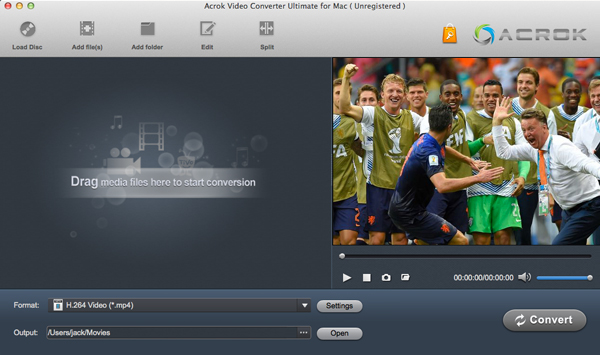
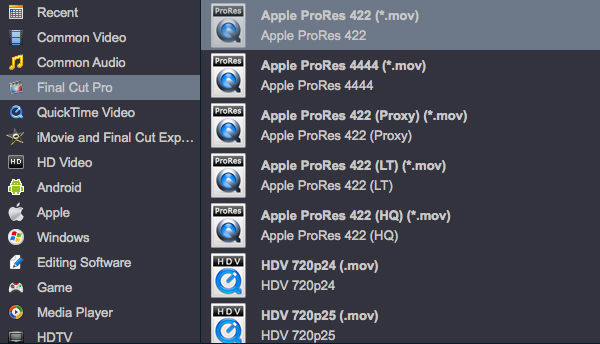
Click the output format dropdown menu. Navigate to the “Editing Software” category and select Apple ProRes MOV. For most editing purposes, ProRes 422 offers an excellent balance between quality and file size. If you need the highest possible quality, choose ProRes 4444.
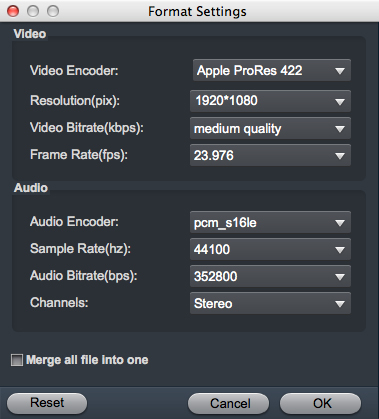
If you wish, you can adjust video resolution, frame rate, and bitrate to match your project settings. For most workflows, the default ProRes preset works perfectly.
Specify a destination folder where the converted files will be saved.
Click the “Convert” button. Acrok will process your files using GPU acceleration, delivering fast conversion speeds. Once complete, you will have ProRes MOV files ready for Final Cut Pro.
Launch Final Cut Pro and import Sony FX5 videos to Final Cut Pro—now in ProRes format. Your older version of Final Cut Pro will recognize and edit these files without any issues.
The latest Final Cut Pro supports Sony FX5 natively. But if you are stuck with an older version on older hardware—like a 2012-2018 Mac Pro that cannot run macOS 15.6—upgrading to an Apple Silicon Mac is expensive, and upgrading the software alone is impossible.
The most cost-effective and practical solution is to convert your Sony FX5 footage to Apple ProRes MOV using a dedicated video converter. Acrok Video Converter Ultimate for Mac handles this task efficiently, supports batch processing, and delivers ProRes files that any version of Final Cut Pro can edit smoothly.
Invest in Acrok once, and you will never have to worry about format compatibility again—no matter which camera you use or which version of Final Cut Pro you run. It is a one-time solution that saves you from costly hardware upgrades and endless troubleshooting.


Well to be honest i'm a big fan of Acrok Video Converter Ultimate which works perfect and great. next thing is we can do as many conversion as we want, I mean we can rip, convert or edit by using this software.
Dowling, Paul
Copyright © 2026 Acrok Studio All Rights Reserved. Terms and Conditions | Privacy | Refund Policy