

 >
Play 4K MKV/MP4 on Nokia Tablet
>
Play 4K MKV/MP4 on Nokia Tablet
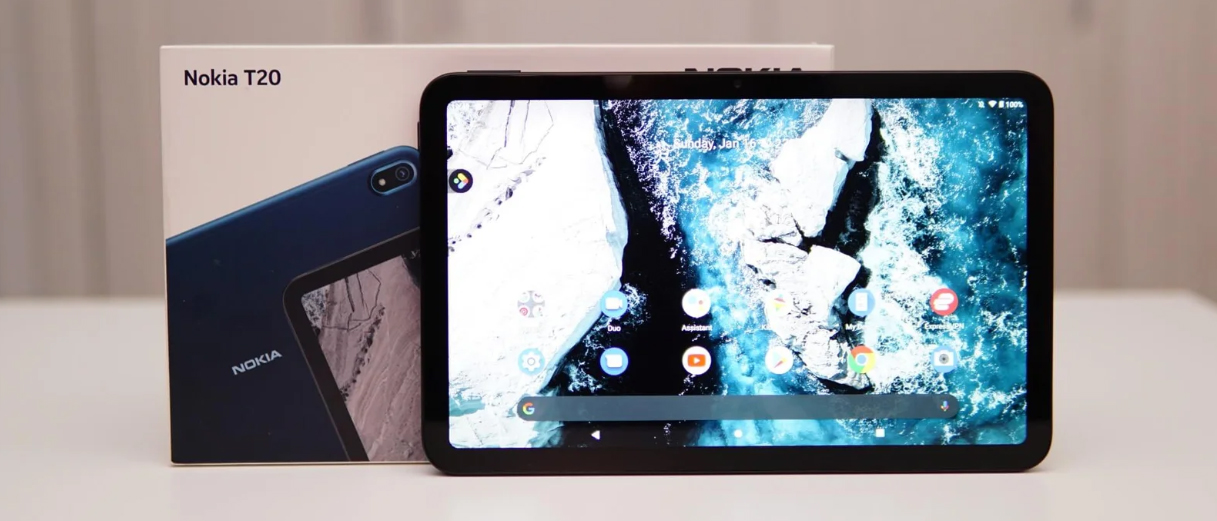
Nokia T20, T10, and N1 tablets are popular choices for families and casual users thanks to their solid build quality, clean Android experience, and affordable price points. However, many users encounter a frustrating problem when they try to play high-definition video files on these devices: the tablet either refuses to play the file, stutters heavily, or shows a “codec not supported” error. This article explains why Nokia tablets struggle with most 4K MKV and MP4 movies, and provides a step-by-step solution to convert those files into a format your device can handle smoothly.
There are three main reasons why your Nokia T10, T20, or N1 tablet cannot play 4K MKV and MP4 files directly.
1. The screen resolution is too low for 4K content
The Nokia T20 has a 10.4-inch display with a resolution of 1200 × 2000 pixels, while the Nokia T10 uses an 8-inch 800 × 1280 panel. The older Nokia N1 offers a 7.9-inch screen at 2048 × 1536. None of these displays can physically show a 4K (3840 × 2160) image in full detail. More importantly, playing a 4K video on a 2K or HD screen wastes system resources and often leads to choppy playback.
2. Hardware decoding limitations of entry-level chipsets
The Nokia T20 is powered by a Unisoc T610 chipset, and the T10 uses a Unisoc T606, both of which are low- to mid-range processors designed for basic tasks like web browsing, video calling, and streaming services. Modern 4K MKV files frequently use the H.265/HEVC codec, which requires dedicated hardware decoding for smooth playback. Entry-level chipsets often lack full HEVC hardware decoding, forcing the tablet to decode 4K video in software – a process that overwhelms the CPU and results in dropped frames, audio sync issues, or outright failure to play. The Nokia N1’s older Intel Atom Z3580 and PowerVR G6430 GPU are even less capable of handling 4K content.
3. Container and codec compatibility gaps
While the Nokia T20 officially supports MKV and MP4 file containers, this support does not guarantee compatibility with the codecs inside. Many 4K MKV files use H.265 (HEVC) encoding, but the tablet’s native video framework may only fully support H.264 (AVC). Likewise, 4K MP4 files sometimes employ high-bitrate profiles or uncommon audio formats (like DTS or TrueHD) that the tablet cannot decode.
In summary, your Nokia tablet’s screen, processor, and built-in codec support are all mismatched with the demands of native 4K MKV and MP4 files – so you simply cannot watch those movies without first converting them.
The most effective way to watch high-definition movies on your Nokia T10, T20, or N1 is to convert the original 4K files into a format that matches your tablet’s capabilities. This means:
By doing this, you dramatically reduce the processing load on your tablet’s CPU and GPU, turning an unwatchable 4K file into a perfectly smooth 1080p MP4.
Acrok Video Converter Ultimate is a professional yet user-friendly software that excels at this exact task. It can load MKV and MP4 files (including 4K and even 8K content), decode them efficiently, and output optimised videos for virtually any device. Here is why it stands out:
For the purpose of this guide, Acrok Video Converter Ultimate will be used to convert MKV and MP4 to Nokia tablet best playback format.
Free download 4K MKV/MP4 to Nokia Tablets Converter
 100% Safe & Clean 100% Safe & Clean
Step 1: Install and launch Acrok Video Converter Ultimate
Download Acrok Video Converter Ultimate from the official website, install it on your Windows or Mac computer, and launch the program.
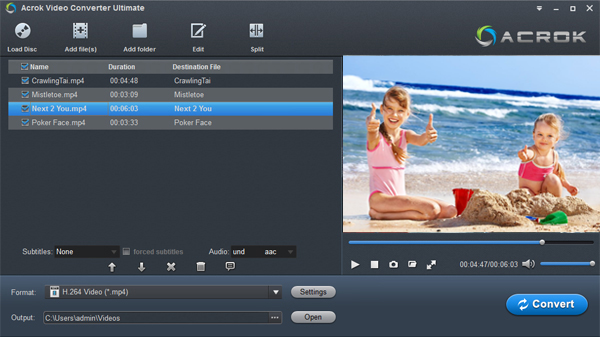
Step 2: Add your 4K MKV or MP4 files
Click the “Add Files” button (or drag-and-drop) to import the 4K MKV/MP4 movies you want to watch on your Nokia tablet.
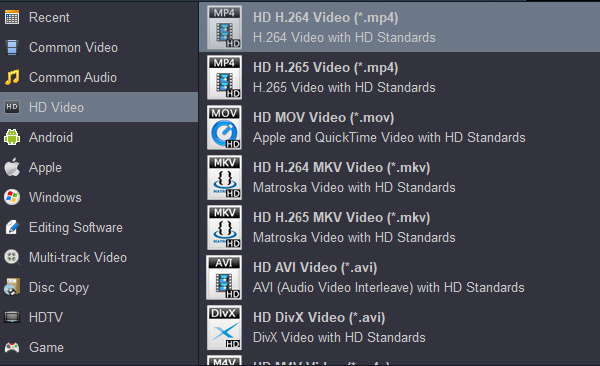
Step 3: Choose the Nokia T20/T10 output format
Click the “Format” button to open the profile list. Navigate to “Device” → “Android” → select either “Nokia T20” or a general “Android Tablet (1080p)” preset. This automatically sets the resolution to 1920 × 1080 or 1200 × 2000, the video codec to H.264, and the container to MP4.
Step 4: Adjust settings (optional)
If you need finer control, click the “Settings” button next to the format. You can lower the bitrate further for very large files, change the frame rate to 30 fps, or select specific subtitles/audio tracks to include.
Step 5: Start conversion
Click the “Convert” button at the bottom right. Acrok will begin processing your file. Thanks to hardware acceleration, this task is usually completed quickly even for 4K sources.
Step 6: Transfer movies to your Nokia tablet
Once conversion finishes, you need to transfer movies to Nokia tablet. Connect your tablet to your computer via USB, select “File Transfer” mode on the tablet, and copy the converted MP4 file into the “Movies” or “Videos” folder. (You can also use cloud storage or a microSD card if your tablet supports it.)
Step 7: Play the file on your Nokia tablet
Disconnect the tablet and open the video using your preferred player. The converted file should now play smoothly without stuttering or errors.
Even after conversion, it is wise to use a capable media player. VLC for Android is highly recommended for Nokia T20, T10, and N1 tablets. VLC supports an enormous range of video and audio codecs, handles subtitles well, and is completely free and open-source. It can play many file formats that the built-in Android player might reject, making it an essential tool for anyone who enjoys local video playback.
Important note about VLC: While a good player like VLC can overcome some compatibility issues (e.g., playing an MKV that the stock player refuses to open), it cannot magically make a 4K video play smoothly on entry-level hardware. If the original file remains at 4K resolution with HEVC encoding, VLC will still struggle because the tablet’s processor lacks the hardware power to decode it in real time. A player is only a piece of software – it cannot upgrade the physical capabilities of your device. To truly fix the problem, you must go back to the conversion step and downscale/compress the video appropriately. Converting with Acrok Video Converter Ultimate addresses the root cause, while VLC acts as a reliable viewer for the converted result.
Watching high-definition movies on a Nokia T10, T20, or N1 is absolutely achievable, but not by throwing raw 4K MKV or MP4 files at the device. These tablets have modest screens, entry-level processors, and limited codec support that make direct 4K playback impossible. The correct workflow is simple: convert, compress, then play. Use Acrok Video Converter Ultimate to convert MKV and MP4 to Nokia tablet best playback format – typically 1080p H.264 in an MP4 container. Pair the converted files with VLC for Android as your media player, and you will enjoy smooth, beautiful movies on your Nokia tablet without lag, stutter, or frustrating error messages. Take control of your video library, and turn your Nokia device into a true portable cinema.
Free download 4K MKV/MP4 to Nokia Tablets Converter
100% Safe & Clean 100% Safe & Clean

Easy tool to use to convert your Blu-ray files into smaller video files for playing on any Android device. It's All-in-one Blu-ray and DVD ripping, conversion and copying tool.
Andre Ohland
Copyright © 2026 Acrok Studio All Rights Reserved. Terms and Conditions | Privacy | Refund Policy