

 >
4K Video Converter
>
4K Video Converter
Read the best 4K Video Converter reviews to download and get professional 4K Video Converter in 2026. Let you play, edit and share your 4K movies and recordings easily.
Content
Part 1: What is 4K and how to get 4K videos?
Part 2: Why do we need a 4K Video Converter in 2026?
Part 3: Best 4K Video Converters in 2026: Top 3 Free & Paid
--------- Acrok 4K Video Converter (Video Converter Ultimate)
--------- Topaz Labs 4K Video Converter
--------- AVCLabs Video Enhancer
Part 4: Conclusion
4K video refers to video with a resolution of approximately 3840 pixels wide by 2160 pixels high (also known as Ultra HD or UHD). That's four times the number of pixels of standard Full HD (1080p). This massive increase in pixels results in a much sharper, more detailed, and more lifelike image, especially on larger screens.
Key benefits of 4K include:
We can obtain 4K video in three main ways:
Watch/Stream 4K Content
Create Your Own 4K Videos:
Shoot with a 4K Camera: Many modern devices can record in 4K:
Edit on a Computer:
Download 4K Videos:
Important Note: To fully enjoy 4K, you need:
While 4K video delivers stunning quality, its high-resolution nature creates several practical challenges. A powerful 4K video converter becomes an essential tool to overcome these hurdles and unlock the full potential of your videos.

Here’s why:
1. Universal Compatibility & Playback
Not all devices and media players support every 4K video format (like HEVC/H.265, which is common for 4K). A converter lets you change the video format or "container" (e.g., from MKV to MP4) to ensure your 4K movies play smoothly on your smart TV, gaming console, smartphone, or tablet without compatibility errors.
2. Manage Massive File Sizes
4K video files are enormous, quickly filling up your phone, computer, or cloud storage. A powerful converter allows you to compress these files efficiently, significantly reducing their size while preserving as much visual quality as possible. This is crucial for saving space or preparing videos for email or messaging apps.
3. Smooth Editing & Sharing
Editing raw 4K footage directly can be slow and demanding on your computer. A converter can transcode videos into an editing-friendly format (like Apple ProRes or a lower-bitrate intermediary) that editing software handles more smoothly. It also helps optimize videos for social media platforms (YouTube, Instagram, etc.), which have specific format, size, and bitrate requirements.
4. Adaptability for Different Uses
5. Hardware-Friendly Optimization
Direct 4K playback can strain older or less powerful hardware, causing stuttering. A good converter can optimize the video's bitrate, codec, and resolution to ensure flawless, power-efficient playback on your specific device.
In short, a powerful 4K video converter acts as a bridge, solving the practical problems of size, compatibility, and performance. It gives you the freedom to enjoy, edit, and share your high-resolution videos anywhere, on any device, without being locked down by technical limitations.
Experience seamless video transformation with a 4K video converter. Effortlessly convert any footage, upscale videos to 4K, and preserve every detail for crystal-clear 4K quality — perfect for professional editing, streaming, and high-quality playback.
You will find many 4K conversion programs by searching on the internet. They are good at transcoding 4K video to 4K, 4K to 1080p, and 4K to 720p, but it is difficult to retain the original video quality. Depending on your needs, the preferred software is Acrok Video Converter Ultimate. This 4K file conversion program is the hottest 4K Blu-ray ripper and 4K video conversion software on the market. In addition to converting 4K videos from different sources and with different encodings, you can also rip and convert 4K/1080p Blu-ray and DVD discs to any video/audio format for playback on your portable devices, such as iPad and iPhone. And what else? You can also edit any downloaded or recorded videos using this top-rated 4K video converter software.
Free download and try best 4K Video Converter
 100% Safe & Clean 100% Safe & Clean
Here are the detailed steps to convert 4K movies to H.264 MP4 video on Windows 11. The way to convert 4K videos for playback on Mac (including macOS 15 Sequoia) is the same. Just make sure you've downloaded the right version.
Run Acrok Video Converter Ultimate, the best 4K video converter software, on Windows or Mac. Click the "Add File" icon to load your 4K MKV, MOV, or MP4 movies.

Tip: How to convert and rip 4K Blu-ray movies?
First, open Acrok software. Next, insert a 4K Ultra HD Blu-ray disc into your Blu-ray drive – the software should load it automatically. Alternatively, you can click the "Add File" icon to load a 4K Ultra HD Blu-ray folder or ISO file. You can play the loaded movies using this 4K video converter.
Click the "Format" bar and select "Common Video" or "HD Video". You will see many output options, such as MP4, MKV, AVI, MOV, WMV, FLV, etc. For watching 4K movies freely, H.264 MP4 is the best output option. If the default settings do not meet your needs, click the "Settings" button to open the "Profile Settings" panel, where you can adjust video size, bitrate, frame rate, sample rate, and audio channels.
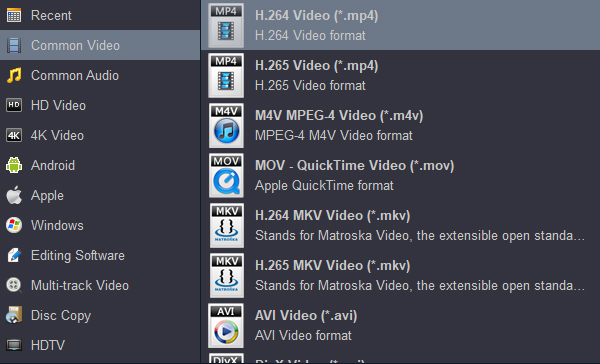
Click the "Convert" button to start the 4K video conversion. When the conversion is complete, click the "Open" button to locate the converted movies. Now you can play your 4K movies on any media player. If you want to play them on your smartphone or tablet, just transfer the video to your device.
If you have tried, you may find that uploading a 4K file to YouTube is not as simple as you think – failures are common. In general, several factors affect uploading 4K videos to YouTube, including video format, size, frame rate, etc.
Acrok Video Converter Ultimate is a professional 4K video converter that solves the problem in one go. It can easily convert 4K video to formats supported by YouTube, Instagram, Facebook, Twitter, etc. Meanwhile, it won't take too much of your time because it delivers super-fast conversion speeds. You can follow the steps above to convert any 4K video for sharing.
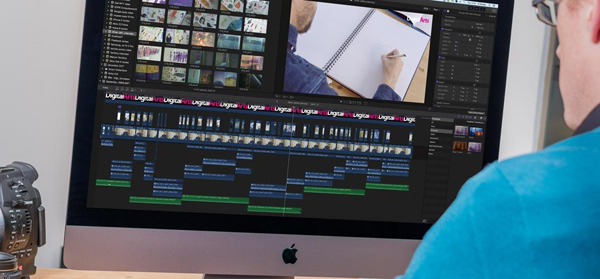
Everyone wants to be able to edit their own recorded footage smoothly in their preferred editing software, using a natively supported format, without rendering, etc. Fortunately, you can fix any problem with the help of professional 4K video conversion software called Acrok Video Converter Ultimate. It can transcode 4K MXF, MOV, MP4, MKV footage to Apple ProRes, MPEG-4, DNxHD, or Apple Intermediate Codec (AIC) for editing in Final Cut Pro, Premiere Pro, Vegas Pro, iMovie, Avid Media Composer, DaVinci Resolve, etc.
Download and try the best 4K Video Converter for free in 2026
100% Safe & Clean 100% Safe & CleanTopaz Labs Video AI is not a traditional video converter. Instead, it is a powerful AI-powered upscaling and enhancement tool specifically designed to intelligently convert lower-resolution, old, or damaged video into stunning, clean 4K (and beyond).
What it Does Best:
Its core strength lies in using trained artificial intelligence models to analyze each frame. It doesn't just stretch pixels; it reconstructs details, reduces heavy noise and compression artifacts, and stabilizes shaky footage. The results can be remarkable, breathing new life into classic films, home videos, or grainy digital footage.
Key Features:
The Verdict:
Pros: Unmatched quality for upscaling and restoration. The AI results are often far superior to traditional converters. Essential for archivists, filmmakers, and content creators who need to modernize old footage.
Cons: Extremely resource-intensive (requires a powerful GPU). Processing is very slow compared to standard converters. It is a premium, expensive piece of software.
In short: If you need a simple format changer, this is overkill. But if your goal is to genuinely improve the visual quality and resolution of your videos, Topaz Video AI is in a class of its own. It’s a specialized, powerful tool for a specific and demanding job.
URL: https://www.topazlabs.com/tools/4k-video-converter
AVCLabs Video Enhancer is a dedicated AI video upscaling and restoration software designed to convert low-resolution, blurry, or noisy footage into higher-resolution, clearer video, typically up to 4K or 8K.
What it Does:
The software applies deep-learning AI models to analyze your video. Its primary functions include:
Key Features & Performance:
The Verdict:
Pros:
Cons:
In short: AVCLabs Video Enhancer is a very capable and user-friendly choice for AI video enhancement. It delivers impressive results for most common tasks—reviving home movies, improving YouTube downloads, or upscaling gameplay footage. For users who find Topaz Video AI overwhelming or too expensive, AVCLabs presents a compelling, effective, and more accessible alternative. It strikes an excellent balance between power and ease of use.
URL: https://www.avclabs.com/ai-tools/4k-video-converter/
In conclusion, converting 4K movies or footage to a common format can be a great way to preserve your collection and make it easier to play back on your own devices, edit in editing software, or share on popular streaming websites. In this guide, we've explored various aspects of the process, from finding the best settings for converting 4K video to discovering the best software options for the task. Topaz Labs Video AI and AVCLabs Video Enhancer are both free to use. However, they have very limited functionality. They generate large files, whereas Topaz Labs decreases video quality. In terms of speed, quality, and advanced settings, Acrok Video Converter Ultimate remains the greatest option.


My tv has the function of playing 3D moveis, it's a pity thatI have no 3D video resources. Now, I can get 3D videos easily. The 3D TV will show itself better.
- Jeffrey hayes
I bought your 4K Video Converter about 3 months ago and have been using it regularly. It does everything I need done (and then some). It has never screwed up. It is very easy to use. It is well worth the money! Sometimes I also feel myself disturbing, but you answered my questions extremely patiently. It's really nice.
- Sean Mahoney
This is one of the best DVD and Blu-ray ripping software I have ever used! It works flawlessly, and has a user friendly UI!
- Peter Ward
As a 4K video converter, I have nothing to say. This amazing software is convenient and easy to use. It can rip DVD into any format you choose. I recommend it to first-time users and even to users who need something that is both powerful and fast.
- Alton Hill
Copyright © 2026 Acrok Studio All Rights Reserved. Terms and Conditions | Privacy | Refund Policy