

 > 2D to 3D Converter

Watching a standard 2D film with simulated depth can feel surprisingly immersive, especially if you already own a 3D TV or a VR headset. The good news is that you do not need a Hollywood studio to add 3D effect on a 2D movie. With the right software, you can convert 2D video to 3D and export it as a standard MP4 file that plays on most modern displays. This guide walks through the practical options, from a full-featured desktop converter to a quick online tool, and explains which approach makes sense for a full-length movie.
Before choosing a converter, it is worth understanding why MP4 is the target format rather than MKV, AVI, or a proprietary 3D format. The answer comes down to compatibility. MP4 is supported natively by the vast majority of today's popular consumer electronics — smart TVs from Samsung, LG, and Sony, gaming consoles, smartphones, tablets, and streaming boxes all play MP4 files directly without additional codecs or transcoding. That means once you convert 2D video to 3D and export as MP4, you can copy the file to a USB drive and plug it into your TV, or stream it from a network drive, and it will simply play.
MP4 also works smoothly with media server applications like Plex. Plex recognizes MP4 containers reliably, and its transcoding engine handles them efficiently, so you spend less time waiting for buffering and more time watching. Some 3D-specific containers or obscure formats may require Plex to transcode on the fly, which can strain a low-power server or cause playback stuttering. Choosing MP4 as your output avoids that problem. In short, MP4 is not the only format that can carry 3D content, but it is the one that gives you the fewest surprises across the widest range of devices and apps.
If your goal is to convert movies to 3D MP4 without worrying about file size limits or watermarks, a desktop application is the sensible route. Acrok Video Converter Ultimate (Windows Version | Mac Version) is built for exactly this kind of job. It handles Blu-ray, DVD, and standard video files, and it includes a dedicated 2D to 3D conversion feature that works on Windows machines. The Mac version supports the same capability, so you can add 3D effect on 2D movie files regardless of your platform.
The workflow is straightforward: import your source video, choose a 3D output profile (such as anaglyph or side-by-side, depending on your display and glasses), and start the conversion. Because it is a local application, there is no upload wait and no cap on how long your movie can be. That matters when you are working with a two-hour film rather than a short clip. The output is a standard MP4 file, which means you can play it on a 3D TV, a computer with VLC configured for 3D display, or a VR headset that accepts SBS content.
 100% Safe & Clean 100% Safe & Clean
Current offer: Acrok is running a 40% off promotion on Video Converter Ultimate through its official store. The listed price drops from $89.00 to $53.40 for both the Windows and Mac versions. If you plan to convert more than one or two films, the discount makes the desktop route considerably more attractive than piecing together free tools.
The process is built around a four-step workflow that Acrok applies to all conversions, with the 3D effect added during the optional editing stage.
Open Acrok Video Converter Ultimate and click the Add Files button on the main interface to load your source video. You can also drag the file directly into the program window. Batch conversion is supported if you want to process several movies at once, and the software accepts DVD/Blu-ray discs, ISO files, and folders in addition to standard video files.
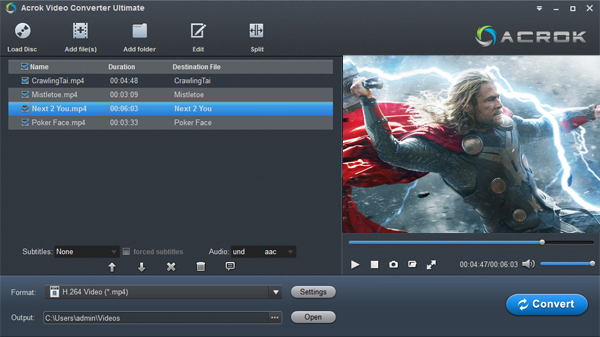
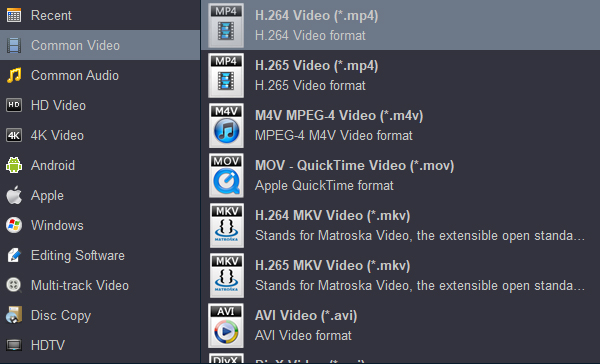
Click the Format drop-down menu and select MP4 from the video format list. Acrok supports a wide range of output formats, but MP4 is the practical choice for playback on TVs, media servers, and portable devices, as discussed earlier in this guide.
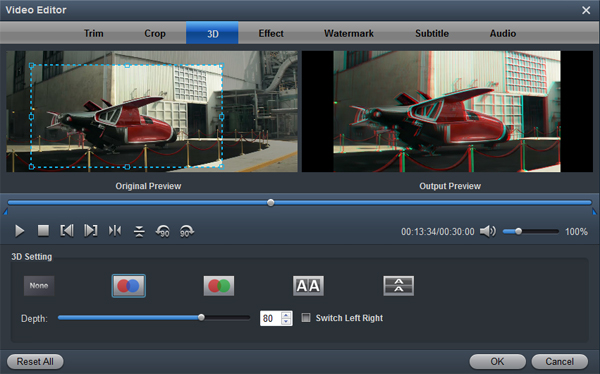
Before starting the conversion, click the Edit button to open the video editor. Among the editing tools (Trim, Crop, Effect, Watermark, Audio, Subtitle), select the 3D option. This is where you enable the 2D-to-3D conversion and choose the 3D effect or output mode that matches your display and glasses. The editor also provides a preview so you can check the depth effect before committing to the full conversion.
In the Output menu, choose the destination folder for the converted file. When you are ready, click the Convert button to start the conversion. Once the process is complete, click Open to access the finished 3D MP4 file. Because this is a local desktop conversion, there is no upload limit or queue, and the output retains the full length of your movie.
With the 3D MP4 file ready, you can copy it to a USB drive for a 3D TV, stream it through Plex, or load it onto a VR headset that supports side-by-side content. The next section covers three additional applications if you want to compare alternatives or test a short clip before converting a full film.
Not everyone needs a full suite. The tools below cover different priorities: one free open-source option for privacy-conscious users, one straightforward online converter for quick tests, and one polished commercial alternative.
Owl3D is a desktop tool that uses AI depth estimation to generate natural-looking 3D from 2D footage. It runs locally, so your movie never leaves your computer, and it supports output in side-by-side and other stereoscopic formats. The free tier allows 60 seconds of video per conversion without a watermark, which is enough to test the quality on a scene from your film before committing to a paid plan .
Volumx is a browser-based option for people who want to convert 2D movie to 3D online free without installing anything. It specializes in SBS output for VR headsets like Meta Quest and Apple Vision Pro. The trade-off is typical of online tools: upload size and processing time are limited, so it is better suited to short clips or a single scene than a full feature film .
HitPaw Univd sits in the middle ground as a commercial desktop converter with a clear 2D-to-3D module. It offers multiple split-screen modes, including anaglyph red/cyan and side-by-side, and lets you adjust the parallax value to control how strong the depth effect feels. Output formats include MP4, MOV, MKV, and others. It is a reasonable alternative if you want a guided interface with preview support, though it is a paid product.
| Tool | Type | Best For | Key Limitation | Price |
|---|---|---|---|---|
| Acrok Video Converter Ultimate | Desktop (Win/Mac) | Full-length movies, Blu-ray/DVD sources, MP4 output | Paid software (discount available) | $53.40 |
| Owl3D | Desktop (Win/Mac) | Privacy-focused local AI conversion | Free tier limited to 60 seconds | Free tier; paid plans available |
| Volumx | Online | Quick tests, VR SBS clips | File size and processing limits | Free (online) |
| HitPaw Univd | Desktop | Guided 2D-to-3D with preview and parallax control | Paid; not free | Commercial license |
Searching for a free 2D to 3D Video Converter online will surface plenty of options, and they can be useful for experimenting with a short clip to see how a particular scene responds to depth simulation. However, most free online 2D to 3D Converter services impose upload limits, queue times, or watermarks. For a full movie, those constraints make the experience frustrating. A local desktop tool avoids the upload entirely and gives you consistent output quality across the entire film.
If you want to convert 2D movie to 3D MP4 and actually watch the result on your TV or headset without interruptions, start with Acrok Video Converter Ultimate while the 40% discount is active. Use Owl3D's free tier or Volumx for a quick test clip if you want to compare depth quality before committing. The key is to match the tool to the job: online converters for short experiments, desktop software for the movie you actually plan to sit down and watch.


I've upgraded the software to the latest version and now it's faster. It can crack many newly bought discs, not to mention the 4K video conversion.
Shimony, Oded
Copyright © 2026 Acrok Studio All Rights Reserved. Terms and Conditions | Privacy | Refund Policy