

 > Play movies on OnePlus 15

Wondering which formats are supported for playback on your OnePlus 15 or OnePlus 15R? Check this guide to see the specs for both models, including their best playback video and audio formats and native codecs.
There is no denying that OnePlus has become one of the most popular Android lineups to date. With its latest iteration, the OnePlus 15 and OnePlus 15R, the company continues to deliver powerful performance and a premium viewing experience. Both phones feature a high-resolution display that makes text, images, and video absolutely pop, even in direct sunlight, which makes enjoying HD movies on the OnePlus 15 or 15R fantastic. But can we play all movies on them? You need to know what formats can play on the OnePlus 15 and 15R.
Video: MP4, 3GP, MKV, MOV, AVI, FLV, HEVC, AVC, VP9, VP8, AV1, WEBM, TS, M2TS, ASF
Audio: MP3, AAC, AMR, APE, OGG, FLAC, WAV, MIDI
Both the OnePlus 15 and OnePlus 15R support the same video and audio playback formats.
Although OnePlus claims that the OnePlus 15 and 15R support AVI and MKV playback, you may still run into trouble when you transfer your movies to either smartphone. This is because AVI is only a container format. The video and audio tracks inside an AVI file can use various codecs, such as DivX, Xvid, or H.265. If the codec is not supported by the phone, the video will not play. In that case, you need to convert the AVI file to a OnePlus 15/15R-friendly format like H.264 MP4.
In addition, how can we play Blu-ray, DVD and other downloaded movies on the OnePlus 15 or 15R? For playing all movies such as Blu-ray, MKV, MOV, AVI, MPG, RMVB, etc., you have to convert these files to OnePlus 15/15R-supported formats via third-party software. Here you need a video converter for the OnePlus 15 and 15R. Acrok Video Converter Ultimate is a handy video converter that converts any movies/videos to a OnePlus 15/15R-playable format. With this smart video tool, you can convert Blu-ray, AVI, MKV, WMV, FLV, RMVB, MPG, MOV, MP4, M2TS, VOB, and other videos to a OnePlus 15/15R-playable format. If you are running macOS, you can get the Mac version of this OnePlus 15/15R video converter — Acrok Video Converter Ultimate for Mac.
Free download OnePlus 15/15R Format Converter
 100% Safe & Clean 100% Safe & Clean
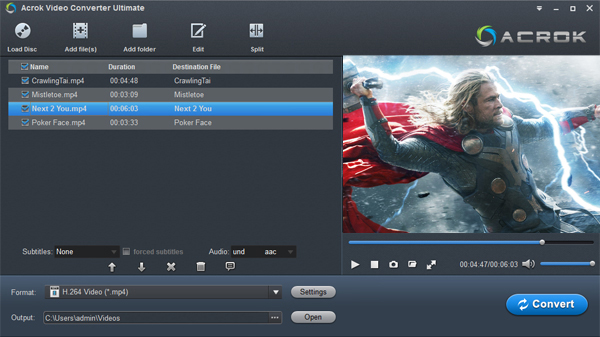
Run the best Blu-ray Ripper and click the "Load Disc" icon to add Blu-ray or DVD movies from your Blu-ray drive. All the loaded files will be listed on the left item bar, and you can preview them on the right, as the picture below shows.
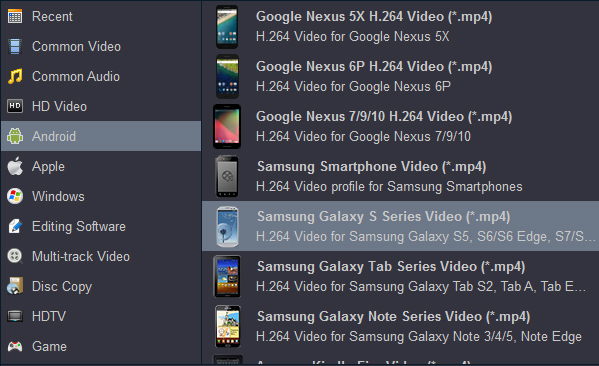
According to the official OnePlus website, H.264 MP4 is the most compatible video format for both the OnePlus 15 and OnePlus 15R. So here we recommend you select "Android > OnePlus Series Video (.mp4)" as the export format. If that preset is not available, choose "Common Video > H.264 Video (.mp4)". It will fit the OnePlus 15 and 15R perfectly.
After all these preparations, just click the "Convert" button to begin the Blu-ray/DVD to OnePlus 15/15R conversion.
Run Acrok Video Converter Ultimate as the best OnePlus 15/15R format converter. Click "Add Files" to import MKV, MOV, or AVI videos from your computer. Another method to import files is the simple drag-and-drop operation. Batch conversion is supported, so you can load multiple files at a time. If you want to join all the imported files, just click the "Settings" icon and then tick "Merge all videos into one file" at the bottom.
Simply click the "Format" bar to choose a OnePlus 15/15R-supported format. You can go to the "Common Video", "HD Video", or "Android" category to get the H.264 MP4 profile.
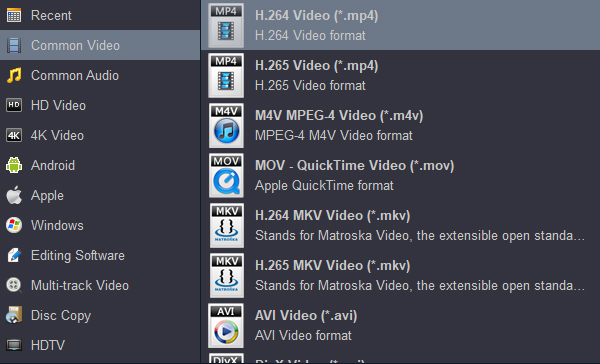
Before starting the conversion, you still have the option to edit the video files as you wish. When all settings are done, simply click the "Convert" button to activate the MKV, MOV, or AVI conversion. You can get the converted files from the output folder. That's all the steps you need to follow to convert downloaded video files for the OnePlus 15 or 15R. It’s as easy as ABC, right? Download it to test it now.
Conclusion
Acrok Video Converter Ultimate is an all-in-one video converter. It not only helps users convert downloaded or recorded videos into their desired formats, but also allows them to back up movies from old discs at home to a computer, or convert movies into a format playable on electronic devices — H.264 MP4. If your OnePlus 15 or OnePlus 15R cannot recognize your movies, just follow the steps above to solve the problem.


By far this is the best Blu-ray ripping program I have ever used. I can do everything myself right from the comfort of my house, and it's extremely easy to use. I love it. Thank you guys for this video converter.
Omar Rivera
Copyright © 2026 Acrok Studio All Rights Reserved. Terms and Conditions | Privacy | Refund Policy