

 >
TS Video Converter
>
TS Video Converter

Looking to convert TS files to MP4, WMV, MOV, or MKV online for free? This guide explains why TS conversion is necessary, compares popular TS video converter tools including Acrok, Zamzar, HandBrake, and Leawo, and highlights Acrok's key advantages. Perfect for users seeking a free TS video converter online or a powerful desktop solution for batch conversion.
A Transport Stream, or TS file, is a type of video streaming file commonly used to store video content on DVDs and Blu-ray discs, as well as for broadcasting services. It utilizes standard MPEG compression to efficiently encode video data, making it suitable for saving streamed or broadcast video content. Additionally, TS files are known for their ability to multiplex multiple data streams — including audio, video, and metadata — into a single stream, making them an ideal choice for distributing high-definition video content over the internet or broadcast networks.
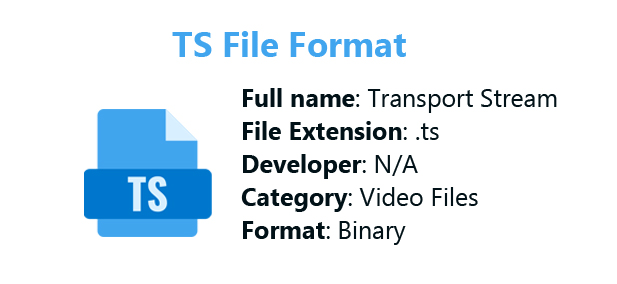
When we download videos from popular video sites (such as Bilibili or YouTube download tools), the cached videos are often split into multiple .ts segments. Screen recording software also exports videos directly as .ts files. Ripping DVDs or Blu-ray discs can also output files in TS format. Compared to the MP4 format, TS video files are larger, but they have one notable advantage: TS files are highly error-resistant. Even if a file becomes corrupted or loses some data, the remaining portion can still be played.
If you want to play TS files on your own device, most mainstream video players support this format — for example, VLC Media Player, PotPlayer, IINA, nPlayer, MX Player, and others.
TS (Transport Stream) files are widely used for storing video content on DVDs and Blu-ray discs, as well as for broadcasting services. They utilize MPEG compression to encode video data efficiently, making them suitable for streaming and broadcast applications. However, despite their advantages in broadcasting, TS files present several challenges for everyday users.
Compatibility Issues
Most built-in media players like Windows Media Player and QuickTime do not support TS files by default. This means that if you download a TS video from a video site or record a live stream, you may find yourself unable to play it on your computer.
Large File Size
TS videos are significantly larger than regular video files, making them impractical for storage on your main drive. When you want to save a video for offline use or share it with others, the large size becomes a major obstacle.
Limited Use Cases
Since TS files are designed for web-based video delivery and online playback, their use is limited for everyday scenarios. Converting these files to modern formats makes them easier to play, more compact, and much more suitable for offline use on any device.
Converting your TS files to widely supported formats like MP4, WMV, MOV, or MKV resolves all these issues at once. MP4, in particular, is the most universal choice for playback across TVs, phones, browsers, and media players. MOV is optimized for Apple devices and editing workflows, while MKV is ideal for archiving multiple subtitle and audio tracks.
Here are some reliable software options to help you convert TS to MP4 or other formats:
| Software | Platform | Price | Key Features |
|---|---|---|---|
| Acrok Video Converter Ultimate | Windows/Mac | Paid | 10X hardware acceleration, batch conversion, supports TS, M2TS, Blu-ray, DVD, MKV, MP4, MXF and more |
| Zamzar | Online | Freemium | No installation required, supports multiple formats |
| Leawo Prof. Media | Windows/Mac | Paid | Specializes in Blu-ray/DVD conversion |
| AscendLab | Online | Free/Paid | Browser-based, easy to use |
| HandBrake | Windows/Mac/Linux | Free | Open-source, highly customizable, supports batch conversion |
If you need a free TS Video Converter online alternative, online tools like Zamzar and AscendLab work well for smaller files. However, for professional-grade conversion with full control, Acrok Video Converter Ultimate offers several advantages over other options:
Comprehensive Format Support
Acrok supports converting virtually any video format, including TS, M2TS, MXF, MOV, MP4, WMV, MKV, AVI, FLV, and many more. Whether you need to convert TS video to MP4, convert TS file to MOV, convert TS format to WMV, convert TS movie to MKV or convert TS media to MP3, Acrok handles it all.
10X Hardware Accelerated Conversion
Thanks to its hardware acceleration system for NVIDIA and AMD GPUs, Acrok performs conversions up to 10 times faster than standard software. This means you can convert TS to H.264 MP4 or other formats in minutes, not hours.
Batch Conversion Support
Unlike many online converters that process one file at a time, Acrok supports batch conversion. You can add multiple TS files at once and convert them simultaneously to MP4, MOV, WMV, or MKV, saving you significant time.
Built-in Video Editing Tools
Before converting TS to other common formats, you can edit your videos using Acrok's built-in tools. Trim unwanted segments, crop to remove black bars, merge multiple clips, adjust brightness/contrast, add watermarks, and more.
Blu-ray and DVD Support
Acrok can also convert Blu-ray discs and DVDs, making it a comprehensive multimedia solution. This is particularly useful if your TS files originated from disc sources.
High-Quality Output
The software ensures lossless conversion, preserving the original video quality while significantly reducing file size when converting to modern formats.
Free download and try the best TS Video Converter
 100% Safe & Clean 100% Safe & Clean
The following steps use the Windows version as an example to show you how to convert TS files to your desired format. If your computer runs macOS, the steps are essentially the same. Mac users can easily follow this tutorial to complete the format conversion.
Go to the official Acrok website, download the software, and install it on your Windows or Mac computer. This software is more than just a video converter — it can also back up and convert Blu-ray and DVD movies to any format of your choice.
Click the "Add Files" button or simply drag your TS files directly into the main interface. Batch conversion is supported, so you can add multiple files at once. After importing your file, you can play it directly in the preview window located on the right side.
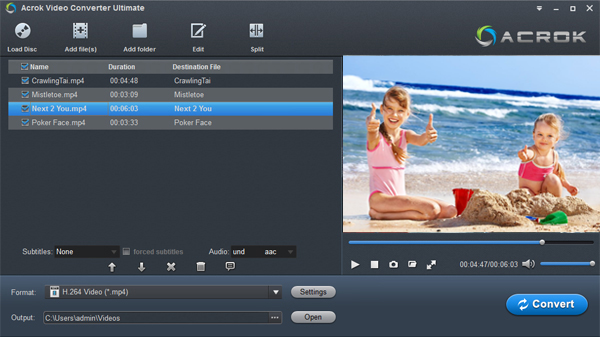
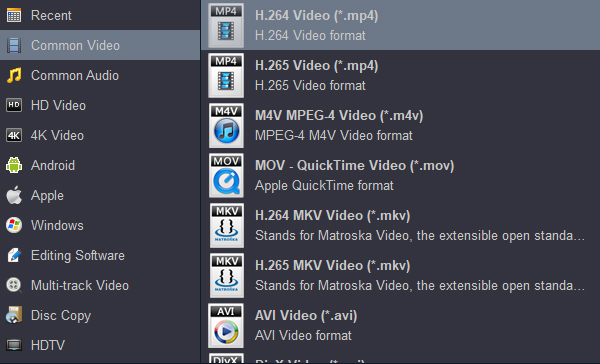
Click the "Format" drop-down menu to select your preferred output format:
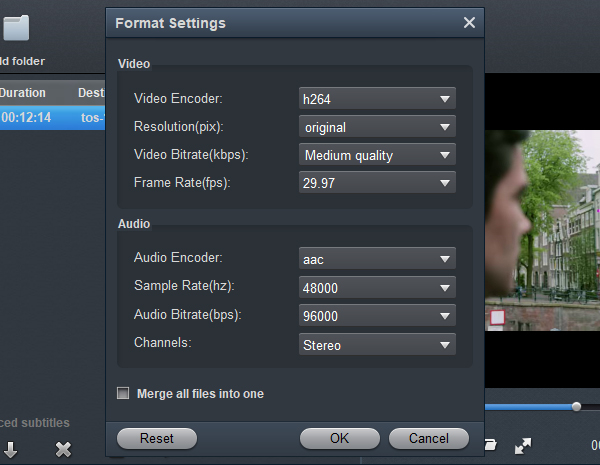
You can also click "Settings" to adjust parameters like bitrate, frame rate, and resolution for precise control over output quality. It's important to note that the higher you set the resolution and bitrate, the larger the output video file will be. Additionally, these parameter settings have a direct influence on the conversion speed.
To better preserve the original video quality, return to the main interface of the software and click the "Properties" icon to check the detailed parameters of the source video.
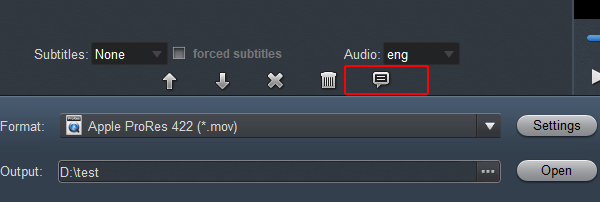
Select your output folder, then click the "Convert" button. With hardware acceleration enabled, conversion will complete quickly even for large TS files.
Once conversion is complete, click the "Open" button to locate your converted MP4, MOV, WMV, or MKV files. They are now ready to play on any device, share with others, or edit in your preferred software.
Tip: Converting TS video files to common formats like MP4 doesn't have to be complicated. With free online TS video converter such as Zamzar or AscendLab, you can convert TS to MP4, MOV, AVI, or other formats in just three simple steps:
The service requires no registration, no software installation, and works entirely in your browser. While the file size limitation means it's best for smaller TS files, it's an excellent free solution for quick conversions. If your TS file is quite large, you'd be better off skipping these online services and opting for a more professional desktop tool — Acrok Video Converter Ultimate.
| Feature | Online Converters | Acrok Desktop Software |
|---|---|---|
| File Size Limit | Usually ≤200MB | No limit |
| Speed | Dependent on internet | 10X hardware acceleration |
| Privacy | Files uploaded to server | 100% local processing |
| Batch Conversion | Usually not supported | ✅ Supported |
| Editing Tools | Basic or none | ✅ Advanced editing |
| Internet Required | Yes | Only for download |
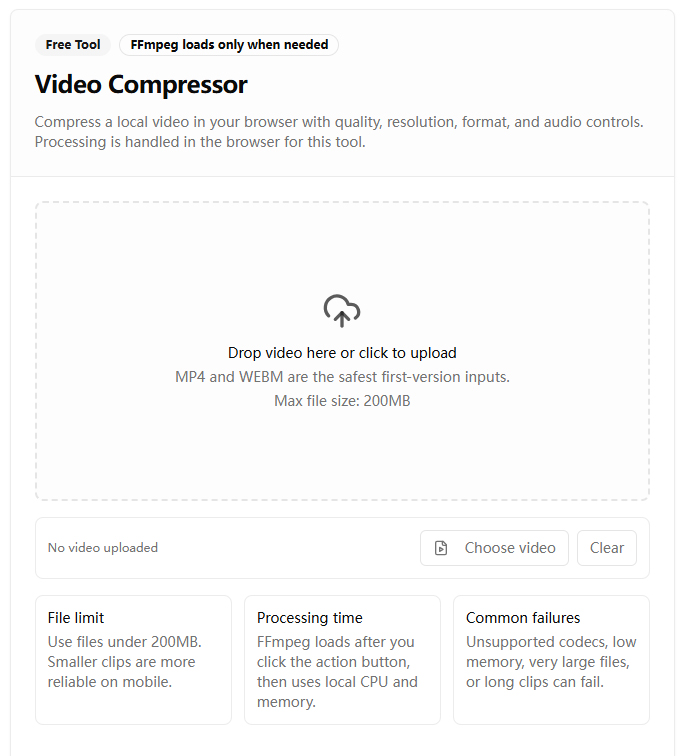
If you want to convert TS video files online, first you need to clarify which free online video converters to use. A Google search will show users many similar websites, such as Online-Convert, Zamzar, AscendLab, etc. However, they have one thing in common: they do not support importing DVD TS files or Blu-ray TS files, nor do they support converting video files larger than 200 MB. What's more, the range of output formats is very limited — AscendLab only supports MP4 and WebM.
How can you use these online tools to convert TS files to other formats? I'll take AscendLab as an example to explain how this kind of software operates.
Step 1: Open the official website - https://ascend-lab.com/tools/video-compressor
Step 2: Import TS video files.
Step 3: Select output format under Output format column.
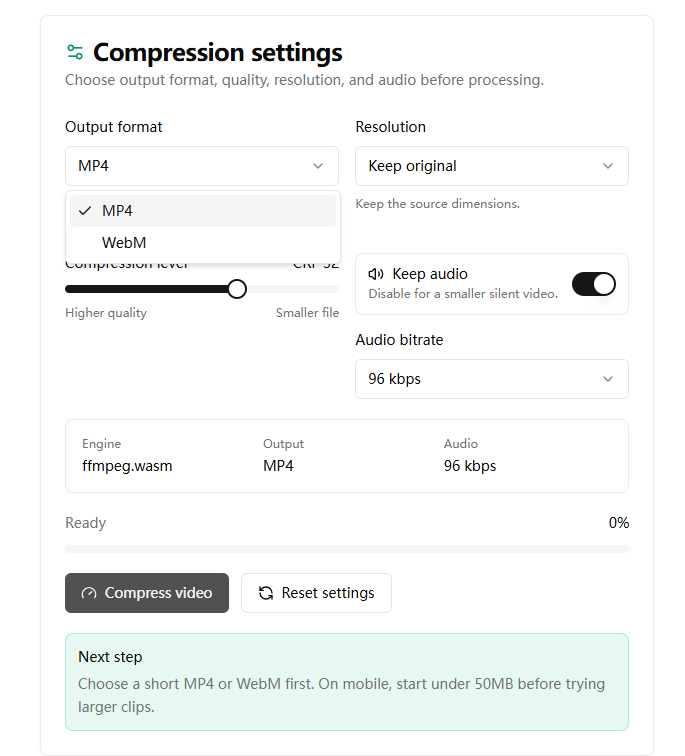
Step 4: Click "Compress video" button to start converting TS to MP4.
For occasional conversion of small TS files, online converters like Zamzar or AscendLab are convenient options. However, if you regularly work with TS videos or need to convert TS to MP4 in bulk, Acrok Video Converter Ultimate is the more efficient, private, and feature-rich choice.
Converting TS files to widely supported formats like MP4, WMV, MOV, or MKV is essential for improving playback compatibility, reducing file size, and enabling seamless sharing across devices. While several free TS Video Converter online options exist for basic needs, they come with limitations on file size, speed, and features.
For users seeking professional results—whether you're converting videos downloaded from streaming sites, recordings from screen capture software, or ripped Blu-ray content—Acrok Video Converter Ultimate offers the best balance of speed, quality, and functionality. With hardware acceleration, batch processing, built-in editing tools, and support for virtually every format including TS to MP4, TS to MOV, convert TS to WMV, and convert TS to MKV, it's the ultimate solution for all your video conversion needs.
Ready to convert your TS files? Download Acrok Video Converter Ultimate today and enjoy your videos on any device, anywhere.
100% Safe & Clean 100% Safe & Clean

As a videographer, I rely on high-quality tools. Acrok video converter app meets all my needs. The conversion speed is impressive, and the quality is top-notch.
- Sinead Mcintosh
With Acrok video conversion software, I can convert my MKV and Blu-ray movie to iMovie best editing videos on Mac. In addition, I can convert my camcorder's footage to my LG TV playable format. Now, I can share my movies with my family and friends easily. This as a great piece of software easy to use with great results. I will recommend Acrok programs to all my friends.
- Dean Davis
Copyright © 2026 Acrok Studio All Rights Reserved. Terms and Conditions | Privacy | Refund Policy