

 >
Audi MMI Video/Audio Formats
>
Audi MMI Video/Audio Formats
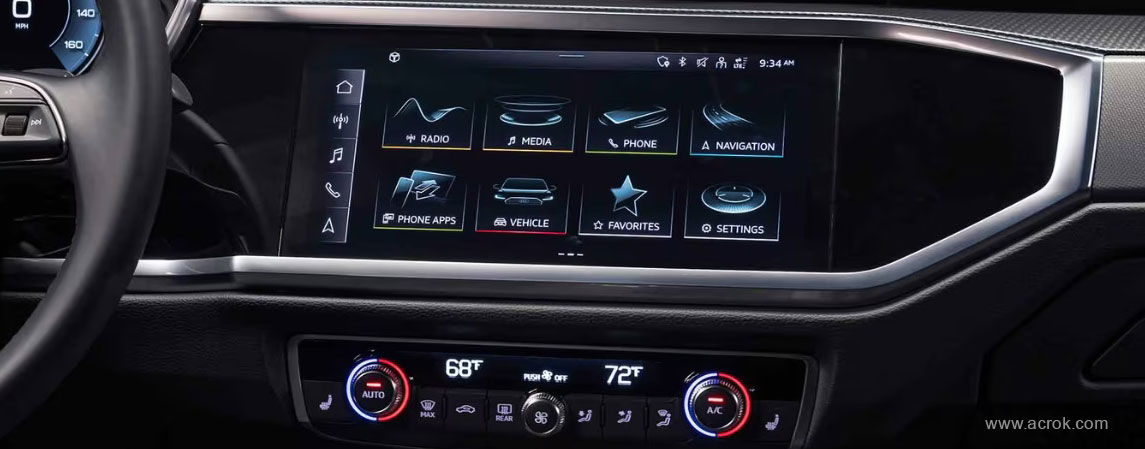
Do you like to listen to music in the car? In order to make driving less boring, many people choose to play their favorite songs in the car. If I sit in the car, I tend to listen to older folk music or classical music. We can listen to music in our car via different ways, such as SD/SDHC/SDXC/MMC memory cards, DVD drive, portable players. Can we play all downloaded music via Audi MMI by memory cards or USB sticks? Some users have encountered the following questions.
I have connected an external HD 500gb on my radio and it works great except that it doesn't read/recognise FLAC files. I know that newer cars (ie 2016) can read this type of file. Is there anything I can do to make my radio reading them? - John Zegelin
Dear Experts , I am having an Audi Q5 3.0 S line 2017 model. I have tried to play FLAC from SD card, but system says No supported formats available to play. Do you think FLAC will work in Audi Q5 2017 model? I need help on this please. - Prasanth
The Multi Media Interface (MMI) system is an in-car user interface media system developed by Audi, and was launched at the 2001 Frankfurt Motor Show on the Audi Avantissimo concept car. What formats can playback via Audi MMI?
| Supported media | SD/SDHC/SDXC/MMC memory cards: with a capacity of up to 64 GB DVD drive: Audio CDs; CD-ROMs with a capacity of up to 700 MB; DVD R/RW; video DVDs; audio DVDs compatible with video DVD Audi music interface: portable players, e.g. iPod, MTP players, USB mass storage devices belonging to "USB Device Subclass 1 and 6" compatible with USB 2.0: USB sticks, USB MP3 players, external USB flash memories and external USB hard drives |
|||
| Audio Format | MPEG-1/-2 Layer 3 | Windows Media Audio 9 and 10 | MPEG-2/-4 | |
| .mp3 | .wma; .asf | .m4a; .m4b; .aac | ||
| Video Format | MPEG-1/-2 | ISO-MPEG-4; DivX 3, 4 and 5; Xvid | ISO-MPEG-4 H.264 (MPEG-4 AVC) | Windows Media Video 9 |
| .mpg; .mpeg | .avi | .mp4; .m4v; .mov | .wmv | |
| File system | USB mass storage devices: FAT, FAT32, NTFS Memory cards: exFAT, FAT, FAT32, NTFS USB mass storage partitions: max. 4 partitions CD/DVD file systems: ISO9660, Joliet, UDF |
|||
Obviously, Audi's MMI system is not universal. It does not support many audio and video formats, such as WAV, APE, FLAC, AAC, AC3, MKA, OGG, MP2, MPA, AIFF, DTS, AU, MKV, FLV, MTS, MXF, etc.
To achieve the goal, a great Audio Converter for Audi MMI is needed. Acrok Video Converter Ultimate is considered to be the best free audio, music, song converter. It allows you to freely convert any music to any format as you want. Plus, this music to Audi MMI converter enables you to rip Blu-ray to MMI best playback format as you need. If you are running on Mac OS X, Acrok Video Converter Ultimate for Mac is the alternative choice.
Free download Acrok Free Audio Converter for Audi MMI
 100% Safe & Clean 100% Safe & Clean
Supported Models: A1, A3, A4, A5, A6, A7, A8, Q2, Q3, Q5, Q7, Q8, TT, RS/R8
Note: If you use trial version software to convert videos, there will be our brand logo in the converted videos. Of course, as long as you activate our software, the watermarking will disappear automatically.
This article takes the conversion FLAC format as an example to show you how this free audio converter software works. You can use the same way to convert other audio files to Audi MMI supported format. If you want to play your Blu-ray, DVD and downloaded movies on tablet or smartphone off line, our program can convert any movies to your device's supported fomrat easily.
Run Acrok Video Converter Ultimate as the best free music to Audi MMI file formats converter, then click "Add files" to load .flac or other audio fomrat files into this program.
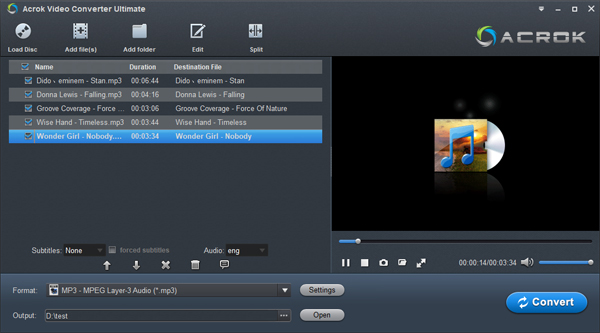
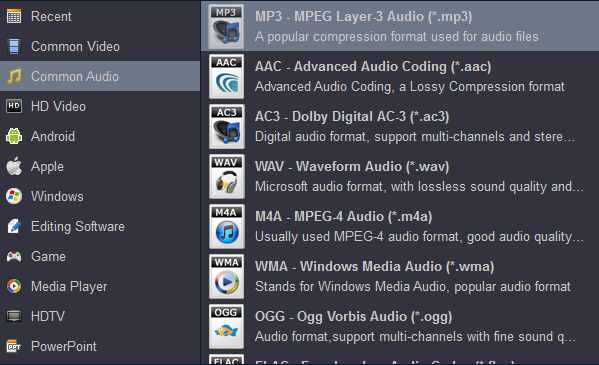
As we know, MP3 is the best playback format for any media player or portable player, so you need to click "Format" bar to choose "Common Audio" category, just select the "MP3 - MPEG Layer-3 Audio (*.mp3)". It is just a piece of cake.
Clicking the Convert button on main interface, you can go to Conversion window to start conversion. After the conversion, you can click "Open" button to locate the converted music, song. Copy or transfer the songs to an USB drive or a smartphone. You can play FLAC music in Audi MMI freely.
If you think the product is of high quality and is not expensive either. Please share it with your friends. I shall be very grateful.
This article takes the conversion MKV format as an example to show you how this software works. You can use the same way to convert other video files to Audi MMI supported format.
Run Acrok Video Converter Ultimate as the Audi MM Video Converter, then click "Add files" to load .mkv or other video files into this program.

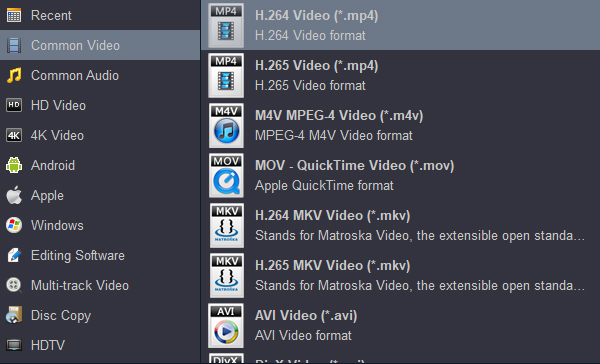
As we know, MP4 is the best playback format for any media player or portable player, so you need to click "Format" bar to choose "Common Video" category, just select the "H.264 Video (*.mp4)". It is just a piece of cake.
Adding a sustome resolution format the supported the Audi MMI.In this case is 720*480. This is a really important step if you don't do it to this format the file will not be playable video.
Tip: Audi MMI Resolution
| MMI 2023 | 10.1-inch, 1,540 x 720 |
| MMI 2019 | 12.3-inch TFT screen resolution (1,920*720) |
| 10.3-inch TFT screen resolution (1,440*540) | |
| 8.6-inch TFT screen resolution (1,440*540) | |
| MMI 3G+ (Connect) | 7-inch TFT color display VGA resolution (800*480) |
| MMI High 3G (A8 Rear Seat Entertainment;7T6+9WP) | 7-inch TFT color display VGA resolution (800*480) |
| MMI 3G/3G+ (HD;7T6) | 7-inch TFT color display VGA resolution (800*480) |
| MMI High 2G (DVD-Rom;7Q2) | 6.5-inch TFT color display 1/4 VGA resolution (480*240) |
| MMI 3G Basic (DVD-Rom;7T2) | 6.5-inch TFT color display 1/4 VGA resolution (480*240) |
Clicking the Convert button on main interface, the transformation process will begin immediately . After the conversion, you can click "Open" button to locate the converted videos. Copy or transfer the videos to an USB drive or a SD card. You can play lu-ray, DVD, MKV, AVI, WMV, MP4, MOV in Audi MMI freely.


I like your free music converter. There are many different audio and video formats out there, and most devices and programs are only compatible with a few specific formats. I can solve all the problems.
Paul Coolledge
Copyright © 2026 Acrok Studio All Rights Reserved. Terms and Conditions | Privacy | Refund Policy