

 >
Convert 4K Blu-ray to 1080p
>
Convert 4K Blu-ray to 1080p

Summary: Want to convert 4K Blu-ray to 1080p online free? Online tools cannot read the disc in your computer's optical drive—this is a physical limitation that no website can overcome. Use a 4K Blu-ray Ripper & 4K to 1080p Converter to compress 4K Blu-ray to 1080p MP4 or rip to 1080p MOV. Watch 4K Blu-ray on 1080p TV or play on tablet after conversion.
If you've ever asked this question to a search engine, you've likely been overwhelmed by conflicting answers—some claiming free online tools exist, others warning that 4K Blu-ray conversion requires complex software and hardware. The truth is more nuanced than a simple yes or no. Let's start with the most important question: Is it actually possible?
The 4K Blu-ray format offers stunning resolution—3840×2160 pixels, four times the detail of standard 1080p Full HD. But owning 4K discs doesn't necessarily mean you can enjoy them everywhere.
Not everyone owns a 4K display. When you play a 4K Blu-ray on a 1080p TV, the image is automatically downscaled to fit your screen's native resolution. Some users find it more practical to convert the disc directly to 1080p files they can store on a tablet or phone for travel, edit in video projects without high-end hardware, or share online without massive file sizes. This brings us to the core question.
The short answer: No, not really. The long answer requires unpacking several layers of technical, legal, and practical barriers.
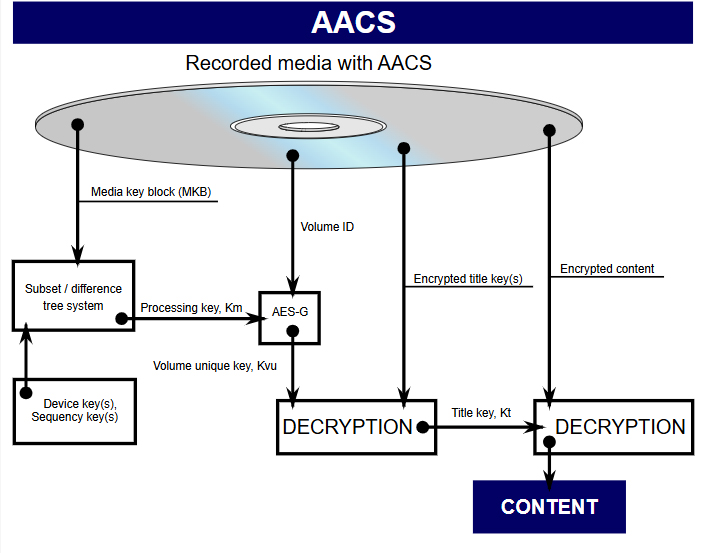
First, 4K Blu-ray discs are heavily encrypted with AACS 2.0 and other protection schemes.
According to industry specifications, commercial 4K Ultra HD discs employ advanced copy protection systems like AACS 2.0, BD+, and BD-J to prevent unauthorized copying. Any tool that claims to convert 4K Blu-ray must first decrypt these protections—something purely online browsers cannot perform because they lack direct access to your Blu-ray drive.
Second, free online video converters have severe practical limits.
Typical online converters accept individual files up to 500MB or 1GB, occasionally 2GB on premium tiers. A single 4K Blu-ray movie typically occupies 50GB to 100GB of data on a BD66 or BD100 disc. Uploading 50GB over a standard home internet connection would take anywhere from hours to days, assuming your connection doesn't time out midway. Even if you somehow uploaded the disc image, an online tool has no physical access to decrypt the AACS-encrypted structure in the first place.

Third, the legal gray area.
Many jurisdictions treat circumventing DRM (Digital Rights Management) on commercial discs as legally ambiguous or outright prohibited under laws like the DMCA. Reputable cloud platforms avoid offering such services to reduce legal liability.
Fourth, the physical reality of disc reading.
An online converter exists entirely in your browser. It cannot insert a disc into your computer's Blu-ray drive, read the optical layer, decrypt AACS keys, or parse BDMV folder structures. At minimum, you need locally installed software that can communicate with your optical drive. This is a fundamental limitation no website can circumvent.
When a free online converter claims to "convert 4K Blu-ray," one of two things is usually true:
Neither qualifies as genuine 4K Blu-ray disc conversion.
The proper method is to install professional Blu-ray ripping software on your computer. These programs can directly read and decrypt the disc, converting it to common formats like MP4 or MOV.
Here are some reliable options:
| Software | Type | Key Features | Price |
|---|---|---|---|
| Acrok Video Converter Ultimate | Paid | It's the best BD/DVD/Video solution for Windows users to backup BD/DVD, compress disc and transcode video clip to almost all popular video and audio formats. | $53.4 (Lifetime) |
| MakeMKV + HandBrake | Paid | Classic combo. Use MakeMKV to losslessly extract the Blu-ray to an MKV file, then use HandBrake to compress it to 1080p. | $50 (Lifetime) |
| VLC | Free | Well-known open-source media player that also offers basic Blu-ray disc conversion functions. But it cannot load and crack commercial Blu ray discs. | Free |
| Leawo Blu-ray Ripper | Paid | Powerful software that supports removing disc encryption and can convert to 1080p or even 4K video. | $119.94 (Lifetime) |
| AnyMP4 Blu-ray Ripper | Paid | Supports high-speed conversion, extracting Blu-ray movies to 1080p and 4K in various video formats. | $55.96 (Lifetime) |
| DVDFab Blu-ray Ripper | Paid | Provides high-quality 1:1 lossless conversion, supporting formats like MP4, MKV, and more. | $99.99 (Lifetime) |
Please note: Some free software (e.g., XMedia Recode) may not be able to handle copyright-protected discs, so you need to check their functional limitations when using them.
Given that online free conversion is impractical, desktop software becomes the only viable path.
Among the available options, Acrok Video Converter Ultimate is widely regarded as a comprehensive solution for 4K Blu-ray conversion needs.
 100% Safe & Clean 100% Safe & Clean
Acrok Video Converter Ultimate is a complete 4K Blu-ray Ripper and 4K to 1080p Converter that rips and converts 4K Blu-ray discs, Blu-ray ISO images, and Blu-ray folders into a wide range of video formats, including MP4 and MOV at 1080p. It can remove common copy protections like AACS, BD+, BD-J, and region codes, making it suitable for personal backups.
Open Acrok software and Load Blu-ray Source
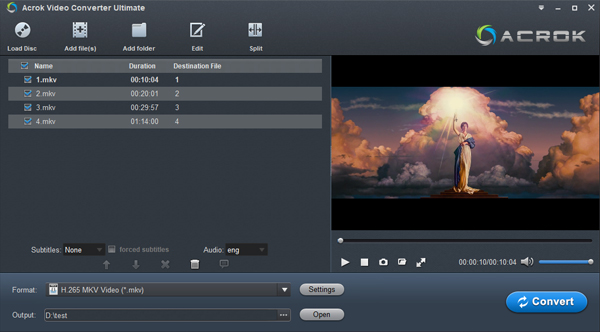
After installing Acrok Video Converter Ultimate for Windows or Mac, insert your 4K Blu-ray disc into your computer's Blu-ray drive. Click the "Load Disc" icon to import your Blu-ray files. You can also load a Blu-ray ISO image or folder into the workspace via drag-and-drop.
 .
.
Choose Output Forma
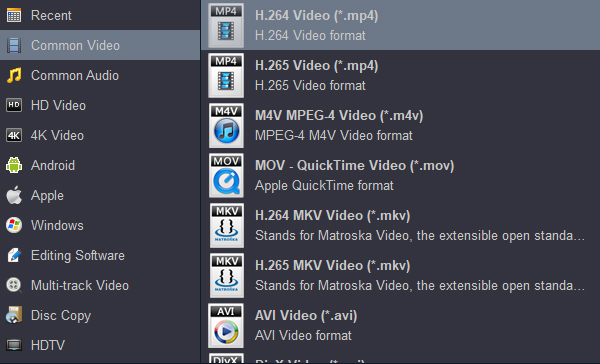
Click the "Format" drop-down to select your desired profile. You can choose from MP4, MOV, WMV, AVI, MKV, etc. under the "Common Video" category. If you plan to play the output videos on a 4K device, select a 4K video format from the "4K Video" category. Optionally choose H.265 (HEVC) encoding for smaller file sizes while retaining excellent quality.
Tip: The software supports batch conversion, hardware acceleration, and simple editing functions like trimming, cropping, merging, and adding watermarks.
Start Conversion
Click the "Output" option to select the destination folder. When you finish all the operations, click the "Convert" button. You can see both the real-time progress and the CPU and GPU usage.
Compared to free online alternatives, Acrok offers several advantages:
| Feature | Free online converters | Acrok Video Converter Ultimate |
|---|---|---|
| 4K Blu-ray decryption | ❌ Not possible | ✅ Yes |
| Works offline | ❌ No | ✅ Yes |
| File size limit | 500MB–2GB | ❌ No limit |
| Conversion speed | Slow (upload/download) | Fast (GPU acceleration) |
| Privacy | Files uploaded to servers | 100% local |
| Batch conversion | ❌ Rarely | ✅ Yes |
| Output quality | Often degraded | Visually lossless |
Q: Can I watch 4K Blu-ray on a 1080p TV directly without conversion?
A: Yes! If you own a 4K Blu-ray player connected to a 1080p TV via HDMI, the player automatically downscales the 4K signal to 1080p for your display. Some viewers even report slightly sharper images compared to standard 1080p Blu-rays, thanks to the richer source material and higher bitrate. But this doesn't help you store the movie on a tablet or edit it in video software.
Q: What about professional-grade tools like HandBrake or MakeMKV?
A: HandBrake is a free, open-source video transcoder, but it cannot decrypt commercial Blu-ray copy protections on its own. It relies on external libraries like libdvdcss to read protected DVDs—and those libraries don't fully support Blu-ray encryption. For 4K UHD, the problem is even more pronounced. HandBrake has clear documentation stating that "removal of copy protection is not supported".
MakeMKV is a different story. It supports decrypting commercial Blu-ray discs (including 4K UHD) by downloading decryption keys. However, MakeMKV is a desktop application you must install locally—it has no online version. Even then, decrypting 4K UHD discs requires up-to-date keys that MakeMKV downloads automatically, meaning if your disc is very new, you might need to wait for key updates.
Q: Could I upload a decrypted 4K MKV to an online converter to downscale to 1080p?
A: Theoretically, yes, if you already decrypted the disc using MakeMKV or similar desktop software. But uploading a 50GB file to a free online converter still faces size limits. Most free tiers cap files at 1GB or 2GB. Premium subscriptions might allow larger uploads, but then you're paying—which defeats the "free" part of your original question.
Q: Are there any true "online" 4K Blu-ray converters?
A: No legitimate, mainstream service offers browser-based conversion of encrypted 4K Blu-ray discs, largely due to the hardware limitations described earlier. Services that claim otherwise typically store your files on their servers—which raises serious privacy concerns about uploading copyrighted movie files to unknown third parties.
To return to the original question: How to convert 4K Blu-ray to 1080p online free?
The honest answer is that true online free conversion doesn't exist. The combination of AACS encryption, massive file sizes, physical hardware requirements, bandwidth constraints, and legal considerations makes it practically impossible.
For a majority of users who want to watch 4K Blu-ray on 1080p TV without doing anything, the simplest solution is using a 4K Blu-ray player connected to a 1080p TV—the player handles downscaling automatically.
For those who need actual 1080p video files stored on local drives for editing or mobile playback, desktop software like Acrok Video Converter Ultimate is the correct tool for the job. It decrypts, rips, and downscales in one streamlined process—all offline, secure, and fast.
In short: no, you can't do it for free online. But with the right offline tool, you can accomplish the task efficiently and legally for personal use.


I'm ecstatic! This worked the first time I tried it. I thought I''d give it a go so we could watch Blu-ray movies from my Galaxy Tab while we're anchored up each nite. I never thought this old dog could figure it out but a huge tip of the cap to Acrok and this program.
William Robb
Copyright © 2026 Acrok Studio All Rights Reserved. Terms and Conditions | Privacy | Refund Policy